Milagre 发布 macOS 本地编码智能体桌面应用公开 alpha
the-ptf/milagre-ade
Milagre 发布 macOS 公开 alpha 版,把 Claude Code 和 Codex CLI 整合进一个本地优先的桌面应用,每个 Chat 可绑定独立 Git Worktree,并显示各智能体的运行或等待状态。
A home for the coding agents running on your Mac.
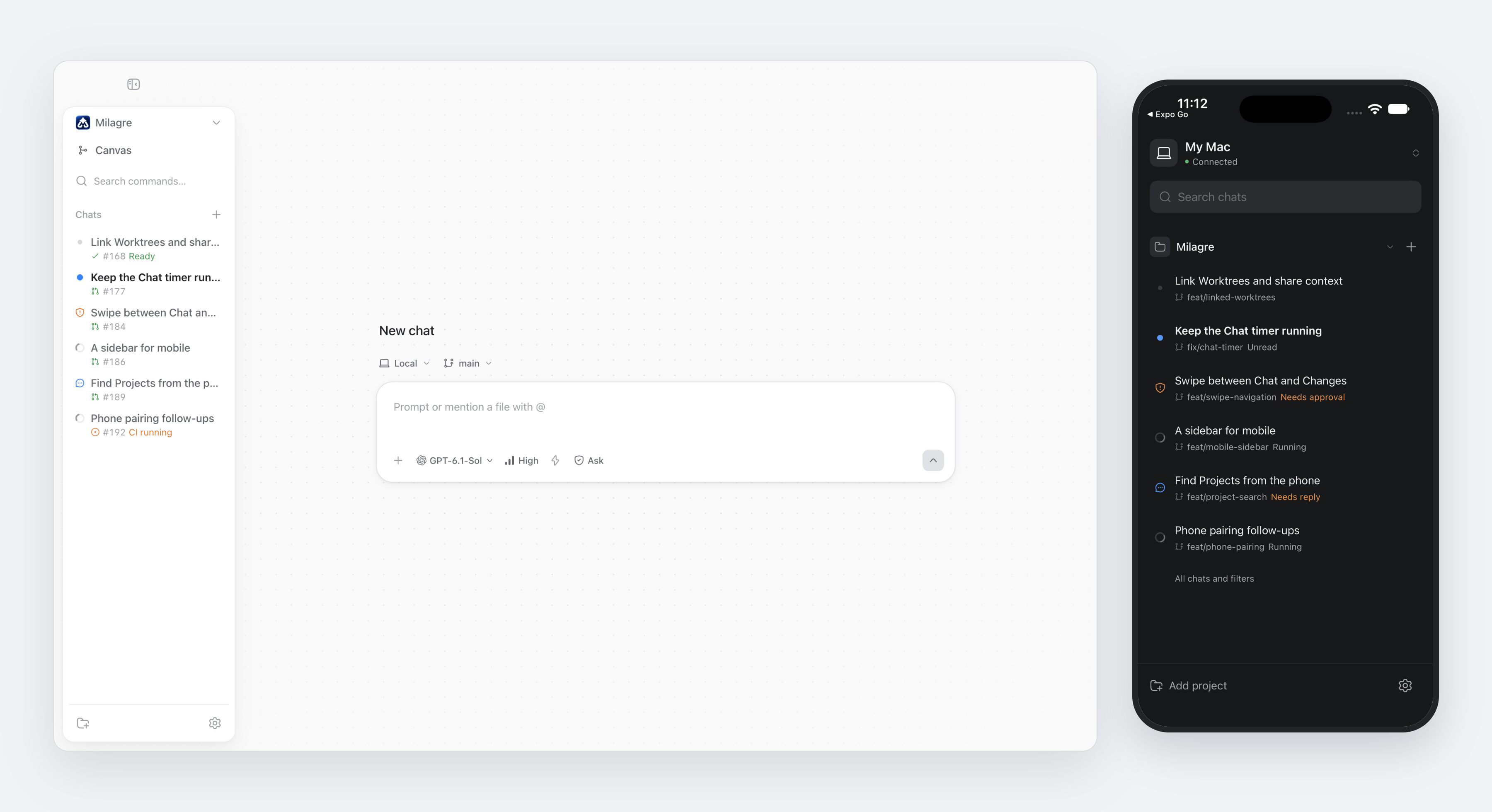
Download for macOS · Phone setup · Contributing
Work on several Projects at once, give each Chat its own Git Worktree, and see which agents are running or waiting for you. Milagre brings Claude and Codex into one local-first desktop app, with a phone companion for following the same work away from your desk.
The screenshot shows the real desktop and mobile interfaces with demo data inspired by recent pull requests.
One place for your work
- Projects and Worktrees. Keep related Chats together and work on separate changes without mixing their files. See pull request status beside each Chat.
- Claude and Codex. Choose a model, keep conversation history across restarts, and send a follow-up while the agent works. Read formatted replies and open a tool row for its command output or diff.
- Your input, when needed. Answer questions and review approval cards in the Chat. Choose Ask approval, Auto or Full permissions for each agent.
- Context across Projects. Link Projects and Worktrees on the canvas. Agents can read linked context, delegate changes to the other side's agent, and negotiate a shared contract.
- The same Chats on your phone. Pair your iPhone from desktop Settings > Devices. Follow running agents, reply, answer questions and approvals, attach files, and inspect changes. Your Mac runs the agents and keeps their state.
Get started
Milagre is a public alpha for macOS. Install the latest release, then open a Git Project and start a Chat.
Or install with Homebrew:
brew install --cask the-ptf/tap/milagre
Native installer checks pass on all three platforms. Public distribution is at different stages:
| Platform | Packages | Availability |
|---|---|---|
| macOS, Apple Silicon and Intel | DMG, ZIP, Homebrew cask | Signed releases and Homebrew are live |
| Windows, x64 | Per-user NSIS installer, WinGet manifest | Native checks pass; signed public release and WinGet listing pending |
| Linux, x64 | AppImage, DEB, RPM, signed APT/RPM repositories | Native checks pass; public release and repository deployment pending |
You need at least one local agent CLI, installed and logged in:
| Agent | Minimum version | Sign in |
|---|---|---|
| Claude Code | 2.1.288 | claude auth login |
| Codex CLI | 0.160.0 | codex login |
Milagre uses your existing agent login. It does not provide model credentials or hosted inference. It reads your login shell's environment, so agents can find node, git, gh and your other tools even when you open the app from Finder.
Experimental software. Use Full permission mode only in a Project you can recover.
For the phone companion, start with pairing and mobile setup. Your Mac must be awake, online and running the host for the phone to reach its agents.
Finish Windows and Linux publication
Apple and Linux signing credentials and the Cloudflare account ID are configured. Public Windows/Linux distribution still needs these GitHub repository secrets:
| Purpose | Missing secrets |
|---|---|
| Windows signing | WIN_CSC_LINK, WIN_CSC_KEY_PASSWORD |
| Linux repository deployment | CLOUDFLARE_PACKAGES_API_TOKEN (a dedicated Cloudflare deployment token) |
After adding the secrets:
- Set the
RELEASE_WINDOWSrepository variable totrue, so Publish builds Windows too. - Publish a stable release with Publish (
channel=stable). It also redeployspackages.milagre.cloud. - Validate the signed Windows installer and WinGet manifest, then submit the manifest to microsoft/winget-pkgs. The public WinGet command becomes available after acceptance.
See desktop distribution for build commands, native test evidence and release instructions. Windows/Linux ARM64, Chocolatey, Scoop, Flatpak and Snap are outside this implementation.
Develop locally
Requires macOS, Node.js 24 or newer, and npm.
npm ci
npm run dev
This starts Vite at http://127.0.0.1:5180 and opens Electron.
npm run typecheck
npm run build
npm test -- --unit
To try mobile without a provider account:
npm run mobile:demo
The demo uses an isolated temporary Project and a deterministic demo agent. See simulator instructions and development, packaging and releases for the full workflows.
Read more
| Guide | Covers |
|---|---|
| Desktop guide | Attachments, file mentions, notifications, Project images, slash skills and permission modes |
| Mobile setup | Pairing, simulators, remote access and phone notifications |
| Local daemon | The shared desktop/mobile host, ownership and recovery |
| Development and releases | Checks, packaging, automatic updates and signed macOS releases |
| Domain glossary | Projects, Worktrees, Chats, Links, Delegation and Negotiation |
Unfinished audit work is recorded in maintenance follow-ups. Feature requests live in GitHub Issues.
Repository
apps/desktop/     React renderer and Electron host
apps/mobile/      Expo phone companion
apps/daemon/      Persistent local Node host and mobile bridge
apps/relay/       Cloudflare phone relay
packages/core/    Agent runtime, providers, persistence and Worktrees
packages/shared/  Models, Chat operations and state reducers
scripts/          Development, integration checks and releases
docs/             Product and engineering documentation
The repo uses npm workspaces with one root lockfile. The desktop and phone connect to a shared local daemon; agent commands run on your Mac. Coordination state lives under .milagre/coordination.json in each Project.
Contribute
Read CONTRIBUTING.md before opening a pull request. Report security-sensitive issues through SECURITY.md.
Released under the MIT License.
来源:GitHub · github.com