zames_pro:无需 API key、用 Playwright 驱动 DeepSeek 网页版的终端编程智能体
Viqto0r/zames_pro
zames_pro 是一个通过 Playwright 驱动 chat.deepseek.com 网页版的终端编程智能体,无需 API key、不按 token 计费,直接使用用户自己的 DeepSeek 账号。

A terminal coding agent that drives chat.deepseek.com through Playwright — no API key required.

English | Русский
A terminal coding agent that works on top of chat.deepseek.com through Playwright. In spirit it is similar to Claude Code / Codex CLI: it starts in the current directory, reads and edits files, runs commands, and commits to git.
No API key required — it drives the DeepSeek web chat like a regular user through a real (headless) browser.
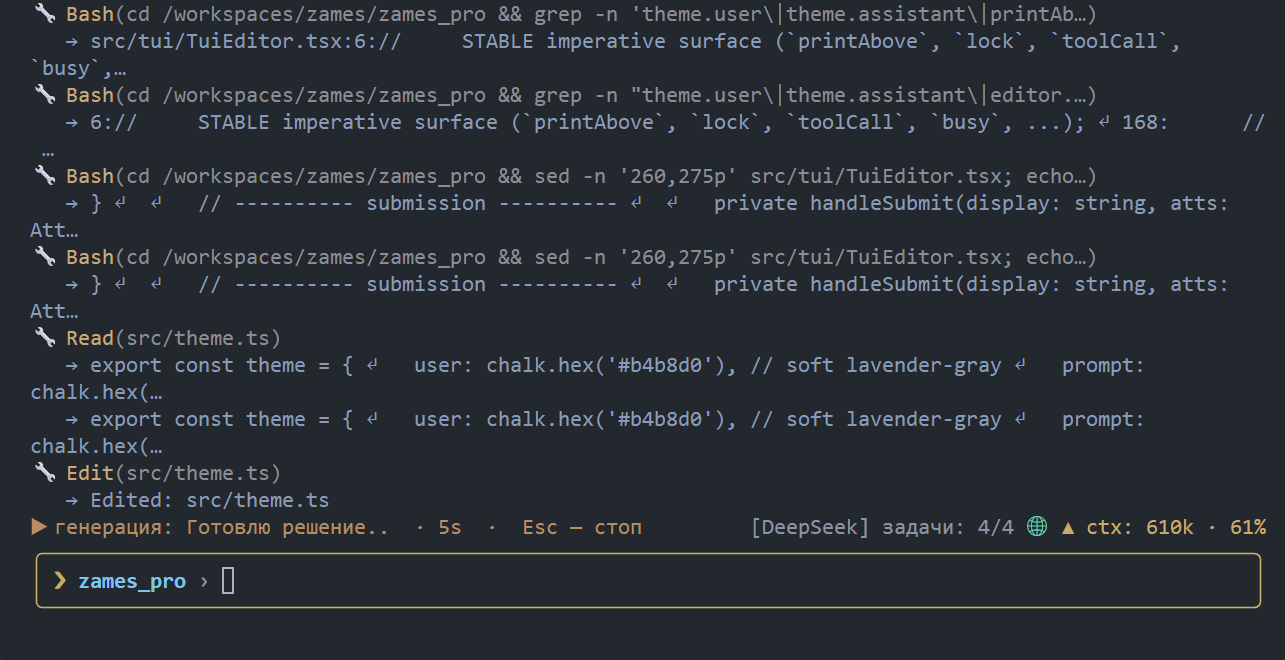
Quick start
npm install -g zames_pro   # Chromium for Playwright is downloaded automatically
cd your-project            # any folder the agent should work in
zames                      # sign in once, then describe your task
There is no API key and no per-token bill: zames signs in to your own
chat.deepseek.com account in a real (headless)
Chromium and drives the web chat like a regular user. The first launch asks for
your DeepSeek login once (the session is stored in ~/.zames/profile); after
that just run zames and type a task in plain language:
❯ refactor the config loader and add a test for the new default
While the agent works you can keep typing — a message sent mid-task is queued
and runs right after it, in the same chat. Esc aborts the current generation,
/help lists commands, /exit quits.
How it works
zames does not call the model API. It launches a headless Chromium with a
persistent profile, signs in to chat.deepseek.com like a human, types the task
into the chat box, and reads the answer back.

In text: you type a task → zames sends the system prompt plus the task into the DeepSeek web chat → the model answers → zames parses the tool call, runs the tool locally, feeds the result back, and prints the final answer for you.
Key pieces:
- The answer is read from the raw network stream (SSE), not the rendered DOM, so tool-call JSON with template strings and escapes survives intact.
- A persistent profile (
~/.zames/profile) keeps you signed in; the headless User-Agent is patched so DeepSeek's CDN does not 403 the login. - A send throttle (15 s by default) keeps the web chat's rate limit happy during long tool-heavy runs.
- The agent is sandboxed to the directory it was started in — no tool can read or write above it.
Table of contents
- Quick start · Features · Why zames? · Requirements
- How it works · Installation · Signing in · Usage
- Tools · Slash commands
- Project context, skills and memory · MCP (external tools) · Configuration
- FAQ · Links · License
Features
- Tools like Claude Code / Codex —
Read,Write,Edit,Bash,Glob,Grep, plusMultiEdit,ApplyPatch,LS,TodoWrite, git and web tools. Every edit is backed by/undo. - Runs while you keep typing — queue messages during a task; they run right after it, in the same chat (like typing during generation on the web).
- Plan mode —
/plan(or--plan) drops all mutating tools, so the agent can investigate the code without touching the tree. - Project context — reads
AGENTS.md,MEMORY.md, skills (SKILL.md) and custom commands from the repo and~/.zames, the same idea as Codex / Claude Code. - Subagents — the
Tasktool delegates a self-contained sub-task to an agent in its own separate chat (isolated context), which returns only a report, so heavy research does not flood the main context. On by default; tune withbrowser.subagents/browser.maxSubagents. - MCP support — plug in external tool servers (e.g.
@playwright/mcp). - Scheduling —
/loop,/cronand/jobsrepeat tasks on a timer. - Bilingual UI — Russian / English (
/config lang).
Why zames?
- No API key, no per-token bill — it uses your own DeepSeek chat account, not the paid API. Good for long, tool-heavy tasks.
- Same workflow as Claude Code / Codex — tools,
AGENTS.md, skills, MCP and slash commands, so it feels familiar from day one. - Runs unattended — headless by default, resumable sessions, and
/loopplus/cronfor scheduled work. - Local-first — the browser profile, credentials and logs never leave your machine, and the agent is sandboxed to the project directory.
Requirements
- Node.js >= 20
- A DeepSeek account. On first launch zames asks for your DeepSeek
login/password in the terminal (and stores them in
~/.zames/config.jsonafter a successful sign-in, so a later logout is handled automatically without asking you again). You can also sign in manually in the browser window when the browser is headed.
Signing in
The browser runs headless by default. When DeepSeek requires a sign-in, zames:
- reuses the session stored in the persistent profile (
~/.zames/profile) if it is still valid; - otherwise signs in automatically with the saved credentials
(
browser.auth.username/browser.auth.password); - otherwise asks you for the login/password in the terminal (in a TTY) and, after a successful sign-in, remembers them for next time;
- otherwise falls back to a manual sign-in hint.
To sign in by hand (for example, if DeepSeek shows a captcha), run with a visible window:
zames --headed
The --headless flag (the default) and headless: true in the config keep
the browser without a window; --headed / headless: false show it.
Headless works out of the box: a headless Chrome normally advertises a
HeadlessChrome/... User-Agent that DeepSeek's CDN blocks with a 403, so
zames strips that marker before loading the page (keeping the real engine
version). You do not need --headed just to log in.
Credentials and toggles can also be edited from /config
(browser.auth.username, browser.auth.password, browser.auth.saveSession).
Installation
npm install -g zames_pro
Chromium for Playwright is downloaded automatically on install. On Linux/WSL
the required system libraries are installed too when passwordless sudo is
available; otherwise run once by hand:
npx playwright install chromium
sudo npx playwright install-deps chromium
Usage
Go to your project folder and run:
zames
The agent works inside the directory it was started in and cannot leave it (sandbox).
While the agent is working you can keep typing: press Enter to queue a message (it is sent right after the current task, in the same chat), or Esc / Ctrl+C to abort the current generation. This mirrors typing during generation on the DeepSeek website.
Input line
The prompt is a small line editor with persistent history:
↑/↓— walk the message history (saved in~/.zames/history.json, so it survives a restart); inside a multiline message the arrows move between lines.Ctrl+R— incremental reverse search over the history (bash-style): type to filter,Ctrl+Rfor older matches,Enterto accept,Escto cancel.Ctrl+_— undo the last edit in the input line (a fat-fingeredCtrl+U/Ctrl+Kis recoverable).Ctrl+U— clear the line,Ctrl+K— delete to end of line,Ctrl+W— delete the word before the cursor,Ctrl+←/Ctrl+→— move by words.\+Enter,Ctrl+J,Ctrl+EnterorShift+Enter— insert a newline./+Tab— slash-command hints and completion.!command— run a shell command directly, bypassing the model (like Claude Code's bash mode). The same sandbox guard as theBashtool applies, so a direct command cannot leave the project either.
Set NO_COLOR=1 to disable colors (a calm default palette is used otherwise).
Images and files
You can paste an image or a file into the input line (Ctrl+Shift+V / Shift+Insert
or the terminal's own paste). zames saves it under <project>/tmp and shows a
marker in the line - [image#1] for images, [file#1] for other files - then
uploads the real file to the chat together with your message. These are the
same formats the DeepSeek web chat accepts (PNG, JPEG, GIF, WEBP, BMP, SVG and
the usual document types).
Pasting an image works when the terminal sends it as a data: URL or as a
base64 blob with a recognizable image signature. You can also paste a path to a
local file (drag a file into the terminal or copy its path); if the file exists
it is attached, otherwise the text is inserted as usual.
Press Ctrl+V (or use an empty paste) and zames reads the image straight from the clipboard: Linux via wl-paste (Wayland) or xclip/xsel (X11), macOS via pngpaste, Windows via PowerShell. The needed Linux tools are installed automatically on npm install (best-effort, through the detected package manager). If no image is found, zames says so and reports which tool it tried, instead of staying silent.
Options
zames --task <task text>
zames --chat <id>
zames --new-chat
zames --resend-prompt
zames --dir <path>
zames --headless
zames --headed
zames --plan
zames --output-format jsonl
zames --debug
zames --version
zames --help
Machine-readable output (scripts / CI)
For one-shot runs (--task) the agent can emit its event stream as JSON lines
on stdout, keeping all human text on stderr:
zames --task "summarize the diff" --output-format jsonlEach line is one event (tool_call, tool_result, assistant_final, ...), so
it pipes straight into jq:
zames --task "..." --output-format jsonl \
  | jq -r 'select(.type=="assistant_final") | .message'
Tools
The agent has the same style of tools as Claude Code / Codex CLI:
- File tools —
Read,Write,Edit,Bash,Glob,Grep.Readreturns raw content by default; passnumbered=trueto getcat -n-style line numbers (for reference only — do not paste them intoEdit). - Extra tools —
LS(list a directory),MultiEdit(several edits to one file applied atomically),TodoWrite(session task checklist),ApplyPatch(multi-file patch in Codex's V4A format:*** Begin Patch…*** End Patch). - Git —
GitStatus,GitDiff,GitLog,GitShow,GitBranchList,GitAdd,GitCommit,GitPush. - Web —
WebFetch,WebSearch. - Service —
respond(final answer to the operator, ends the task).
All file tools stay inside the working directory (sandbox). Write/Edit and
MultiEdit/ApplyPatch make a backup (undo) before touching a file.
Slash commands
Type / in the prompt for hints (Tab completes). Besides the session and config commands (/new, /chats, /resume, /cd, /status, /config, /undo, /transcript, /mcp, /skills, /memory, /init, /reload, /debug-dom, /help, /exit) there are a few that mirror Claude Code / Codex CLI:
- /diff [--staged] — show the working-tree git diff (--staged for the index).
- /diffstat — a one-line change summary (
git diff --stat). - /context — show what is loaded into the prompt (AGENTS.md, MEMORY.md, skills, custom commands) and the system-prompt size.
- /retry — resend the last task into the same chat (handy after a truncated or empty answer).
- /rename <title> — set the current session title (shown in /sessions).
- /copy — copy the last assistant answer to the OS clipboard.
- /cost (alias /usage) — session stats: tasks, tool calls, duration, and the
context size in tokens (DeepSeek's
accumulated_token_usage). - /export [file] — write the session transcript to a Markdown file (zames-export-.md by default).
- /doctor — diagnose node, git, config, browser, clipboard and MCP.
- /add-dir — validate an extra directory (the sandbox is fixed at startup; relaunch with --dir to write there).
- /resume (after /chats) and /resume-id — open a chat and PRINT its
dialogue into the terminal, so the restored context is visible. Only the
last 20 messages are shown (
RESTORED_HISTORY_LIMIT). /last reopens the last chat of the current directory with no lookup step; /sessions shows the saved sessions with their relative age. - /help — the full description of a single command (e.g.
/help diff) instead of the whole list. - /review [focus] [--staged] — ask the agent to review uncommitted changes and report findings (no code changes).
- /plan [on|off] — plan (read-only) mode. While it is on, the mutating tools
(Write/Edit/MultiEdit/ApplyPatch/Bash, GitAdd/GitCommit/GitPush) are removed
from the tool set, so the agent can investigate without touching the tree.
Start in it with
--plan. - /compact — ask DeepSeek to compress the current chat into a handover summary, then open a NEW chat, resend the system prompt and post the summary as the carried-over context. Use it when the context gets long.
- /goal [text|clear] — set a long-lived session goal. It is prepended to every
task message, so the model keeps the big picture across many turns. Stored in
<project>/.zames-goal(git-ignored) and restored on the next launch. - /loop — repeat a task periodically (e.g.
/loop 10m run the tests). /cron " " — run on a schedule. /jobs [rm |clear] lists and stops them. A fired job is put into the same message queue you type into, so it runs when the agent is free (never mid- generation) and still respects the send throttle. - /thinking [on|off] and /web [on|off] — toggle Deep thinking / Smart search.
These (and /queue, /jobs, /goal,
/config <sub>) can be used WHILE the agent is working — they do not touch the in-flight generation. - /queue [clear] — list or clear the messages waiting to be sent after the current task.
The token context is also shown live: the status line above the input has the
spinner/text on the left and the context on the right (e.g. 125k · 13%,
percent of a 1M context). It is COLORED by fill level: green below 50%,
yellow 50-80%, red above 80%. It comes from DeepSeek's
accumulated_token_usage and is hidden until the first answer delivers it.
Project context, skills and memory
Like Codex / Claude Code, zames reads project instructions and reusable
workflows from your repository and from ~/.zames.
- AGENTS.md — project instructions. Put one in the repo root (or in any
parent folder of the working directory). Global instructions live in
~/.zames/AGENTS.md(and~/.claude/CLAUDE.md). Run/initand the agent will explore the project and write an AGENTS.md based on the real build/test commands and conventions (use/init --forceto overwrite an existing file). - MEMORY.md — durable notes that persist between sessions. The agent
appends useful facts here; you can edit it by hand, or add one from the
prompt with
/remember <text>. - Skills — a folder with a
SKILL.mdfile (YAML frontmatter:name,description, optionalallowed-tools,user-invokable) plus any helper files. Discovered under.zames/skills/,.claude/skills/,.agents/skills/,skills/, and~/.zames/skills/. The agent reads the body only when a task matches the description. List them with/skills; invoke one with/<skill-name>. - Custom commands —
.mdfiles under.zames/commands/(or.claude/commands/). They support$ARGUMENTS/{{args}}placeholders and are invoked with/<command-name>.
Skills and custom commands show up in the «/» completion list and in /help.
/skills                       list discovered skills
/memory                       show AGENTS.md / MEMORY.md in effect
/remember <text>              append a durable note to MEMORY.md
/init [--force]               analyze the project and create AGENTS.md
MCP (external tools)
zames can use tools from MCP servers. The flagship example is @playwright/mcp: it gives the agent a real browser (navigate, click, snapshot, type, ...) on top of the one zames already uses for the DeepSeek chat.
Drop a config file (same shape as Claude Code / Cursor):
~/.zames/mcp.json- global<project>/.zames/mcp.json- project-scoped (later files win)<project>/.mcp.json- the common MCP name
{
  "mcpServers": {
    "playwright": {
      "command": "npx",
      "args": ["-y", "@playwright/mcp@latest", "--headless", "--isolated"]
    }
  }
}
IMPORTANT: keep the MCP browser isolated. @playwright/mcp defaults to the
SAME profile directory as zames (~/.zames/profile). If it is launched
without --isolated (or without its own --user-data-dir), the MCP browser
and the agent browser fight over one profile and the DeepSeek chat shows
"Something went wrong when opening your profile". Always pass --isolated
as in the example above.
Servers can also be remote ("url": "https://...", "transport": "sse").
Their tools show up in the agent as server__tool (e.g.
playwright__browser_navigate) and are listed with /mcp and in /status.
A server that fails to connect is skipped with a warning and never breaks the
agent.
Configuration
Global config: ~/.zames/config.json
Local (per project): .zamesrc.json
You can view and change settings without leaving the agent — use the
/config command. Run it without arguments to open an interactive menu
(↑/↓ to move, Enter to change, d to reset, q to quit). Booleans and enums
toggle in place; numbers and strings open an input prompt.
/config                       interactive settings menu
/config list                  print all editable settings
/config get <path>            show a setting
/config set <path> <value>    change a setting
/config reset <path>          reset a setting to its default
/config path                  show config file paths
/config lang <ru|en>          switch interface and agent language
Examples:
/config set maxIterations 20
/config set browser.deepThinking true   # DeepSeek Deep thinking (slow; reasoning is hidden)
/config set browser.webSearch false     # DeepSeek Smart web search
/config lang en
Changes are written to the project .zamesrc.json and applied right away
(where possible without a restart).
Language
/config lang ru or /config lang en switches both the interface language
(help, messages, spinner) and the language the agent answers you in. The
locale lives in ui.locale in the config file.
Agent data is stored in ~/.zames: browser profile, logs, undo history, sessions.
FAQ
Is this an official DeepSeek product? No. zames drives the public chat.deepseek.com web UI through a real browser, like a regular user. It is not affiliated with DeepSeek.
Do I need an API key?
No. You sign in with your own DeepSeek account once; the session is stored in
~/.zames/profile and reused.
Which model does it use? Whichever the DeepSeek web chat uses (DeepSeek-V3, or the reasoning model with "Deep thinking" on). zames never calls the API directly.
Does it work headless / on a server?
Yes — headless is the default, and --output-format jsonl makes it scriptable.
--headed is only needed for a manual sign-in or selector debugging.
Is automating the web UI allowed? That depends on DeepSeek's terms; automating a website may violate them. Use at your own risk and keep the send throttle (15s by default) so you do not hammer the rate limit.
How is it different from Claude Code / Codex?
Same shape (tools, AGENTS.md, skills, MCP, slash commands) but it runs on your
DeepSeek account instead of an API, as a browser automation rather than a
first-party API client.
Links
- npm: https://www.npmjs.com/package/zames_pro
- GitHub: https://github.com/Viqto0r/zames_pro
- Changelog:
CHANGELOG.md - Contributing:
CONTRIBUTING.md - Security policy:
SECURITY.md - Code of conduct:
CODE_OF_CONDUCT.md
License
MIT
🇷🇺 Читать по-русски (Russian)
Терминальный coding-агент, работающий поверх chat.deepseek.com через Playwright. По духу он похож на Claude Code / Codex CLI: запускается в текущей директории, читает и правит файлы, выполняет команды и коммитит в git.
API-ключ не нужен — агент управляет веб-чатом DeepSeek как обычный пользователь через настоящий (headless) браузер.
Быстрый старт
npm install -g zames_pro   # Chromium для Playwright скачается автоматически
cd your-project            # любая папка, в которой должен работать агент
zames                      # один раз войти, дальше просто описывайте задачу
Здесь нет API-ключа и нет оплаты за токены: zames входит в ваш
собственный аккаунт chat.deepseek.com в
настоящем (headless) Chromium и управляет веб-чатом как обычный пользователь.
При первом запуске он один раз спросит логин DeepSeek (сессия сохраняется в
~/.zames/profile); после этого достаточно запустить zames и написать
задачу обычным языком:
❯ отрефактори загрузчик конфига и добавь тест на новый дефолт
Пока агент работает, можно продолжать печатать — сообщение, отправленное
посреди задачи, встанет в очередь и уйдёт сразу после неё, в тот же чат.
Esc прерывает текущую генерацию, /help показывает команды, /exit — выход.
Как это работает
zames не вызывает API модели. Он запускает headless Chromium с постоянным
профилем, входит в chat.deepseek.com как человек, печатает задачу в поле
чата и читает ответ обратно.
Словами: вы вводите задачу → zames отправляет системный промпт и задачу в веб-чат DeepSeek → модель отвечает → zames разбирает вызов инструмента, выполняет его локально, возвращает результат обратно и печатает финальный ответ.
Ключевые детали:
- Ответ читается из сырого сетевого потока (SSE), а не из отрендеренного DOM, поэтому JSON вызова инструмента с шаблонными строками и экранированием остаётся целым.
- Постоянный профиль (
~/.zames/profile) держит вас залогиненным; User-Agent headless-браузера подменяется, чтобы CDN DeepSeek не отдавал 403 на вход. - Троттлинг отправки (15 с по умолчанию) щадит рейт-лимит веб-чата во время долгих прогонов с инструментами.
- Агент запесочен в директорию запуска — ни один инструмент не может читать или писать выше неё.
Содержание
- Быстрый старт · Возможности · Почему zames? · Требования
- Как это работает · Установка · Вход в аккаунт · Использование
- Инструменты · Слэш-команды
- Контекст проекта, навыки и память · MCP (внешние инструменты) · Конфигурация
- FAQ · Ссылки · Лицензия
Возможности
- Инструменты как в Claude Code / Codex —
Read,Write,Edit,Bash,Glob,Grep, плюсMultiEdit,ApplyPatch,LS,TodoWrite, git- и веб-инструменты. Каждая правка подкреплена/undo. - Работает, пока вы печатаете — сообщения, набранные во время задачи, встают в очередь и уходят сразу после неё, в тот же чат (как набор текста во время генерации на сайте).
- Режим плана —
/plan(или--plan) убирает все мутирующие инструменты, чтобы агент изучал код, не трогая дерево. - Контекст проекта — читает
AGENTS.md,MEMORY.md, навыки (SKILL.md) и пользовательские команды из репозитория и~/.zames, как в Codex / Claude Code. - Субагенты — инструмент
Taskпоручает самодостаточную подзадачу агенту в отдельном чате (изолированный контекст), который возвращает только отчёт, так что тяжёлая разведка не засоряет основной контекст. Включены по умолчанию; настраиваются черезbrowser.subagents/browser.maxSubagents. - Поддержка MCP — подключение внешних серверов инструментов (например,
@playwright/mcp). - Планировщик —
/loop,/cronи/jobsповторяют задачи по таймеру. - Двуязычный интерфейс — русский / английский (
/config lang).
Почему zames?
- Нет API-ключа и счёта за токены — используется ваш собственный аккаунт чата DeepSeek, а не платный API. Удобно для долгих задач с инструментами.
- Тот же рабочий процесс, что в Claude Code / Codex — инструменты,
AGENTS.md, навыки, MCP и слэш-команды, так что всё знакомо с первого дня. - Работает без присмотра — headless по умолчанию, возобновляемые сессии,
/loopи/cronдля задач по расписанию. - Local-first — профиль браузера, учётные данные и логи не покидают вашу машину, а агент запесочен в директорию проекта.
Требования
- Node.js >= 20
- Аккаунт DeepSeek. При первом запуске zames спросит логин/пароль DeepSeek в
терминале (и сохранит их в
~/.zames/config.jsonпосле успешного входа, поэтому более поздний разлогин обрабатывается автоматически, без повторных вопросов). Можно также войти вручную в окне браузера, когда он headed.
Вход в аккаунт
Браузер по умолчанию работает headless. Когда DeepSeek требует входа, zames:
- переиспользует сессию из постоянного профиля (
~/.zames/profile), если она ещё валидна; - иначе входит автоматически по сохранённым учётным данным
(
browser.auth.username/browser.auth.password); - иначе спрашивает логин/пароль в терминале (в TTY) и после успешного входа запоминает их для следующего раза;
- иначе показывает подсказку про ручной вход.
Чтобы войти руками (например, если DeepSeek показывает капчу), запустите с видимым окном:
zames --headed
Флаг --headless (значение по умолчанию) и headless: true в конфиге держат
браузер без окна; --headed / headless: false показывают его.
Headless работает из коробки: headless Chrome обычно представляется как
HeadlessChrome/..., и CDN DeepSeek блокирует такой User-Agent ответом 403,
поэтому zames срезает этот маркер перед загрузкой страницы (сохраняя реальную
версию движка). --headed нужен не только ради входа.
Учётные данные и переключатели можно также править из /config
(browser.auth.username, browser.auth.password, browser.auth.saveSession).
Установка
npm install -g zames_pro
Chromium для Playwright скачивается автоматически при установке. На Linux/WSL
необходимые системные библиотеки тоже ставятся, если доступен sudo без
пароля; иначе выполните один раз вручную:
npx playwright install chromium
sudo npx playwright install-deps chromium
Использование
Перейдите в папку проекта и запустите:
zames
Агент работает внутри директории, из которой он запущен, и не может её покинуть (песочница).
Пока агент работает, можно продолжать печатать: Enter ставит сообщение в очередь (оно уйдёт сразу после текущей задачи, в тот же чат), а Esc / Ctrl+C прерывают текущую генерацию. Это повторяет набор текста во время генерации на сайте DeepSeek.
Строка ввода
Промпт — это небольшой редактор строки с постоянной историей:
↑/↓— переход по истории сообщений (сохраняется в~/.zames/history.json, поэтому переживает перезапуск); внутри многострочного сообщения стрелки двигают по строкам.Ctrl+R— инкрементальный поиск по истории в обратном порядке (как в bash): печатайте для фильтра,Ctrl+R— за более старыми совпадениями,Enter— принять,Esc— отменить.Ctrl+_— отменить последнюю правку строки ввода (случайно нажатыеCtrl+U/Ctrl+Kможно вернуть).Ctrl+U— очистить строку,Ctrl+K— удалить до конца строки,Ctrl+W— удалить слово перед курсором,Ctrl+←/Ctrl+→— переход по словам.\+Enter,Ctrl+J,Ctrl+EnterилиShift+Enter— вставить новую строку./+Tab— подсказки и автодополнение слэш-команд.!команда— выполнить shell-команду напрямую, минуя модель (как bash-режим Claude Code). Действует та же песочница, что и для инструментаBash, так что прямая команда тоже не может выйти за пределы проекта.
Установите NO_COLOR=1, чтобы отключить цвета (иначе используется спокойная
палитра по умолчанию).
Картинки и файлы
В строку ввода можно вставить картинку или файл (Ctrl+Shift+V / Shift+Insert
или собственной вставкой терминала). zames сохраняет его в <project>/tmp и
показывает маркер в строке — [image#1] для картинок, [file#1] для прочих
файлов — затем загружает реальный файл в чат вместе с вашим сообщением. Это те
же форматы, что принимает веб-чат DeepSeek (PNG, JPEG, GIF, WEBP, BMP, SVG и
обычные типы документов).
Вставка картинки работает, когда терминал передаёт её как data: URL или как
base64-блок с узнаваемой сигнатурой изображения. Можно также вставить путь к
локальному файлу (перетащите файл в терминал или скопируйте его путь); если
файл существует — он прикрепляется, иначе текст вставляется как обычно.
Нажмите Ctrl+V (или сделайте пустую вставку), и zames прочитает картинку прямо
из буфера обмена: Linux через wl-paste (Wayland) или xclip/xsel (X11), macOS
через pngpaste, Windows через PowerShell. Нужные Linux-утилиты ставятся
автоматически при npm install (best-effort, через определённый пакетный
менеджер). Если картинка не найдена, zames сообщит об этом и напишет, какой
инструмент пробовал, вместо молчания.
Опции
zames --task <текст задачи>
zames --chat <id>
zames --new-chat
zames --resend-prompt
zames --dir <path>
zames --headless
zames --headed
zames --plan
zames --output-format jsonl
zames --debug
zames --version
zames --help
Машиночитаемый вывод (скрипты / CI)
Для одноразовых запусков (--task) агент может выдавать поток событий как JSON
lines в stdout, оставляя весь человеческий текст в stderr:
zames --task "summarize the diff" --output-format jsonlКаждая строка — одно событие (tool_call, tool_result, assistant_final, …),
так что это сразу пайпится в jq:
zames --task "..." --output-format jsonl \
  | jq -r 'select(.type=="assistant_final") | .message'
Инструменты
У агента тот же стиль инструментов, что в Claude Code / Codex CLI:
- Файловые —
Read,Write,Edit,Bash,Glob,Grep.Readпо умолчанию отдаёт сырое содержимое; передайтеnumbered=true, чтобы получить нумерацию строк в стилеcat -n(только для справки — не вставляйте её вEdit). - Дополнительные —
LS(список директории),MultiEdit(несколько правок одного файла атомарно),TodoWrite(чек-лист задач сессии),ApplyPatch(мультифайловый патч в формате V4A от Codex:*** Begin Patch…*** End Patch). - Git —
GitStatus,GitDiff,GitLog,GitShow,GitBranchList,GitAdd,GitCommit,GitPush. - Web —
WebFetch,WebSearch. - Служебный —
respond(финальный ответ оператору, завершает задачу).
Все файловые инструменты остаются внутри рабочей директории (песочница).
Write/Edit и MultiEdit/ApplyPatch делают резервную копию (undo) перед
изменением файла.
Слэш-команды
Введите / в промпте для подсказок (Tab дополняет). Кроме команд сессии и конфига (/new, /chats, /resume, /cd, /status, /config, /undo, /transcript, /mcp, /skills, /memory, /init, /reload, /debug-dom, /help, /exit) есть несколько в духе Claude Code / Codex CLI:
- /diff [--staged] — показать git-диф рабочего дерева (--staged для индекса).
- /diffstat — сводка изменений одной строкой (
git diff --stat). - /context — показать, что загружено в промпт (AGENTS.md, MEMORY.md, навыки, пользовательские команды) и размер системного промпта.
- /retry — отправить последнюю задачу в тот же чат заново (удобно после обрезанного или пустого ответа).
- /rename <title> — задать заголовок текущей сессии (виден в /sessions).
- /copy — скопировать последний ответ ассистента в буфер обмена ОС.
- /cost (алиас /usage) — статистика сессии: задачи, вызовы инструментов,
длительность и размер контекста в токенах (DeepSeek
accumulated_token_usage). - /export [file] — записать транскрипт сессии в Markdown-файл (по умолчанию zames-export-.md).
- /doctor — диагностика node, git, конфига, браузера, буфера обмена и MCP.
- /add-dir — проверить дополнительную директорию (песочница фиксируется при старте; для записи туда перезапустите с --dir).
- /resume (после /chats) и /resume-id — открыть чат и НАПЕЧАТАТЬ его
диалог в терминал, чтобы восстановленный контекст был виден. Показываются
только последние 20 сообщений (
RESTORED_HISTORY_LIMIT). /last открывает последний чат текущей директории без поиска; /sessions показывает сохранённые сессии с их относительным возрастом. - /help — полное описание одной команды (например,
/help diff) вместо всего списка. - /review [focus] [--staged] — попросить агента проверить незакоммиченные изменения и сообщить находки (без правок кода).
- /plan [on|off] — режим плана (только чтение). Пока он включён, мутирующие
инструменты (Write/Edit/MultiEdit/ApplyPatch/Bash, GitAdd/GitCommit/GitPush)
убраны из набора, чтобы агент изучал код, не трогая дерево. Стартовать в нём
можно с
--plan. - /compact — попросить DeepSeek сжать текущий чат в передаточное резюме, затем открыть НОВЫЙ чат, заново отправить системный промпт и положить резюме как перенесённый контекст. Используйте, когда контекст разрастается.
- /goal [text|clear] — задать долгоживущую цель сессии. Она добавляется в
начало каждого сообщения задачи, поэтому модель держит общую картину через
много ходов. Хранится в
<project>/.zames-goal(git-ignored) и восстанавливается при следующем запуске. - /loop — повторять задачу периодически (например,
/loop 10m run the tests). /cron " " — запуск по расписанию. /jobs [rm |clear] перечисляет и останавливает их. Сработавшая задача попадает в ту же очередь сообщений, что и ваш ввод, так что выполняется, когда агент свободен (никогда посреди генерации), и всё равно соблюдает троттлинг отправки. - /thinking [on|off] и /web [on|off] — переключить Deep thinking / Smart search.
Их (а также /queue, /jobs, /goal,
/config <sub>) можно использовать, ПОКА агент работает — они не трогают текущую генерацию. - /queue [clear] — показать или очистить сообщения, ждущие отправки после текущей задачи.
Контекст в токенах показывается и вживую: в строке статуса над вводом слева
спиннер/текст, справа — контекст (например, 125k · 13%, процент от 1M
контекста). Он ОКРАШЕН по уровню заполнения: зелёный ниже 50%, жёлтый 50-80%,
красный выше 80%. Значение приходит из DeepSeek accumulated_token_usage и
скрыто до первого ответа.
Контекст проекта, навыки и память
Как в Codex / Claude Code, zames читает инструкции проекта и переиспользуемые
процессы из вашего репозитория и из ~/.zames.
- AGENTS.md — инструкции проекта. Положите его в корень репозитория (или в
любую родительскую папку рабочей директории). Глобальные инструкции живут в
~/.zames/AGENTS.md(и~/.claude/CLAUDE.md). Запустите/init, и агент изучит проект и напишет AGENTS.md на основе реальных команд сборки/тестов и соглашений (/init --forceперезапишет существующий файл). - MEMORY.md — долговечные заметки, переживающие сессии. Агент дописывает
сюда полезные факты; можно править вручную или добавить из промпта через
/remember <text>. - Навыки — папка с файлом
SKILL.md(YAML-фронтматтер:name,description, опциональноallowed-tools,user-invokable) плюс любые вспомогательные файлы. Ищутся в.zames/skills/,.claude/skills/,.agents/skills/,skills/и~/.zames/skills/. Агент читает тело только когда задача совпадает с описанием. Список —/skills; вызов —/<skill-name>. - Пользовательские команды —
.md-файлы в.zames/commands/(или.claude/commands/). Поддерживают подстановки$ARGUMENTS/{{args}}и вызываются как/<command-name>.
Навыки и пользовательские команды видны в списке автодополнения «/» и в
/help.
/skills                       список найденных навыков
/memory                       показать действующие AGENTS.md / MEMORY.md
/remember <text>              дописать долговечную заметку в MEMORY.md
/init [--force]               проанализировать проект и создать AGENTS.md
MCP (внешние инструменты)
zames может использовать инструменты с серверов MCP. Главный пример — @playwright/mcp: он даёт агенту настоящий браузер (navigate, click, snapshot, type, ...) поверх того, который zames уже использует для чата DeepSeek.
Положите файл конфига (той же формы, что в Claude Code / Cursor):
~/.zames/mcp.json— глобальный<project>/.zames/mcp.json— на уровне проекта (поздние файлы побеждают)<project>/.mcp.json— привычное имя MCP
{
  "mcpServers": {
    "playwright": {
      "command": "npx",
      "args": ["-y", "@playwright/mcp@latest", "--headless", "--isolated"]
    }
  }
}
ВАЖНО: держите MCP-браузер изолированным. @playwright/mcp по умолчанию
использует ТУ ЖЕ директорию профиля, что и zames (~/.zames/profile). Если
запустить его без --isolated (или без собственного --user-data-dir),
MCP-браузер и браузер агента подерутся за один профиль, и чат DeepSeek
покажет «Something went wrong when opening your profile». Всегда передавайте
--isolated, как в примере выше.
Серверы бывают и удалёнными ("url": "https://...", "transport": "sse").
Их инструменты видны агенту как server__tool (например,
playwright__browser_navigate) и перечисляются в /mcp и /status.
Сервер, который не смог подключиться, пропускается с предупреждением и
никогда не роняет агента.
Конфигурация
Глобальный конфиг: ~/.zames/config.json
Локальный (на проект): .zamesrc.json
Просматривать и менять настройки можно не выходя из агента — командой
/config. Запустите её без аргументов, чтобы открыть интерактивное меню
(↑/↓ — навигация, Enter — изменение, d — сброс, q — выход). Булевы и
enum переключаются на месте; числа и строки открывают ввод.
/config                       интерактивное меню настроек
/config list                  показать все изменяемые настройки
/config get <path>            показать настройку
/config set <path> <value>    изменить настройку
/config reset <path>          сбросить настройку к дефолту
/config path                  показать пути файлов конфига
/config lang <ru|en>          переключить язык интерфейса и агента
Примеры:
/config set maxIterations 20
/config set browser.deepThinking true   # DeepSeek Deep thinking (медленно; рассуждения скрыты)
/config set browser.webSearch false     # DeepSeek Smart web search
/config lang en
Изменения пишутся в проектный .zamesrc.json и применяются сразу (где это
возможно без перезапуска).
Язык
/config lang ru или /config lang en переключает и язык интерфейса
(справка, сообщения, спиннер), и язык, на котором агент вам отвечает. Локаль
хранится в ui.locale в файле конфига.
Данные агента хранятся в ~/.zames: профиль браузера, логи, история undo,
сессии.
FAQ
Это официальный продукт DeepSeek? Нет. zames управляет публичным веб-интерфейсом chat.deepseek.com через настоящий браузер, как обычный пользователь. Он не связан с DeepSeek.
Нужен ли API-ключ?
Нет. Вы один раз входите в свой аккаунт DeepSeek; сессия хранится в
~/.zames/profile и переиспользуется.
Какую модель он использует? Ту, которую использует веб-чат DeepSeek (DeepSeek-V3 или reasoning-модель при включённом «Deep thinking»). zames никогда не вызывает API напрямую.
Работает ли headless / на сервере?
Да — headless по умолчанию, а --output-format jsonl делает его скриптуемым.
--headed нужен только для ручного входа или отладки селекторов.
Разрешена ли автоматизация веб-интерфейса? Это зависит от условий DeepSeek; автоматизация сайта может их нарушать. Используйте на свой риск и держите троттлинг отправки (15 с по умолчанию), чтобы не бить по рейт-лимиту.
Чем отличается от Claude Code / Codex?
Та же форма (инструменты, AGENTS.md, навыки, MCP, слэш-команды), но работает
на вашем аккаунте DeepSeek вместо API, как автоматизация браузера, а не
first-party API-клиент.
Ссылки
- npm: https://www.npmjs.com/package/zames_pro
- GitHub: https://github.com/Viqto0r/zames_pro
- Changelog:
CHANGELOG.md - Contributing:
CONTRIBUTING.md - Security policy:
SECURITY.md - Code of conduct:
CODE_OF_CONDUCT.md
Лицензия
MIT
来源:GitHub · github.com