NekoAI:开源 AI 桌面宠物,支持 Claude、OpenAI、Gemini 与 Ollama
nucket/NekoAI
NekoAI 是一款开源 AI 桌面宠物,可在 Windows、macOS、Linux 上运行,宠物会在桌面漫游并跟随光标,点击即可通过气泡对话。
✨ What is NekoAI?
NekoAI is an open-source, AI-powered desktop pet that lives on your screen. It wanders around your windows, reacts to what you do, and when you need it — it thinks, answers, and helps, right there on your desktop.
It's a love letter to the 90s/00s desktop companions (Neko, eSheep, Shimeji) rebuilt with a modern stack and a real AI brain inside.
You:    "Hey Neko, explain this regex real quick"
Neko:   *walks over, pops a bubble*
        "That matches one or more digits at start of line. *purrs*"
🎬 See it in action

Zero-config onboarding on Windows — NekoAI auto-detects Ollama and walks you in.
| Windows | MacOS | Linux |
|---|---|---|
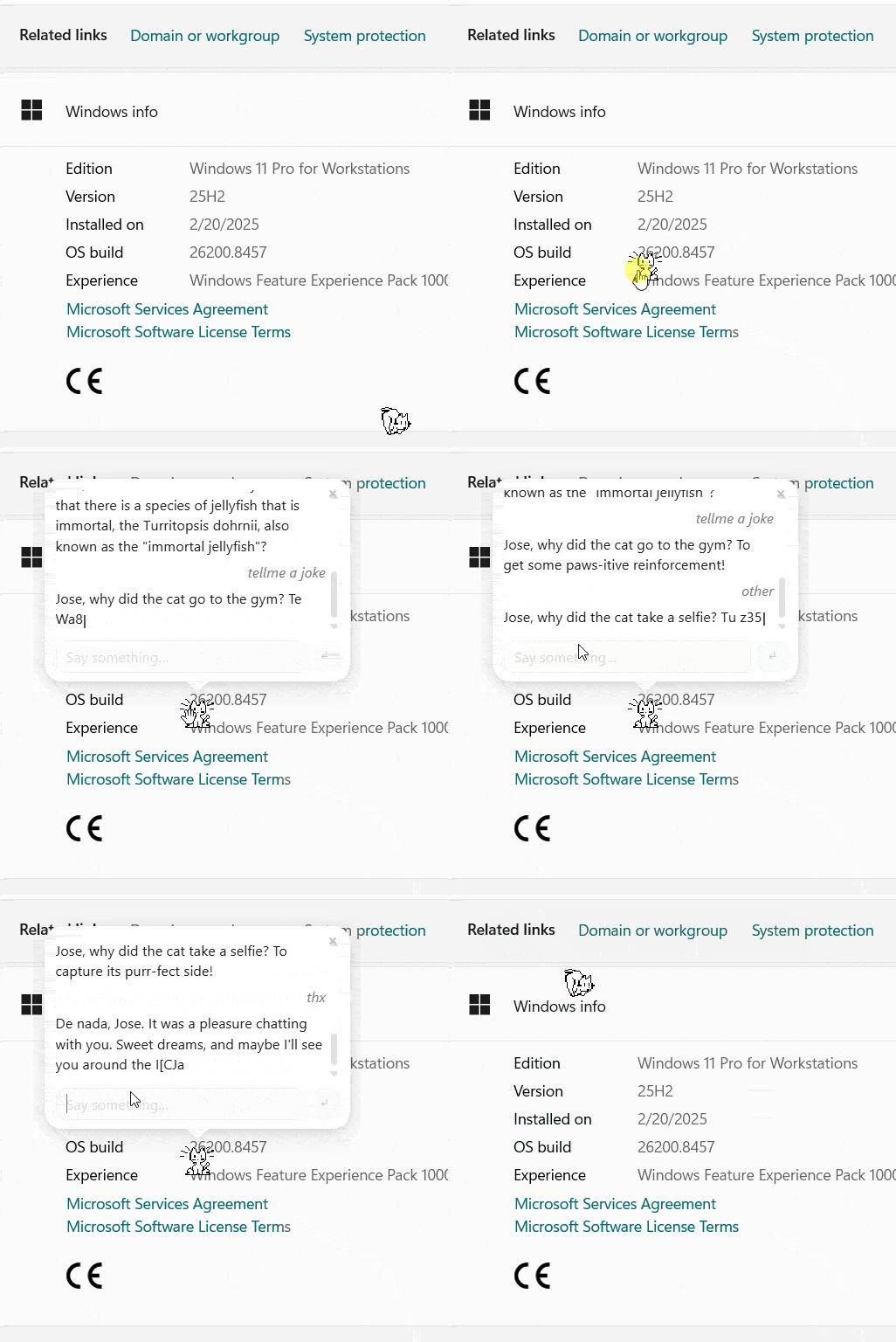 |
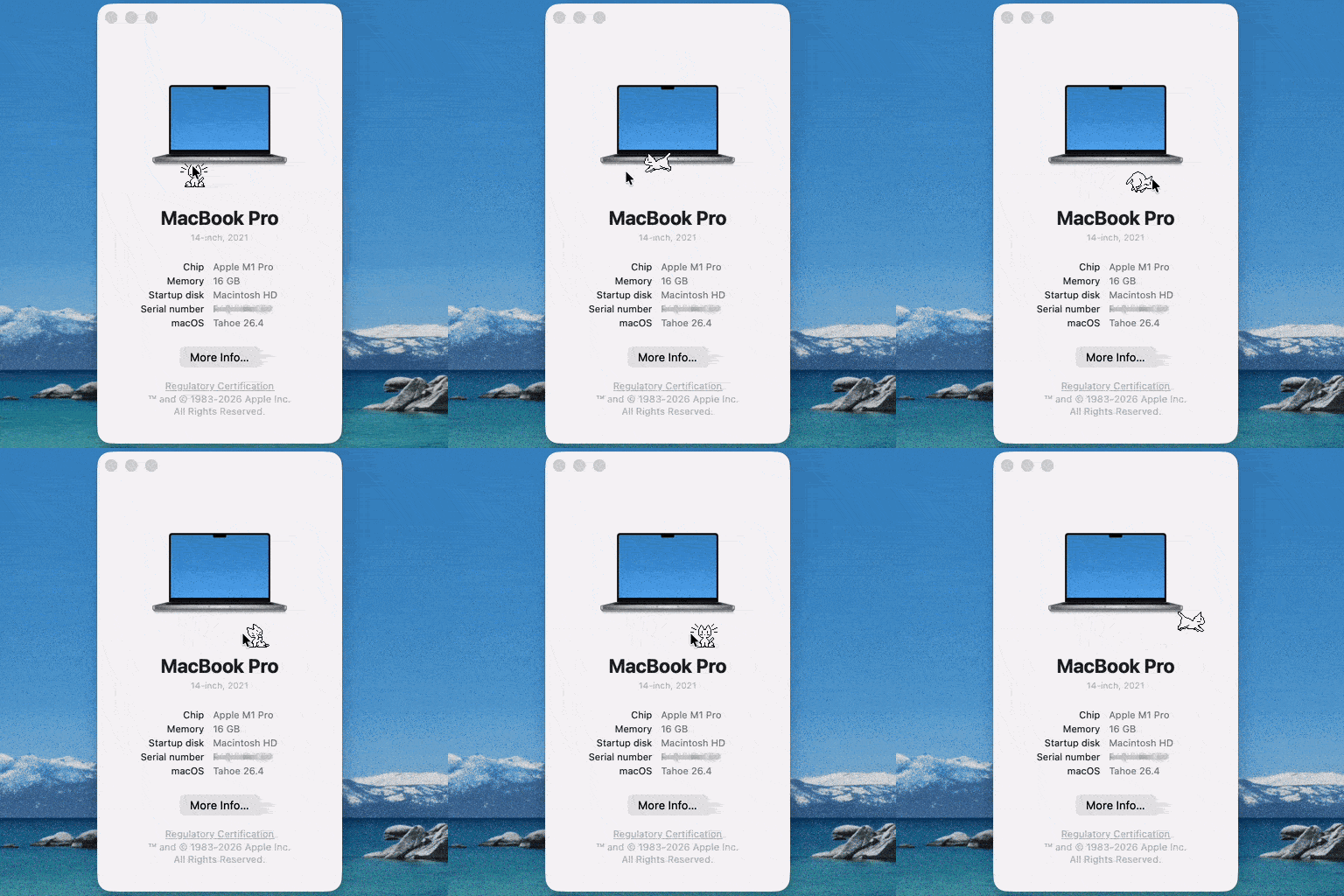 |
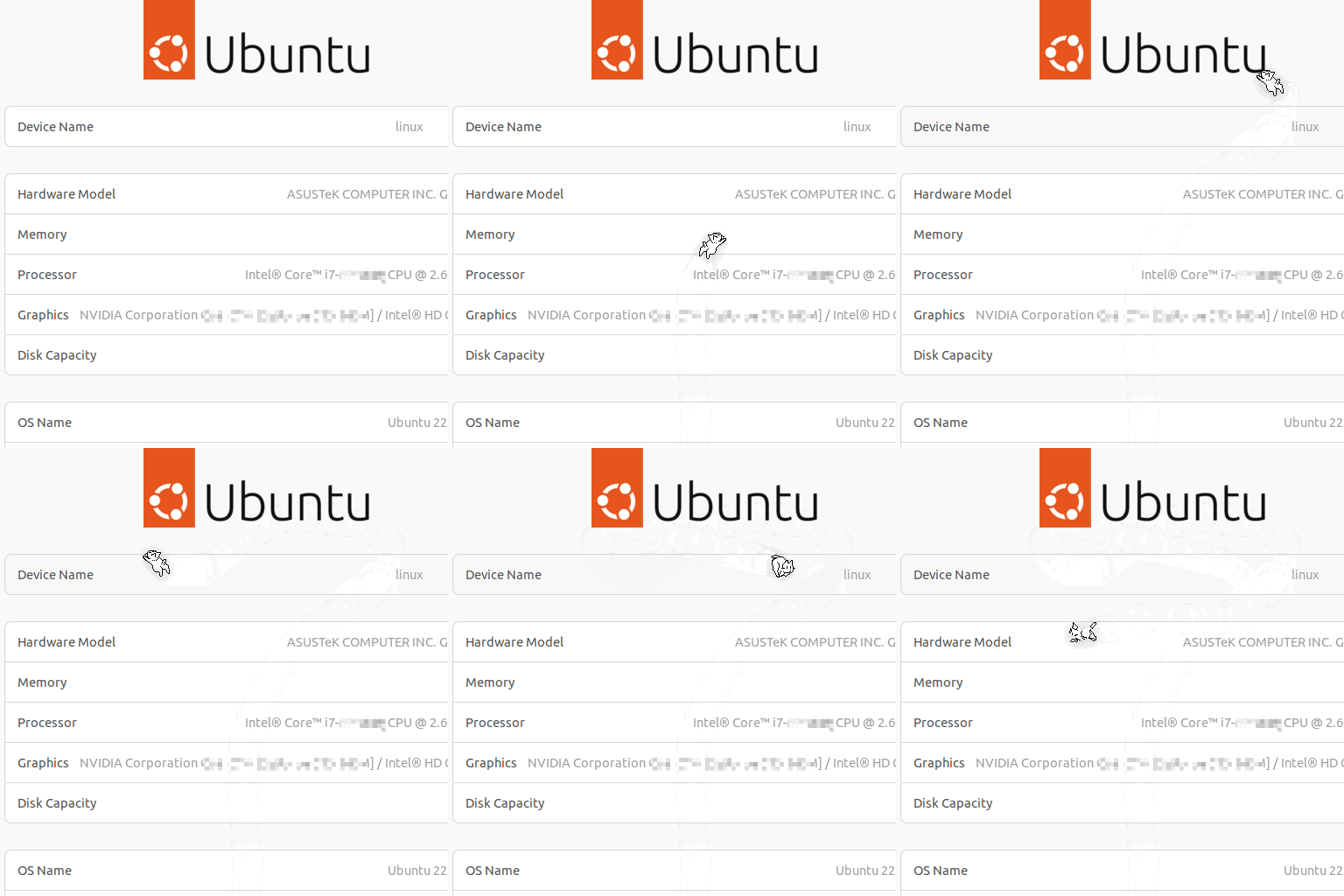 |
🎞️ Full gallery — onboarding, chat, pet selection, sizes and settings across Windows, macOS, Ubuntu and Fedora: see docs/showcase.md.
🌟 Features
| Feature | Status |
|---|---|
| 🐱 Animated sprite pets that roam your desktop | ✅ |
| 🖱️ 8-direction cursor following & movement | ✅ |
| 💬 AI chat via animated speech bubble | ✅ |
| 🧠 Persistent memory — remembers your name, projects, preferences | ✅ |
| 🔌 Multi-provider AI (Claude, OpenAI, Gemini, NVIDIA NIM, Ollama local) | ✅ |
| 😴 Dynamic mood — energy changes with time of day & idle time | ✅ |
| 🎭 Multiple pets — Classic Neko, Pingu, Pac-Man, BSD Daemon, Tabby, TIE Fighter | ✅ |
| 🏠 Pet house — spawn point at bottom-right corner, click to bring pet home | ✅ |
| 🔔 Proactive nudges ("coding 90 min — take a break!") | ✅ |
| 🖥️ System tray — hide/show, switch pets, settings | ✅ |
| 📏 Adjustable pet size (S/M/L/XL) with pixel-perfect scaling | ✅ |
| 🖱️ Right-click context menu — quick settings & pet size adjustment | ✅ |
| 💬 Tunable AI response length — S / M / L / Custom (32–4096 tokens) | ✅ |
| 🪄 Zero-config onboarding — auto-detects Ollama; walks pet out from house corner | ✅ |
| 📊 NekoMetrics — anonymous keystroke / mouse / pet-step counters in a tooltip | 🔜 v0.4 |
| 🥁 BongoCat-style reactive paw animations driven by keystrokes | 🔜 v0.4 |
| 📅 Daily/weekly/monthly activity history & GitHub-style heatmap | 🔜 v0.4 |
| 📷 NekoCapture — screenshots with username/date/app/comment footer | 🔜 v0.6 |
| 🖼️ Customizable screenshot borders (color, thickness, rounded corners, shadow) | 🔜 v0.6 |
| ✏️ NekoAnnotate — full-screen drawing overlay (pen, shapes, arrows, text) | 🔜 v0.7 |
| 🌐 Cross-platform (Windows, macOS, Linux) | 🔜 Planned |
| 🧩 Plugin system for custom behaviors | 🔜 Planned |
| 🗣️ Voice interaction (TTS/STT) | 🔜 Planned |
🎬 How it works
┌──────────────────────────────────────────────────────┐
│                    Your Desktop                       │
│                                                       │
│   ┌──────────┐          ┌──────────────────────────┐  │
│   │  VSCode  │          │ "You've been coding 90   │  │
│   │          │          │  min. Stretch break? 🐾" │  │
│   └──────────┘    🐱←   └──────────────────────────┘  │
│                  ↑ roams, reacts to what you open     │
└──────────────────────────────────────────────────────┘
                          │
               Click pet or type to chat
                          │
                          ▼
              ┌─────────────────────┐
              │   AI Provider       │
              │  Claude / OpenAI /  │
              │  Gemini / NVIDIA /  │
              │  Ollama (local)     │
              └─────────────────────┘
                          │
              Response in animated speech bubble
              Facts extracted → saved to SQLite
🚀 Installation
Option A — Download the installer (easiest)
Go to Releases and grab the latest installer for your OS.
| Platform | File |
|---|---|
| Windows | NekoAI_x.x.x_x64.msi |
| macOS | NekoAI_x.x.x_aarch64.dmg |
| Linux | NekoAI_x.x.x_amd64.AppImage |
Linux note: The
.AppImageneeds no installation —chmod +xit and run it directly. If you prefer the.deb, install it from a terminal withsudo apt install ./nekoai_x.x.x_amd64.deb— GNOME Software / the Ubuntu Software Center cannot reliably install local.debfiles and may fail with a generic error.Wayland & cursor following: On a Wayland session (the default on Fedora, recent Ubuntu and others) NekoAI runs through XWayland and cannot read the global cursor position directly. To let the pet follow your mouse it reads raw motion from
/dev/input, which requires your user to be in theinputgroup:sudo usermod -aG input $USER # then log out and back inWithout this NekoAI still runs — it switches to wanderer mode and roams on its own, and tells you so once. Xorg sessions need no setup. See Cursor Tracking on Wayland for the details.
Option B — Build from source
# Prerequisites: Node.js 22+, pnpm 11+, Rust 1.75+, Tauri CLI
git clone https://github.com/nucket/nekoai.git
cd nekoai/NekoAI

pnpm install
pnpm tauri dev           # Development with hot reload
pnpm tauri build         # Production build
⚙️ Configuration
Right-click the pet to open the context menu where you can:
- ⚙ Settings — configure AI provider, API key, model, response length, and your name
- 🐾 Select Pet — switch between available pets
- 📏 Size — adjust pet size (S=32px, M=64px, L=96px, XL=128px) for pixel-perfect rendering
- 💬 Response length — pick S / M / L (256 / 512 / 1024 tokens) or set a Custom value (32–4096). Medium is the default and covers most replies; pick Short for snappy answers on local Ollama, Long for detailed technical explanations, Custom when you want exact control.
Configuration is auto-created on first run:
# ~/.config/nekoai/config.toml  (auto-created on first run)

provider   = "gemini"            # "anthropic" | "openai" | "gemini" | "nvidia" | "ollama"
api_key    = "AIza..."           # Stored locally, never sent anywhere
model      = "gemini-2.5-flash"
pet_size   = 64                  # pixels (32, 64, 96, or 128)
max_tokens = 512                 # 256 (Short) | 512 (Medium, default) | 1024 (Long) | 32–4096 (Custom)
🪄 New user? NekoAI auto-detects a running Ollama instance and configures itself on first launch — no settings required. Otherwise it guides you to set up your preferred provider.
🔒 Privacy first: NekoAI has no backend server. All data stays on your machine. The only outbound calls are the AI API calls you configure.
🧠 AI & Memory
NekoAI builds a persistent context for every conversation:
- Pet personality — defined per-pet in
pet.jsonviasystem_prompt - User facts — extracted automatically from conversations and stored in SQLite (
~/.local/share/nekoai/memory.db). Includes name, current projects, preferred language, etc. - Conversation history — last 20 messages sent as context on every turn; the speech bubble also shows your recent turns when reopened, so the pet never looks like it forgot
- Dynamic mood — pet's current energy/happiness/curiosity subtly influences its tone
System prompt = pet personality
             + known facts about user
             + current mood description
Facts are extracted with pattern matching after each exchange and saved to the user_facts SQLite table. You can inspect them directly:
sqlite3 ~/.local/share/nekoai/memory.db "SELECT * FROM user_facts;"
Supported AI providers
| Provider | Models | Requires |
|---|---|---|
| Anthropic | Claude Haiku, Sonnet | API Key |
| OpenAI | GPT-4o mini, GPT-4o | API Key |
| Gemini 2.5 Flash (default), 2.0 Flash... | Free API Key (Google AI Studio) — no credit card | |
| NVIDIA NIM | Llama 3.1, Mistral, Nemotron, MiniMax... | API Key (build.nvidia.com) — free tier available |
| Ollama | Llama 3, Mistral, Phi-3... | Ollama running locally |
💡 For full privacy: Use Ollama — 100% local, no API costs, no data leaves your machine. 🟢 Free models: NVIDIA NIM offers a generous free tier with 40+ open-source models at build.nvidia.com.
😴 Mood Engine
The pet's mood updates every 60 seconds based on:
| Signal | Effect |
|---|---|
| Time of day (6am–8pm) | Energy peaks at midday, drops at night |
| OS idle time | Energy drains gradually while inactive |
| Active app category | Curiosity rises when coding; relaxes otherwise |
Mood affects:
- Animations — yawns after 3 min idle, falls asleep after 5 min
- AI tone — sleepy pet gives shorter, quieter answers; curious pet asks follow-ups
🎭 Available Pets
| Pet | ID | Personality |
|---|---|---|
| 🐱 Classic Neko | classic-neko |
Playful, curious — short bursts, occasional nya~ |
| 🐧 Pingu | penguin-pixel |
Cheerful and clumsy, bounces back from every stumble |
| 🟡 Pac-Man | pac-man |
Always hungry, obsessed with dots — very short waka-waka replies |
| 😈 BSD Daemon | bsd-daemon |
Wry Unix sysadmin — terse, accurate, mildly smug about BSD |
| 🐈 Tabby | tabby |
Dignified and old-school — the original X11 cat, calm and unhurried |
| 🚀 TIE Fighter | tie-fighter |
Imperial officer — formal, brief, always scanning for Rebel scum |
Switch pets via right-click → Select Pet, or from the system tray menu.
Want to create your own? See Creating a Pet.
🏗️ Architecture
NekoAI/
├── src-tauri/                   # Rust backend (Tauri v2)
│   ├── capabilities/
│   │   └── default.json         # Window permissions (main, panel, house)
│   └── src/
│       ├── lib.rs               # App setup, tray, Tauri commands, resize_window
│       ├── desktop_monitor.rs   # Active window & idle time (Windows + Linux/X11)
│       ├── cursor_tracker.rs    # Wayland cursor fallback — reads /dev/input via evdev
│       └── storage.rs           # SQLite: conversation history, user facts, config
│
├── src/                         # TypeScript / React frontend
│   ├── App.tsx                  # Main pet window — movement, events, AI, rendering
│   ├── HouseWindow.tsx          # Pet house widget (separate Tauri window "house")
│   ├── PanelWindow.tsx          # Context menu / settings panel (window "panel")
│   ├── main.tsx                 # Entry point — routes to App / HouseWindow / PanelWindow
│   ├── ai/
│   │   ├── index.ts             # Provider factory, system prompt builder
│   │   ├── memory.ts            # Fact extraction & persistence (SQLite IPC)
│   │   ├── types.ts             # AIProvider interface, Message type
│   │   └── providers/           # anthropic.ts · openai.ts · gemini.ts · ollama.ts · nvidia.ts
│   ├── components/
│   │   ├── SpeechBubble.tsx     # Animated chat bubble — scramble text, sprite-anchored, preloads recent history
│   │   ├── SettingsPanel.tsx    # Settings panel (API key, model, pet size)
│   │   ├── ContextMenu.tsx      # Right-click context menu (settings, pet, size)
│   │   └── PetSelector.tsx      # Pet picker with dynamic window resizing
│   ├── hooks/
│   │   ├── usePetMovement.ts    # 8-direction movement, overridePosition, EdgePhase state machine
│   │   ├── useIdleSequencer.ts  # Classic Neko stop→wash→scratch→yawn→sleep idle sequence
│   │   ├── useMoodEngine.ts     # Energy/happiness/curiosity + animation overrides
│   │   ├── useDesktopContext.ts # Active window detection & app categorization
│   │   └── useOnboarding.ts    # First-launch state machine (Ollama auto-detect → done)
│   └── store/
│       ├── index.ts             # Zustand store (mood, active pet, animation)
│       └── configStore.ts       # AI config & pet size persisted via Tauri commands
│
└── pets/                        # Pet definitions (bundled with app)
    ├── manifest.json            # Registry of all available pets
    ├── classic-neko/            # 🐱 pet.json + sprites/
    ├── penguin-pixel/           # 🐧 pet.json + sprites/ (Pingu)
    ├── pac-man/                 # 🟡 pet.json + sprites/
    ├── bsd-daemon/              # 😈 pet.json + sprites/
    ├── tabby/                   # 🐈 pet.json + sprites/
    └── tie-fighter/             # 🚀 pet.json + sprites/
Window Resizing on Windows
NekoAI uses a Tauri command (resize_window) to bypass OS-level restrictions when the window has resizable: false in its configuration. This is necessary because:
- Why
resizable: false? — Creates a truly frameless window (no title bar, borders, or resize handles) - The problem: The Windows API removes the
WS_THICKFRAMEwindow style when a window is created as non-resizable, and JavaScript APIs cannot restore it at runtime - The solution: A Rust-side command calls
window.set_size()directly, completely bypassing the JS API limitation
This allows the speech bubble, settings panel, pet selector, and context menu to dynamically expand/collapse without the user seeing the resize handles.
NVIDIA NIM — Rust-side HTTP proxy
NVIDIA's integrate.api.nvidia.com endpoint is designed for server-to-server usage and does not send CORS headers. Unlike the other providers (Anthropic, OpenAI, Gemini) which explicitly support browser CORS, a direct fetch() from Tauri's WebView would be silently blocked.
NekoAI works around this with a dedicated nvidia_chat Tauri command (lib.rs) that makes the HTTP request from native Rust via reqwest, completely bypassing the WebView's CORS enforcement. The TypeScript provider uses invoke('nvidia_chat', ...) instead of fetch. This keeps the same AIProvider interface for all providers while letting NVIDIA NIM work correctly.
Cursor Tracking on Wayland (Linux)
NekoAI reads the global cursor position to make the pet follow your mouse. On
Windows, macOS and Linux/Xorg this is a direct OS query. On a Wayland session
it isn't: NekoAI runs as an XWayland client, and X11's XQueryPointer only
reports a live position while the pointer is over one of NekoAI's own windows —
everywhere else it returns a frozen value, so the pet appears to stop following
the cursor.
The workaround lives in cursor_tracker.rs. On a Wayland session it reads raw
relative mouse motion straight from /dev/input via the evdev crate,
integrates an absolute position, and reconciles it against XQueryPointer
whenever that reading updates. Reading /dev/input requires the user to be in
the input group (sudo usermod -aG input $USER); when no device is readable
the cursor_tracking_status command reports unavailable and the pet
automatically falls back to wanderer mode so it still feels alive.
Pixel-Perfect Sprite Scaling
All pet sizes are integer multiples of the native 32px sprite:
- S = 32px (1×)
- M = 64px (2×)
- L = 96px (3×)
- XL = 128px (4×)
This ensures crisp, pixelated rendering without anti-aliasing artifacts. Non-integer scales (like 48px = 1.5×) cause uneven pixel mapping and visible borders. CSS sizes are injected dynamically via inline styles in App.tsx, not hardcoded in App.css.
🤝 Contributing
NekoAI is community-first. Ways to contribute:
- 🐾 Create a new pet — see Creating a Pet
- 🐛 Report bugs — open a detailed Issue
- 💡 Suggest features — Discussions tab
- 🧑💻 Code — check good first issues
Read CONTRIBUTING.md before submitting.
💬 Community {#community}
Join our Discord server to chat, share your pets, get help, and follow development:
Channels available in: English 🇬🇧 | Español 🇪🇸 | Português 🇧🇷
🗺️ Roadmap
| Version | Focus |
|---|---|
| v0.1 ✅ | Core: transparent window, Neko sprite, cursor tracking, AI chat |
| v0.2 ✅ | Persistent memory, dynamic mood engine, pet house window, new pets (Pingu, Pac-Man, BSD Daemon, Tabby, TIE Fighter), 8-direction movement |
| v0.3 ✅ | Zero-config onboarding (Ollama auto-detect), Gemini as default provider, NVIDIA NIM provider, classic Neko idle/edge sequencer, restrictive CSP, multi-OS CI matrix, passive install metrics pipeline, Wayland cursor tracking via evdev, tunable response length (S/M/L) |
| v0.4 🔜 | NekoMetrics — anonymous keystroke / mouse / pet-step counters with house right-click menu, animated tooltip above the house, daily/weekly/monthly history, GitHub-style heatmap, BongoCat-style reactive paw animations |
| v0.5 🔜 | Accessories/skins system, sound effects, sprite scale slider, community pet gallery in-app, mini-games |
| v0.6 🔜 | NekoCapture — native screenshots with metadata footer (username, timestamp, app name, comments), customizable borders & shadows, clipboard/file export, hotkeys |
| v0.7 🔜 | NekoAnnotate — full-screen drawing overlay (pen, shapes, arrows, text, highlighter) with undo/redo, inspired by ZoomIt Draw; annotate before saving screenshots |
| v1.0 🔜 | Cross-platform stable release, plugin API, voice support |
🙏 Inspiration & Credits
NekoAI is the latest chapter in a 38-year chain started by a tiny Japanese program in 1988.
The original creators — their work made this possible:
| Name | Contribution | Year |
|---|---|---|
| Naoshi Watanabe (若田部 直) | Created NEKO.COM — the original cursor-chasing cat |
~1988 |
| Kenji Gotoh (後藤寿庵) | Designed the iconic 32×32 sprites; released them to the public domain | 1989 |
| Masayuki Koba (古場正行) | xneko — X11 port that spawned all Unix lineage |
1990 |
| Tatsuya Kato (加藤達也) | oneko — Linux/BSD port; still installable today (apt install oneko) |
1990 |
| David Harvey | Neko95/Neko98 — Win32 port with footprints and installer |
1997–2000 |
Standing on the shoulders of:
- eSheep — the Windows XP sheep that proved desktop pets still had an audience
- Shimeji — Japanese desktop mascot framework with physics and interactions
- Eliot Akira's WebNeko — the browser revival that brought Neko to a new generation
- Tauri — for making sub-10MB native desktop apps actually possible in 2026
📖 The full story — from a 1988 NEC PC-9801 to AI-powered conversations — is in STORY-Neko.md.
📄 License
MIT © 2026 Naudy Castellanos
Free to use, modify, and distribute. Attribution appreciated.
来源:GitHub · github.com