kaizen 发布双检查点智能体工作流工具
hfadhlullah/kaizen
kaizen 发布一套面向 AI 智能体的工作流工具,在构建前先给出计划供用户批准,构建完成后再由未见过构建者推理过程的第二个智能体复审,输出编号并分级的问题清单。

Stop finding your AI's mistakes next week.
See the plan before it starts. Get a second opinion when it is done.
You ask an AI for something real: a feature, a launch email, a migration plan. It goes quiet, then hands you a finished thing. Did it understand you? What did it change? What is wrong that you won't notice until next week?
kaizen adds two checkpoints:
- Before: you see the plan and say yes or no. Nothing is built until you approve.
- After: a second agent reviews the work. It never saw the first one's reasoning, so it has nothing to defend. It tells you what's wrong, numbered and graded.
You decide what gets fixed.
Install
# macOS · Linux · WSL
curl -fsSL https://bun.sh/install | bash && ~/.bun/bin/bunx kaizen-agent
# Windows PowerShell
irm bun.sh/install.ps1 | iex; & "$env:USERPROFILE\.bun\bin\bunx.exe" kaizen-agent
Already have Bun? bunx kaizen-agent. It sets itself up for every agent you already use.
Then, in any project:
/kaizen <what you want done>
That's it. No init and no config.
See it
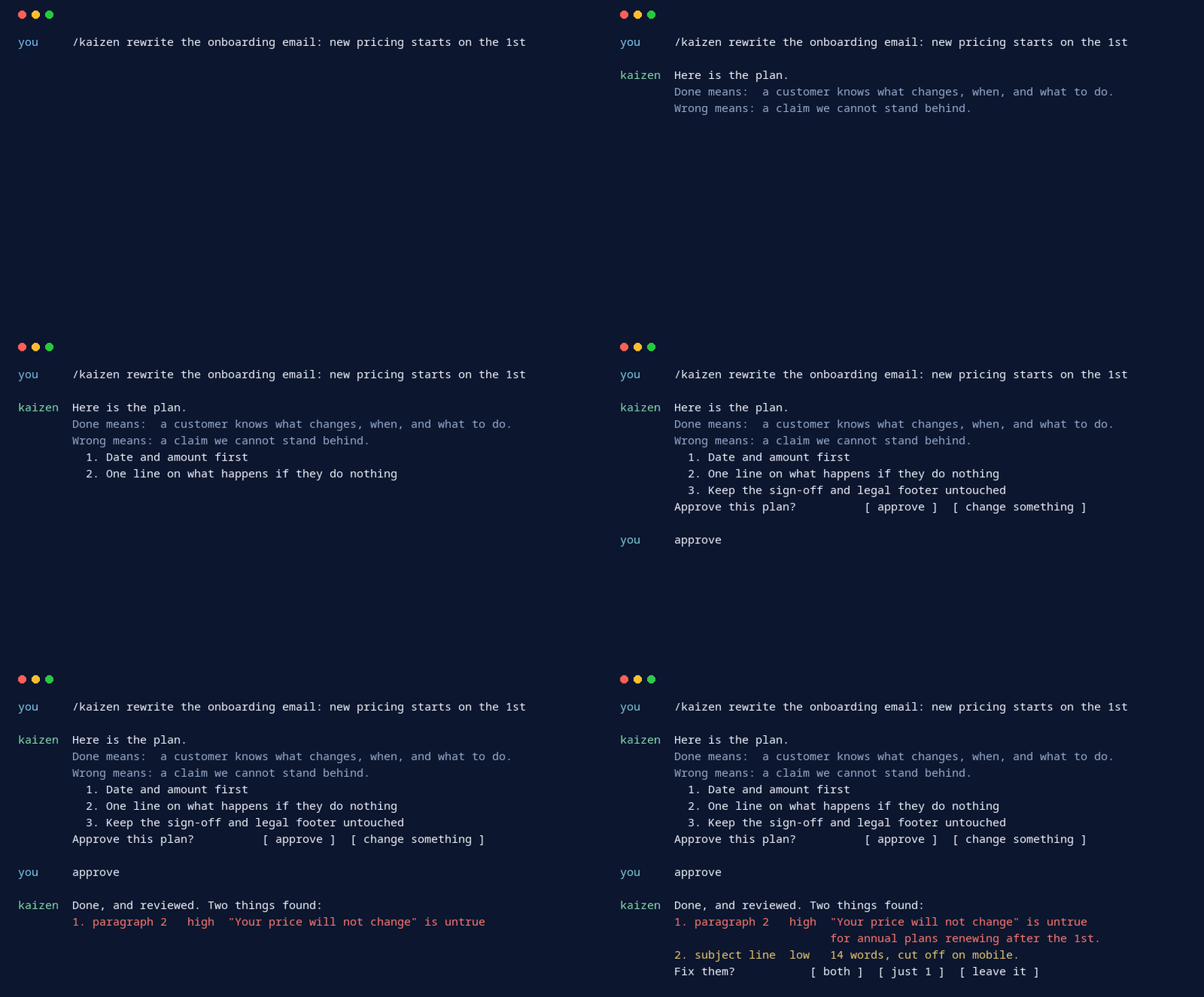
you    /kaizen rewrite the onboarding email — the new pricing starts on the 1st

kaizen Here is the plan.

       This is a customer email, not a policy page.
       Done means: a customer knows what changes, when, and what to do — in one read.
       Wrong means: a claim we cannot stand behind, or someone thinks they are being
       charged more than they are.

       What I will do:
         1. Rewrite the opening so the date and the amount come first
         2. Add one line on what happens if they do nothing
         3. Keep the existing sign-off and legal footer untouched

       Approve this plan?                    [ approve ]  [ change something ]

you    approve

kaizen Done, and reviewed. Two things found:

       1. paragraph 2  high    "Your price will not change" is not true for annual
                               plans renewing after the 1st. Fix: name both cases.
       2. subject line low     14 words, cut off on mobile. Fix: lead with the date.

       Fix them?                             [ both ]  [ just 1 ]  [ leave it ]
Nobody told the reviewer to hunt for untrue claims. It worked out that this was a customer email and reviewed it as one.
Code: a bug in checkout
you    /kaizen the discount field lets you enter more than 100%

kaizen Done, and reviewed.
       Verified: ran the suite — 47 passed, 0 failed. Before the change: 44 passed.

       1. cart.py:12  medium  A discount of exactly 100 now returns 0 instead of
                              being rejected. Fix: use > not >=.
"It should work" is never accepted. The builder has to show the run and the numbers.
Marketing: a landing page for a launch
you    /kaizen landing page copy for the Pro tier launch

kaizen Done, and reviewed. Three things found:

       1. benefits 3   high    "Unlimited exports" — the shipped limit is 500/month.
       2. headline     medium  Names a competitor. Legal reviews those; flagging, not fixing.
       3. CTA          low     "Get started" appears on the free signup too. Ambiguous.
Every claim is checked against what actually ships.
Research: a decision memo
you    /kaizen should we move from per-seat to usage-based pricing? write it up

kaizen Done, and reviewed. Two things found:

       1. section 3  high    The recommendation rests on 4 accounts out of 60. That
                             is not stated where the conclusion is.
       2. section 2  medium  Churned accounts were excluded with no reason given —
                             they are the ones the model treats worst.
No tests, no tone check. It looked for unsupported leaps and cherry-picked data.
Operations: a migration runbook
you    /kaizen runbook for moving the database to the new region on Saturday

kaizen Done, and reviewed. Two things found:

       1. step 7   critical  No rollback after the DNS cutover, and it is not marked
                             as the point of no return. Fix: mark it, add the TTL wait.
       2. step 3   high      Says "restore the backup" but never says which backup or
                             how to confirm it is the right one.
How it works
| Stage | ||
|---|---|---|
| 1 | Plan | Reads your request, writes a plan. Changes nothing. |
| 2 | You approve | Say yes, or say what to change. |
| 3 | Build | Does the work, then proves it: runs the tests, checks each claim, walks each step. |
| 4 | Review | A fresh agent checks the work and lists what's wrong. |
| 5 | Fix | Serious findings get fixed and rechecked. The rest comes to you, never silently dropped. |
Why people use it
- It isn't just for code. Emails, docs, runbooks, research. kaizen works out what done and wrong mean for each request, so a book chapter is never reviewed for race conditions.
- The reviewer has nothing to defend. It starts cold, sees only your request, the plan and the result, and finds what the builder talked itself past.
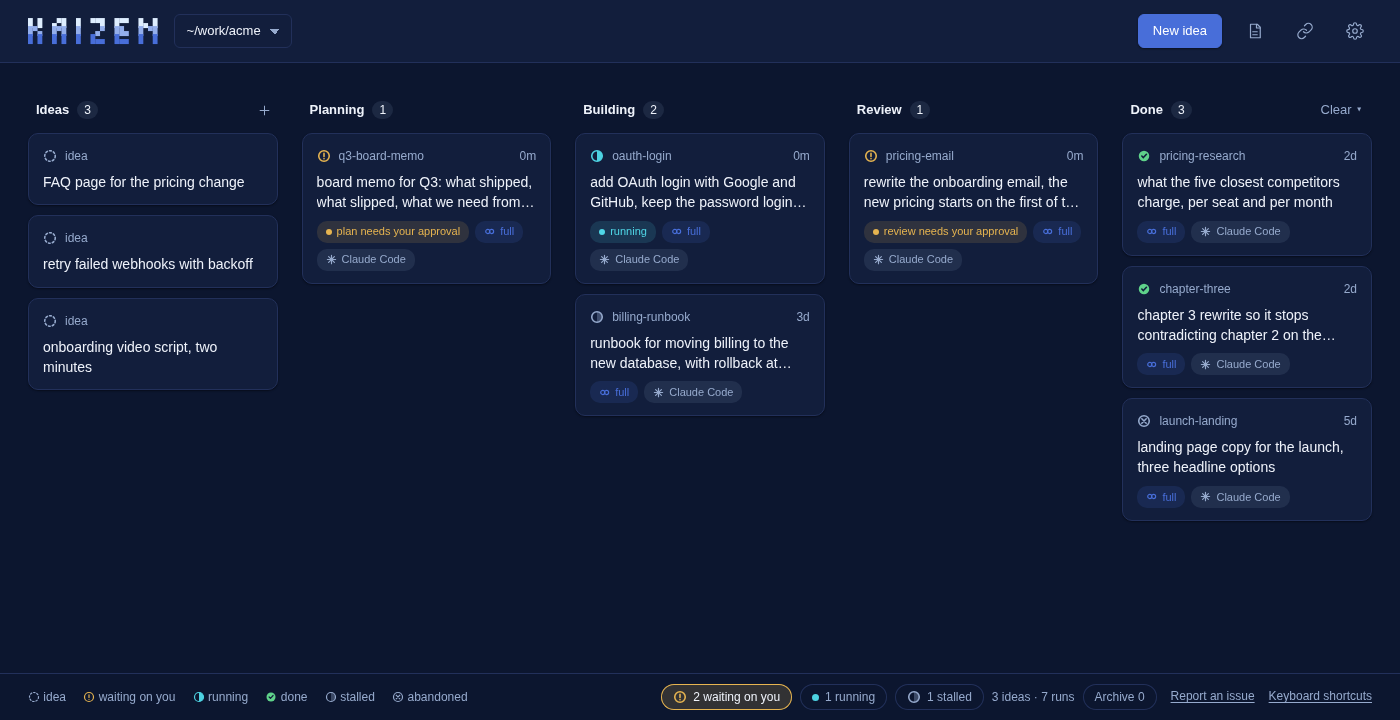
- A board for all your work. Run
kaizenin a terminal, orkaizen webin the browser. Ideas, plans, builds and reviews across every project, updating live. Start a run, approve or revise a plan, answer its questions, pick which findings to fix, then commit and push, all without opening a terminal. - Requests come to you. Paste a Google Sheet or Doc link and every request in it lands on the board as an idea.
- Notes and voice, offline. A markdown notebook beside the board, plus dictation on every field. Whisper runs in the page, so audio never leaves your machine.
- Plain files, any agent. Every run is a folder of markdown in
.kaizen/. Start in Claude Code, finish in Codex, Antigravity, OpenCode, Cursor or Gemini CLI.
Kaizen Bot
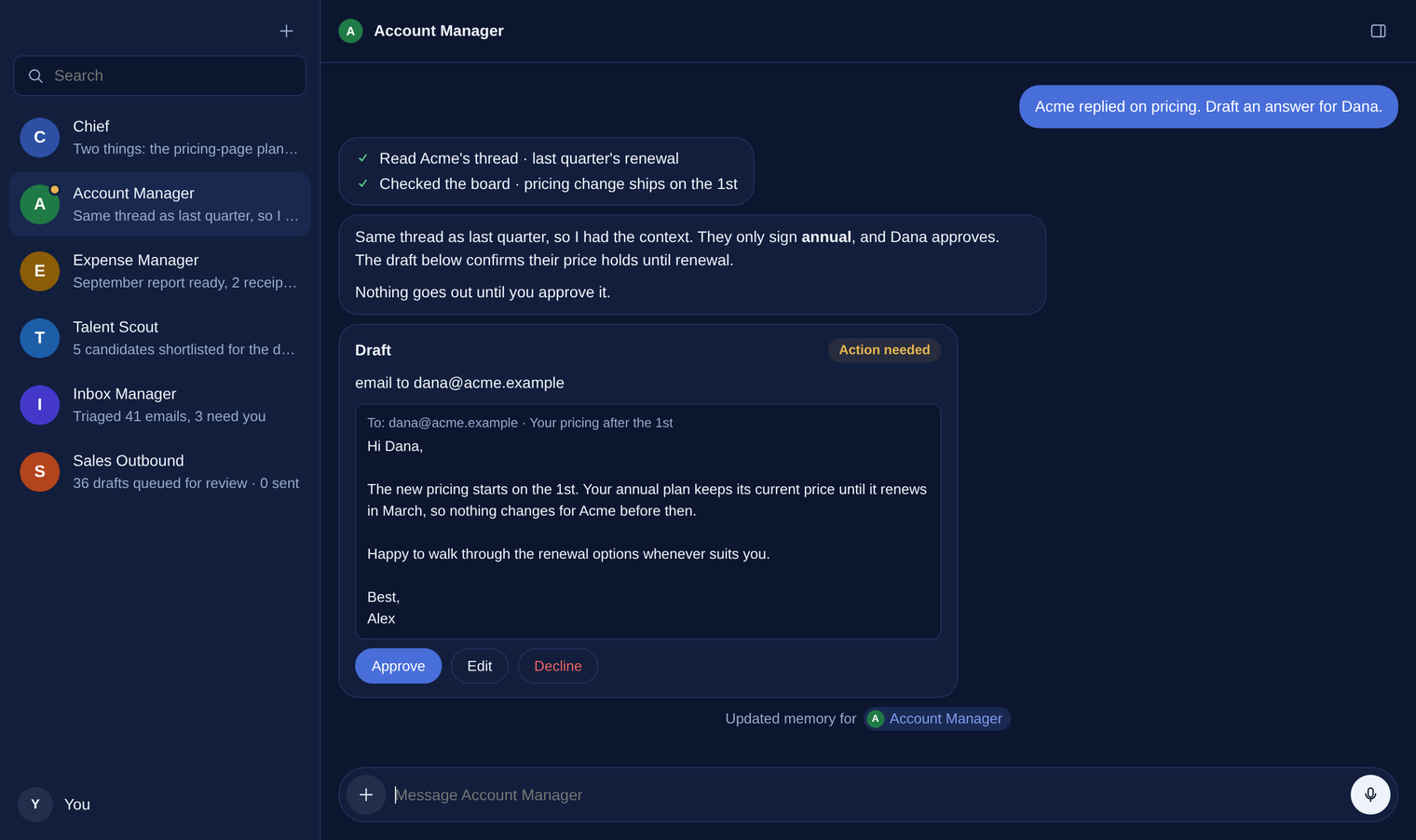
A chat front end for your board, with AI teammates for every division. Ask Chief what's waiting on you, what's running, and what a plan or review says. Hand Sales Outbound, Marketing, Customer Service or Account Manager their team's asks, and they turn them into board ideas and runs. The board still does the real work: plan, approval, build, review.
- Nothing happens behind your back. An agent may read the board, add an idea or a note, remember a fact and draft a message. Starting a run, approving a plan or fixing findings waits on a card until you click Approve. It never turns on Yolo and never commits.
- Nothing is ever sent. Emails, posts and replies are drafts: approve one, then copy it or export them all as Markdown.
- Teammates and routines. One agent can ask another, and any agent can run a task on a schedule: every weekday at 7, brief me on the board.
Kaizen Bot lives in the repo's bot/ folder, not the npm package. With the board running (kaizen web):
git clone https://github.com/hfadhlullah/kaizen && cd kaizen/bot
cp .env.example .env      # set PROVIDER, MODEL and that provider's key
bun start                 # http://127.0.0.1:7430
Download the app
Kaizen Bot also comes as a desktop app, with no Bun or repo needed. Download yours from the latest release:
| OS | File | Install |
|---|---|---|
| macOS | Kaizen-Bot-macos-arm64.dmg (Apple Silicon), Kaizen-Bot-macos-x64.dmg (Intel) |
Open it, drag Kaizen Bot to Applications |
| Windows | Kaizen-Bot-Setup-windows-x64.exe |
Run the setup; it asks for your provider and API key |
| Linux | kaizen-bot-linux-x64, kaizen-bot-linux-arm64 |
chmod +x, then run it |
The first time, it creates ~/.kaizen-bot/.env for your provider and key. After that it
starts the board if kaizen is installed, and opens the chat in its own window; quit it from
Settings. The app is unsigned, so macOS and Windows warn on first open. How to get past that,
and how to uninstall, is in
Download the app.
Anthropic, OpenAI and Requesty are supported. Setup, privacy and settings are in the Kaizen Bot README.
Commands
| Command | |
|---|---|
/kaizen <request> |
Start a run |
/kaizen-plan <request> |
Plan only |
/kaizen-auto <request> |
No stops; report at the end |
/kaizen-lite <request> |
Every stage in this session: cheaper |
/kaizen-full <request> |
Every stage its own cold agent: the independent review |
/kaizen-review [target] |
Review something that already exists |
/kaizen-approve · /kaizen-reject <reason> |
Answer whatever the run is waiting on |
/kaizen-run · /kaizen-abort |
Carry on with an approved plan, or drop the run |
/kaizen-status · /kaizen-backlog |
What's waiting, in flight, done, or left over |
/kaizen-gather |
Pull new requests from your sources onto the board |
/kaizen-config |
Change this project's settings |
/kaizen-help |
The full card |
In a terminal: kaizen (dashboard), kaizen web (board), kaizen settings, kaizen upgrade.
Stuck on 1.18.0 or older? If kaizen upgrade says could not pull and stays on the old version, run this once: bunx kaizen-agent@latest. Your old install is kept as ~/kaizen.old; from then on kaizen upgrade works by itself.
Bundled skills
Installed alongside kaizen; your agent uses them when a request fits. Everything they make lives in ~/.kaizen/.
| Skill | What it makes |
|---|---|
story-deck |
A cinematic storytelling pitch deck (A5 .pptx): story first, the product last. Output in ~/.kaizen/decks/. |
story-video |
A publish-ready video from a prompt, photos, screenshots, a deck or footage: narration, captions, sound design, music, mastering, 16:9 and 9:16, revisable. Output in ~/.kaizen/videos/. Works with no accounts (free voice, synthesized sounds); an ElevenLabs key unlocks natural voices. |
Each skill has a scripts/check.sh that lists what it needs (Node, Python, ffmpeg, LibreOffice).
Learn more
- The guide: the board, request sources, notebook, settings, installer flags, uninstall
- Kaizen Bot: the chat front end, its agents, routines and privacy
spec.md: the contract every stage followsadapters.md: running outside Claude Code, with Codex and Antigravity as the worked examples. OpenCode, Cursor and Gemini CLI load the same skill folder- Found a bug?
kaizen issue, or Report an issue on the board, opens a GitHub bug form with your system details filled in. Nothing is sent until you press Submit on GitHub.
License
MIT. Kaizen (改善) is Japanese for continuous improvement: small changes, checked as you go.
来源:GitHub · github.com