dgenerate:可脚本化的命令行图像与视频生成编辑工具
Teriks/dgenerate
dgenerate 是一款可脚本化的命令行工具与库,支持用 SD、SDXL、SD3、Flux、Flux.2、Z-Image、Qwen-Image、Kolors 等架构生成图像,并通过 --model-type ltx 调用 LTX-2.5、--model-type wan 调用 Wan 2.1/2.2 生成整段视频。
dgenerate is a scriptable command-line tool (and library) for generating and editing images, generating whole video clips with LTX and Wan,
and processing animated inputs with AI.
Whether you're generating or editing single images, batch processing hundreds of variations, generating a short mp4 from a prompt, or transforming entire videos frame-by-frame, dgenerate provides a flexible, scriptable interface for a multitude of generation and editing tasks.
For the extensive usage manual, manual installation guide, and API documentation, visit readthedocs.
What You Can Do
Image Generation
- Generate images using a number of popular model architectures such as: SD, SDXL, SD3, Flux, Flux.2, Z-Image, Qwen-Image, and Kolors
- Batch process multiple parameter combinations combinatorially to generate variations
- Run large models on limited hardware with inference optimizations and quantization
- Utilize models from HuggingFace and CivitAI for generation
- Advanced prompt weighting (LPW), SD-WebUI (Common syntax), InvokeAI syntax, and
llm4gen(SD1.5 only) - Control Nets, T2I Adapters, IP Adapters, LoRA, and Textual Inversion (embeddings)
- Text to image, image to image, and inpainting
- Diffusion-based image upscaling
Video Generation
- Generate a whole clip in one pipeline call with
--model-type ltx(Lightricks LTX-2.5 and the earlier LTX-Video checkpoints) - Text-to-video, or condition with
--image-seeds: a still or clip as the opening frames,last-frame=as the closing frame, or both together - Use a video, GIF, or other animated file as conditioning to extend existing footage or generate a lead-in; slice with
--frame-start/--frame-end - Process the opening and closing conditioning separately, for example
--seed-image-processors grayscale + canny - Guide LTX-2.5 with an IC-LoRA from
--ltx-ic-lora, such as canny, depth, or pose control, from a reference clip processed by--control-image-processors - Load style or effect LoRAs with
--loras, on their own or together with an IC-LoRA - Set clip length and frame rate with
--video-lengthsand--video-fps; LTX-2.5 can predict duration from the prompt when length is omitted - LTX-2.5 muxes generated audio into mp4 output; the earlier LTX-Video model accepts a GGUF diffusion transformer
- Generate Wan 2.1 / 2.2 clips with
--model-type wan(Wan-AI): text-to-video, image-to-video, first-last-frame, video-to-video, and VACE - Animate a character still with
--model-type wan-animateusingwan-pose=andwan-face=, orwan-driving=with--wan-animate-preprocess(the existingopenposeandyoloprocessors) or--wan-pose-image-processors/--wan-face-image-processors - Animate a character still with
--model-type wan-animate-2usingwan-driving=as the motion clip - Compile denoiser, ControlNet, and VAE blocks with
--torch-compile - Example configs under
examples/ltx2,examples/ltx_video,examples/wan,examples/wan_animate, andexamples/wan_animate_2; see the video generation manual
Image Processing
- Easily chain image processors together for advanced scripted image manipulation
- Utilize built-in image processors for edge detection, depth mapping, segmentation, feature detection, and more
- Run upscaling / image restoration models such as ESRGAN, SwinIR, etc... via spandrel
- Run image processors generically on any image
Animation & video processing (per frame)
- Run image diffusion once per frame to transform videos into artistic, non-temporally consistent animations (distinct from whole-clip generation above)
- Process GIF, WebP, APNG, MP4, and any other video format supported by av (ffmpeg)
- Memory-efficient, streamed processing of video content from disk
- Apply image processors to any animated input, for example upscaling / classification / mask generation
Scripting
- Utilize the built-in shell language to script generation tasks, work in REPL mode from the Console UI
- Write scripted workflows with intelligent VRAM/RAM memory management, garbage collection, and caching
- Write plugins such as image processors, prompt weighters, shell language features, etc. in Python if desired
Config generation
A local Qwen model writes a dgenerate config from a plain language request. It retrieves the closest example configs and documentation, then checks the result with dgenerate and asks the model to fix anything that is rejected.
dgenerate --sub-command assistant -o cat.dgen "generate a cute cat, 30 steps"This needs the xllamacpp extra. The Console UI Generate Code menu runs the same command. See the assistant sub-command in the manual.
Getting Started
Quick Install
Download an install wizard for your platform from the releases page for a hassle-free setup into an isolated Python environment. The same binary installs from the command line. See the network installer section of the manual.
Manual Install
System Requirements
- GPU: NVIDIA with CUDA 12.6 or newer, AMD (ROCm 7.2 or 7.14 on Linux, or AMD's Windows wheel index), or Apple Silicon
- Python: 3.11 or newer, except 3.14.1, and older than 3.15
- OS: Windows, macOS, or Linux
Note: CPU rendering is possible but extremely slow unless the given model is tailored for it.
Two Ways to Use dgenerate
Command Line
Perfect for automation and batch processing:
dgenerate stable-diffusion-v1-5/stable-diffusion-v1-5 --prompts "a cute cat" --inference-steps 15 20 30

dgenerate --file workflow-config.dgen
Interactive GUI
# launch the Console UI

dgenerate --console
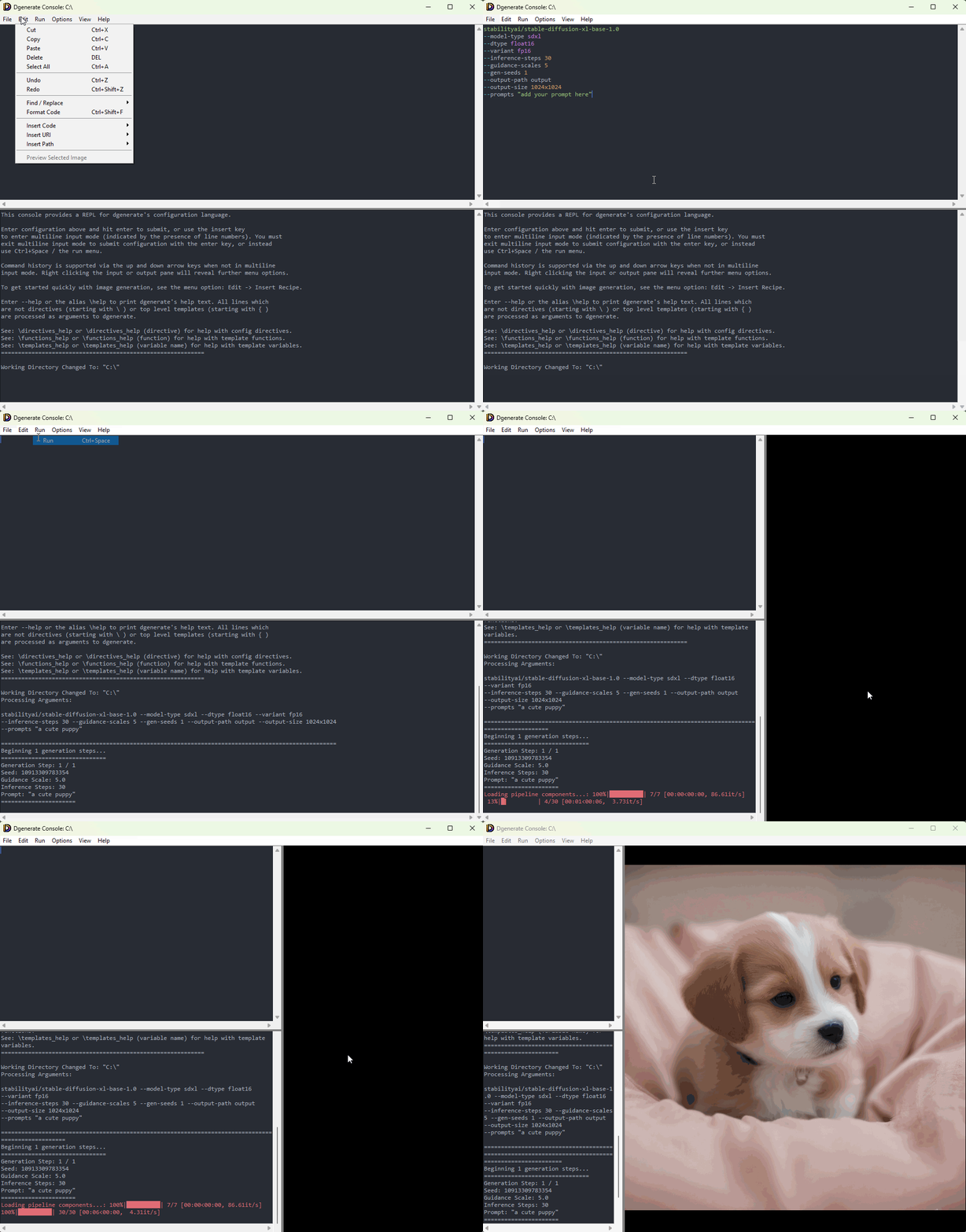
Features a syntax-highlighting console / editor:
- REPL / code editor for the built in shell language to assist with building complex workflows
- Generate Code writes a config script from a plain language request with a local Qwen model
- Preview plays finished GIF, WebP, APNG, and MP4 clips, including audio. The timeline under the picture has play, scrub, a speaker button (sound waves, or a red X when muted), and a volume slider
- Vulkan is the default preview on Windows and Linux with the
console_ui_vulkanextra. On macOS OpenGL is the default; setDGENERATE_CONSOLE_UI_VULKAN=1to use Vulkan.DGENERATE_CONSOLE_UI_VULKAN=0keeps the OpenGL viewer fromconsole_ui_opengl - Smooth zoom / pan, and a bounding box / coordinate picker
- Various templating utilities (recipes, and URI builders) for quickly creating scripts and working interactively
- In editor documentation for all arguments, and built in image processors / plugins
- Lightweight multiplatform Tkinter-based UI
来源:GitHub · github.com