trafft-mcp:让 AI 助手用自然语言管理 Trafft 预约日历
mjmirza/trafft-mcp
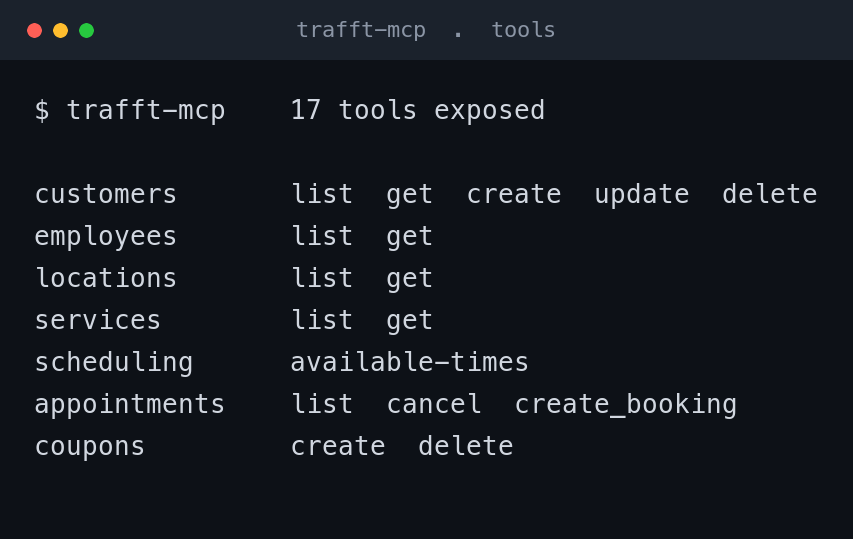
社区开发者发布开源 MCP 服务器 trafft-mcp,把 Trafft REST API 封装成 17 个 MCP 工具,覆盖客户、员工、地点、服务、预约和优惠券 8 个领域,支持 Trafft 云端、自托管、白标及经销商账户。

Talk to your Trafft booking calendar in plain language, from any AI assistant.

Not affiliated with Trafft. This is a free, community-built bridge. Trafft and the Trafft logo are trademarks of their owner, and all credit for the booking platform and its API goes to Trafft. This project lets an AI assistant talk to that API for you. Full detail in docs/LICENSING.md.
What it is, in one line
Trafft runs your bookings. This connects your AI assistant to Trafft so you can manage it all by asking.
Quick start in 3 steps
flowchart LR
  S1["1<br/>Copy your 3 Trafft keys"] --> S2["2<br/>Paste them into your assistant"] --> S3["3<br/>Ask in plain words"]
Loading
- Copy your 3 keys from Trafft. Jump to Where to find your credentials. You need an API URL, a Client ID, and a Client Secret.
- Paste them in following Install. It is copy and paste, nothing to write.
- Ask in plain words. That is the whole workflow. Examples below.
What you can ask
Once it is connected, you talk to your assistant normally and it acts on your real Trafft account.
- "What appointments do I have next week?"
- "Book a strategy session for Sarah on Monday at 2pm."
- "Which slots are free for a consultation this Friday?"
- "Add a new customer, Max, max@example.com."
- "Create a 10 percent coupon called LAUNCH."
No code. No dashboards. No clicking through screens.
See it working
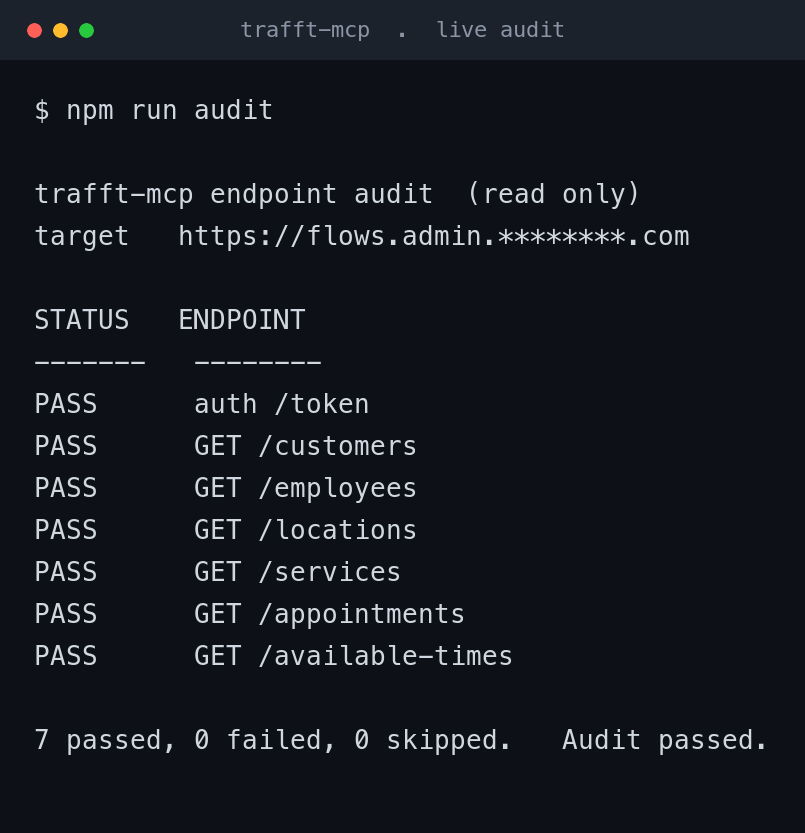
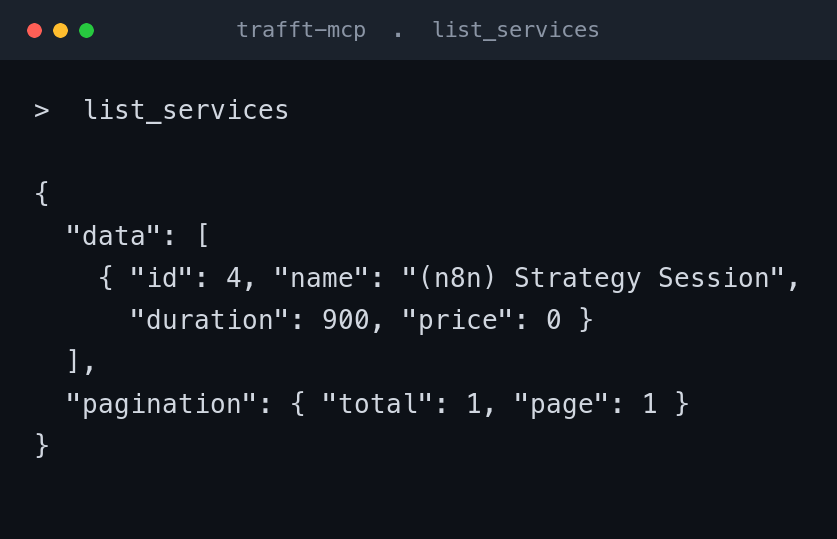
The tools are verified live against a real Trafft instance. The bundled auditor logs in and probes the core read endpoints, and the deep mode round-trips the write paths, so you know the connection is healthy before you rely on it. Sensitive values are masked in these images.
Where to find your credentials
You need three values from your own Trafft account. Here is exactly where they live.
flowchart LR
  A["Log in to<br/>Trafft"] --> B["Open<br/>Features and Integrations"] --> C["Open the<br/>API card"] --> D["Copy<br/>URL, Client ID,<br/>Client Secret"]
Loading
- Log in to your Trafft admin dashboard.
- Open Features and Integrations in the left sidebar.
- Find the API card. If it shows Enable, click that first, then Set Up. If it is already on, click Set Up.
- The page shows your API URL, Client ID, and Client Secret. Copy all three.
Then map each value to a setting.
| What you copied in Trafft | Where it goes | Looks like |
|---|---|---|
| API URL | TRAFFT_API_URL |
https://yoursubdomain.trafft.com |
| Client ID | TRAFFT_CLIENT_ID |
a long string of letters and numbers |
| Client Secret | TRAFFT_CLIENT_SECRET |
a longer string of letters and numbers |
The API URL is the full web address of your Trafft, with no slash at the end. On a normal cloud account it looks like https://yoursubdomain.trafft.com. On a white-label or self-hosted account it is your own domain, for example https://booking.yourcompany.com. Use whatever the API card shows you.
The Trafft API comes with the Agency tier and above. If the API card is missing, your plan may not include it yet.
Install
git clone https://github.com/mjmirza/trafft-mcp.git
cd trafft-mcp
npm install
npm run build
Add your credentials.
cp .env.example .env
# open .env and paste your three values
Your .env is private. It is gitignored, never committed, and never leaves your machine.
Connect your assistant.
Claude Code (command line)
claude mcp add trafft \
  --command node \
  --args /absolute/path/to/trafft-mcp/build/index.js \
  --env TRAFFT_API_URL=https://yoursubdomain.trafft.com \
  --env TRAFFT_CLIENT_ID=your_client_id \
  --env TRAFFT_CLIENT_SECRET=your_client_secret

claude mcp list   # trafft should show as connected
Claude Desktop, Cursor, and other clients
Add this to the client's MCP config file (claude_desktop_config.json, .cursor/mcp.json, or equivalent), then restart the client.
{
  "mcpServers": {
    "trafft": {
      "command": "node",
      "args": ["/absolute/path/to/trafft-mcp/build/index.js"],
      "env": {
        "TRAFFT_API_URL": "https://yoursubdomain.trafft.com",
        "TRAFFT_CLIENT_ID": "your_client_id",
        "TRAFFT_CLIENT_SECRET": "your_client_secret"
      }
    }
  }
}
Use the absolute path to build/index.js.
For developers
How it works
trafft-mcp is a Model Context Protocol server. It wraps the Trafft REST API and exposes it as MCP tools over stdio. Any MCP client spawns it and calls those tools during a session.
flowchart LR
  A["You<br/>(plain language)"] --> B["MCP client<br/>Claude Code / Desktop / Cursor"]
  B -- "stdio JSON-RPC" --> C["trafft-mcp<br/>(this server)"]
  C -- "Bearer token<br/>over HTTPS" --> D["Trafft REST API<br/>your instance"]
  D --> C --> B --> A
Loading
Authentication is an OAuth2 client-credentials exchange. The server trades your client credentials for a Bearer token, sends it on every call, and refreshes it automatically if it expires.
sequenceDiagram
  participant S as trafft-mcp
  participant T as Trafft API
  S->>T: POST /token (grant_type=client_credentials, client_id, client_secret)
  T-->>S: { access_token }
  S->>T: GET /services (Authorization Bearer access_token)
  T-->>S: services
  Note over S,T: On 401 the server re-authenticates once and retries.
Loading
| Property | Value |
|---|---|
| Language | TypeScript |
| Runtime | Node 18 or newer |
| Transport | stdio (JSON-RPC) |
| SDK | @modelcontextprotocol/sdk |
| Auth | OAuth2 client-credentials Bearer token, refreshed on 401 |
| Tools | 17 across 8 domains |
| Works with | Trafft cloud, self-hosted, white-label, and reseller client accounts |
All 17 tools
| Tool | What it does |
|---|---|
list_customers |
List customers, with paging |
get_customer |
Fetch one customer by id |
create_customer |
Add a new customer |
update_customer |
Change fields on a customer |
delete_customer |
Remove a customer (destructive) |
list_employees |
List staff members |
get_employee |
Fetch one employee, with assigned services |
list_locations |
List locations (needs Multiple Locations) |
get_location |
Fetch one location |
list_services |
List bookable services, durations, and prices |
get_service |
Fetch one service |
get_available_times |
Upcoming open slots for a service, grouped by date |
list_appointments |
List appointments, filtered by status, with paging |
cancel_appointment |
Cancel an appointment (destructive) |
create_booking |
Book an appointment for an existing customer |
create_coupon |
Create a discount coupon |
delete_coupon |
Remove a coupon (destructive) |
See docs/API.md for the full endpoint reference.
Built to use few tokens
Every result an AI assistant reads costs tokens. This server stays small by default.
- Compact responses, never pretty-printed. That alone roughly halves the size.
- Empty fields are stripped from every response.
- A hard size cap protects the assistant from a flood. One big list can never overwhelm it. Tunable with
TRAFFT_MAX_RESPONSE_CHARS(default20000). - List tools return a small page by default, so broad questions stay small until you ask for more.
Check that it works
Run doctor first. It checks your three settings, confirms the URL is https, authenticates live, and probes a read endpoint, with a clear fix for anything that fails.
npm run doctor       # guided preflight. settings, https, live auth, one read probe
npm run audit        # read only. logs in and probes the core read endpoints
npm run audit:deep   # also round-trips the write paths with a throwaway record it cleans up
The auditor also maps which endpoints your account exposes, so you can see exactly what is available on your plan. A scheduled copy runs monthly in CI and opens an issue if anything breaks. Add your three keys as repository secrets to turn it on.
White-label, self-hosted, and reseller accounts
This works whether your Trafft is on the cloud, on your own domain, or on a white-label or reseller client account, because you give it the full base URL rather than a fixed subdomain. Point TRAFFT_API_URL at whatever your API card shows. If your instance uses a different API version path, set TRAFFT_API_PATH (default /api/v2).
What the API does not cover
The Trafft API is in beta and does not expose the whole portal. These have no public API today, so they cannot be controlled here.
- Employee working hours and schedules
- Payments, refunds, and invoices
- Service extras (add-ons)
Free-slot results still respect all schedule rules, because Trafft applies them on its side. Run npm run audit to see the true, current surface of your own instance.
Contributing
This repository keeps a hard quality gate so it does not collect technical debt. Every push and pull request must compile cleanly and pass Fallow with zero dead code. Work on a branch, open a pull request, let CI pass, then merge.
Connect and support
Built and maintained by Mirza Iqbal (Skayel Ltd, next8n). One click to follow.
If this saves you time, a few small things help a lot.
- Star this repository so more Trafft users can find it.
- Follow on any platform above. One click each.
- If it earns its keep, consider sponsoring. Sponsorship funds the upkeep and the monthly endpoint checks.
Thank you for using it and for sharing it.
License and trademarks
Source-available under the OpenRoots Agent License 2.3. Free at or below USD 20 million annual revenue, and for any individual or nonprofit. See docs/LICENSING.md.
Trafft and the Trafft logo are trademarks of their owner. This project is independent and not affiliated with, endorsed by, or sponsored by Trafft. The logo appears here under nominative fair use to identify the platform this tool connects to. Full evaluation in docs/LICENSING.md.
来源:GitHub · github.com