ai-chat-exporter:导出 ChatGPT、Claude 和 Gemini 对话的浏览器扩展
nuncaeslupus/ai-chat-exporter
浏览器扩展 ai-chat-exporter 支持将 ChatGPT、Claude 和 Gemini 的对话导出为 Markdown、PDF、HTML、DOCX、TXT、JSON 六种格式,并保留代码高亮、图片、Artifacts 内容与网页搜索引用。
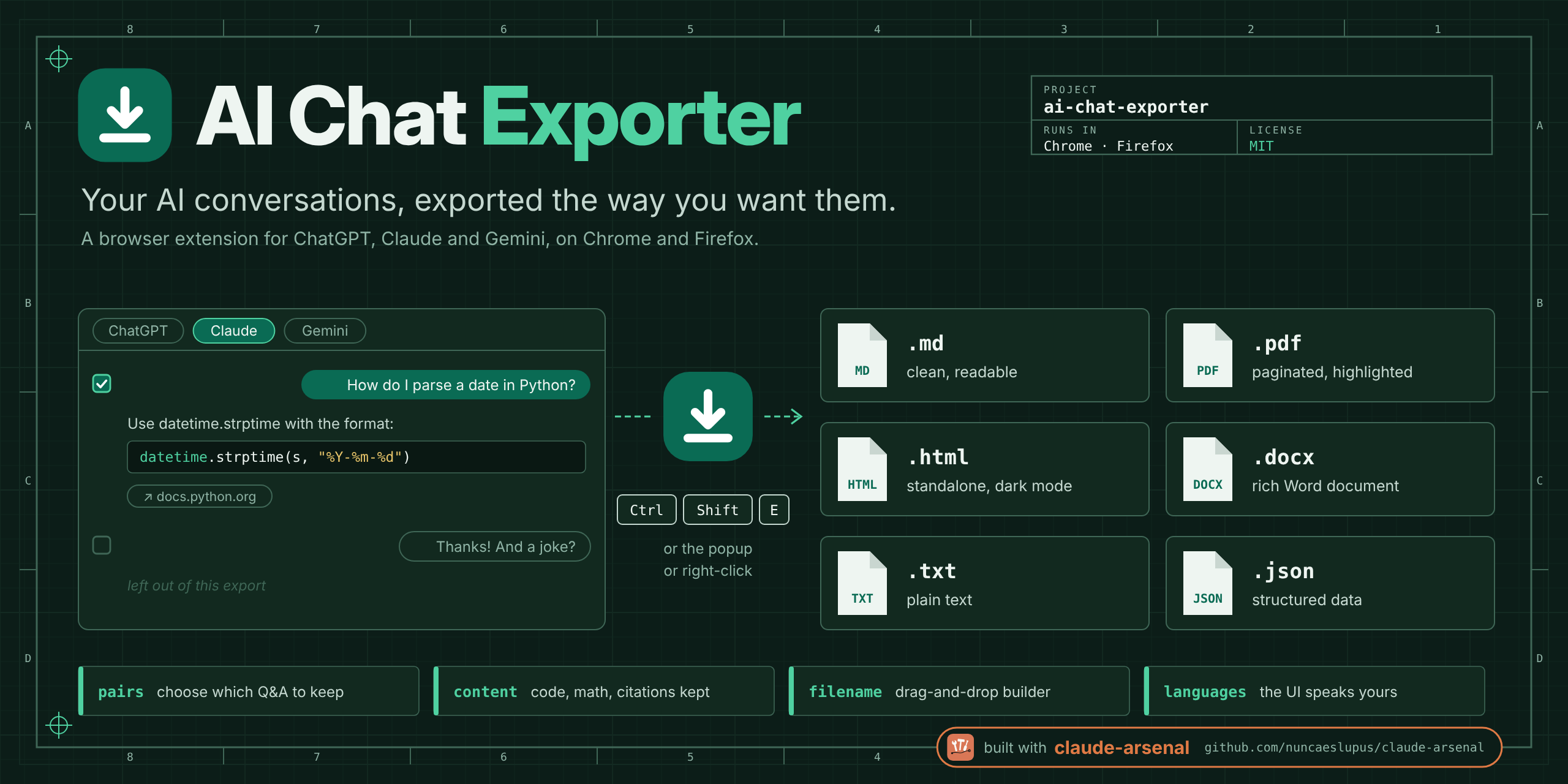
A browser extension to export your AI chatbot conversations from ChatGPT, Claude, and Gemini to multiple formats.
Features
- 🚀 Multi-Platform Support: Export conversations from ChatGPT, Claude, and Gemini
- 📄 Multiple Export Formats:
- Markdown (.md) - Clean, readable format with proper formatting
- PDF (.pdf) - Paginated documents with syntax highlighting and page numbers
- HTML (.html) - Standalone HTML with inlined styling
- Word Document (.docx) - Rich formatted documents
- Plain Text (.txt) - Simple text format
- JSON (.json) - Structured data for programmatic use
- 🎨 Rich Content Support:
- Code blocks with syntax highlighting
- Images (embedded in PDF; referenced by URL in HTML and Markdown)
- Artifacts / canvas content
- Web search citations (link, title and domain)
- Math rendered by the page, preserved as its LaTeX source
- Lists, headings, blockquotes
- Inline formatting (bold, italic, code, links)
- 🔧 Smart Parsing:
- Preserves conversation structure
- Removes UI artifacts (buttons, icons)
- Maintains code formatting
- 🖱️ Three ways to export: the toolbar popup, a right-click Export/Print
context menu, and
Ctrl+Shift+E/Cmd+Shift+E - 🌍 Multilingual: Interface available in 7 languages (English, Spanish, French, German, Italian, Portuguese, Catalan)
- ✅ Q&A pair selection: Choose which exchanges to export instead of all or nothing, from the popup's pair chooser
- ⚙️ Export options: A metadata/timestamp toggle, text-size choice, and a drag-and-drop filename builder, all in the popup
- 🌓 Dark mode: In the popup and in exported HTML
Installation
The easiest way is to install it from the Chrome Web Store or Firefox Add-ons.
- https://chromewebstore.google.com/detail/ai-chat-exporter/jnllafelflonllnhccgofcakopbpjahf
- https://addons.mozilla.org/en-US/firefox/addon/ai-chat-exporter-and-printer/
Install it from source:
Manual Installation
Chrome/Edge
- Download or clone this repository
- Run
pnpm installto install dependencies - Run
pnpm build:chrometo build the extension - Open Chrome and go to
chrome://extensions/ - Enable "Developer mode"
- Click "Load unpacked" and select the
dist/chromefolder
Firefox
- Download or clone this repository
- Run
pnpm installto install dependencies - Run
pnpm build:firefoxto build the extension - Open Firefox and go to
about:debugging#/runtime/this-firefox - Click "Load Temporary Add-on"
- Select the
manifest.jsonfile in thedist/firefoxfolder
Usage
- Navigate to a conversation on ChatGPT, Claude, or Gemini
- Click the extension icon in your browser toolbar
- Choose your preferred export format
- Click "Export" to download the conversation, or "Print" to open it in the browser print dialog
You can also right-click anywhere on a supported page and pick a format from the Export or Print submenus. Print is available for every format except DOCX.
Keyboard Shortcut
Ctrl+Shift+E(Cmd+Shift+Eon Mac) - Export the current conversation in the format you last used. This is the only shortcut the extension registers; rebind it atchrome://extensions/shortcutsor, in Firefox,about:addons→ gear icon → "Manage Extension Shortcuts".
Supported Platforms
All three platforms are parsed by a dedicated parser with unit tests against a captured DOM snapshot.
ChatGPT (chat.openai.com, chatgpt.com)
- All message types
- Images (uploaded and generated)
- Canvas / code artifacts
- Web search citations
- Code blocks with syntax highlighting
Claude (claude.ai)
- Conversation export
- Artifact contents, fetched from Claude's own API using your existing session (the DOM only renders an artifact chip). If that call fails, the export still succeeds and the extension tells you the artifact bodies are missing.
Gemini (gemini.google.com)
- Conversation export, with the model's thinking panel and action bars excluded
- Rendered math preserved as its LaTeX source
Development
Prerequisites
- Node.js >= 22.0.0
- pnpm (package manager)
Setup
# Install dependencies
pnpm install

# Run development build with watch mode
pnpm dev:chrome  # For Chrome
pnpm dev:firefox # For Firefox

# Run tests
pnpm test

# Type checking
pnpm typecheck

# Linting
pnpm lint
pnpm lint:fix

# Format code
pnpm format
Project Structure
ai-chat-exporter/
├── src/
│   ├── core/
│   │   ├── parsers/      # Platform-specific parsers
│   │   │   ├── chatgpt/
│   │   │   ├── claude/
│   │   │   └── gemini/
│   │   ├── exporters/    # Export format handlers
│   │   │   ├── structured-md-exporter.ts
│   │   │   ├── pdf-exporter.ts
│   │   │   ├── html-exporter.ts
│   │   │   ├── docx-exporter.ts
│   │   │   ├── txt-exporter.ts
│   │   │   └── json-exporter.ts
│   │   ├── services/     # Core services
│   │   └── types/        # TypeScript types
│   ├── extension/        # Extension-specific code
│   │   ├── background/   # Service worker
│   │   ├── content/      # Content scripts
│   │   └── popup/        # Extension popup
│   └── shared/            # Storage, messages, constants
├── tests/                # Test files
├── build/                # Build configuration
└── manifests/            # Extension manifests
Architecture
The extension uses a clean architecture with structured content:
- Parsers - Extract conversations from platform DOM
- Structure Service - Convert HTML to structured JSON (paragraphs, code blocks, headings, etc.)
- Exporters - Generate files from structured content
- Content Scripts - Injected into supported pages; parse the conversation and run the export or print on request
- Background Service - Extension lifecycle, context menus, keyboard command
- Popup UI - Format picker with Export and Print buttons
See docs/dev/development-plan.md for detailed progress and architecture.
Adding a New Parser
To add support for a new AI platform:
- Create a new folder in
src/core/parsers/[platform]/ - Create
parser.tsextendingBaseParser - Create
selectors.tswith DOM selectors - Implement required methods:
canParse()- Check if URL matches platformgetTitle()- Extract conversation titlegetModel()- Extract model nameextractQAPairs()- Parse messages into Q&A pairs
- Register parser in
src/core/parsers/index.ts
Adding a New Export Format
- Create a new exporter in
src/core/exporters/[format]-exporter.ts - Extend
BaseExporter - Implement
export()method - Register in
src/core/exporters/index.ts
Contributing
Contributions are welcome! Please:
- Fork the repository
- Create a feature branch (
git checkout -b feature/amazing-feature) - Commit your changes (
git commit -m 'Add amazing feature') - Push to the branch (
git push origin feature/amazing-feature) - Open a Pull Request
Guidelines
- Follow the existing code style
- Add tests for new features
- Update documentation as needed
- Ensure all tests pass (
pnpm test) - Run type checking (
pnpm typecheck)
Not implemented yet
So you know what you are not getting:
- In-page export buttons. Export and print are reached from the popup, the right-click menu, or the keyboard shortcut only.
- Batch export. One conversation at a time.
Open work is tracked in GitHub issues; see docs/dev/development-plan.md for the longer-term plan.
Privacy & Security
- No Data Collection: The extension has no backend. It never sends your conversations anywhere, and we never see, store, or receive them
- Local Processing: Reading the page, formatting the export, and generating the output file all happen locally in your browser
- No Analytics: No usage tracking, no telemetry, no third-party SDKs
- No Third-Party Requests: The only network requests are to the chat provider whose page you are already on —
claude.ai's own API (using your existing session) for message content the DOM doesn't render, and, for PDF exports, the conversation's images so they can be embedded in the file - Open Source: Full source code available for review
Exported HTML and Markdown reference conversation images by their original URL rather than embedding them, so opening one asks the provider for those images. Everything else in an exported file is inlined — no external stylesheet, script, web font, or tracking pixel. Full details in docs/PRIVACY.md.
Technical Details
Built With
- TypeScript 6.0
- Vite (build tool)
- Vitest (testing)
- jsPDF (PDF generation)
- docx (Word document generation)
- marked (Markdown parsing)
Browser Compatibility
- Chrome/Edge: Version 88+
- Firefox: Version 112+
Permissions
The extension requires:
activeTab- To access the current conversationstorage- To save user preferencescontextMenus- For the right-click Export and Print menusscripting- To re-inject the content script into a chat tab that was already open when the extension was installed, updated or reloaded- Host permissions for
chat.openai.com,chatgpt.com,claude.ai,gemini.google.com, and*.web-sandbox.oaiusercontent.com(reading a ChatGPT Deep Research report from its sandboxed frame)
See docs/PRIVACY.md for the full detail behind each one.
License
MIT License - see LICENSE file for details
Support
Acknowledgments
- Inspired by the need to preserve AI conversations
- Built with modern web technologies
- Thanks to the open-source community
Note: This extension is not affiliated with or endorsed by OpenAI, Anthropic, or Google.
Built with claude-arsenal
This repository is developed with claude-arsenal, a Claude Code plugin marketplace for spec-driven work: specs before code, failing tests first, acceptance gates with numbers. The vendored skills live in claude-arsenal/.
来源:GitHub · github.com