OpenAI Dots 与 Meta Muse 开发者对比:同一提示词建应用,Dots 8/8 公开可访问、Muse 0/8
Dots vs. Muse for Developers
同一提示词让 OpenAI Dots 与 Meta Muse 各自搭建并部署一个公开的 AI 服务状态看板,重复 8 次后 Dots 的 8 个应用全部通过 ChatGPT Sites 部署到 Cloudflare Workers 并可公开访问,Muse 的 8 次均未验证到公开应用。
- Dots 选择 ChatGPT Sites,使用 Cloudflare Workers 托管、Cloudflare D1 作为 SQLite 存储,并采用 ChatGPT 登录。
- Muse 使用 SQLite 和自定义身份验证构建本地服务器,然后尝试通过隧道实现公网访问。
我们给 OpenAI 的 Dots 和 Meta 的 Muse 下达了相同的提示词:构建并部署一个公开的 AI 服务状态仪表盘。它需要共享的事件历史记录、带私有关注列表的账户,以及每 15 分钟抓取一次。我们让每个产品自行选择技术栈。
我们对每个产品重复执行该任务八次,且未连接外部托管、数据库或身份验证账户。
TL;DR / Dots 对比 Muse
它们选择的技术栈
所请求的应用:一个具有共享数据、私有关注列表和定时抓取的公开仪表盘。
| 层级 | OpenAI Dots | Meta Muse |
|---|---|---|
| 托管 | ChatGPT Sites运行在 Cloudflare Workers 上 | Muse 内部的服务器尝试通过隧道将其公开暴露 |
| 数据库 | Cloudflare D1托管的 SQLite 存储 | 7 次构建中使用本地 SQLite1 次构建:通过 @hatch/space-sdk 使用 Muse 数据库 |
| 登录 | ChatGPT 登录由平台提供 | 7 次构建中使用自定义登录1 次构建:通过 @hatch/space-sdk 使用 Muse 登录 |
| 框架 | React + Vinext + Vite全部 8 次构建中一起使用 | 四种不同的技术栈Node.js + Express:4 次构建Python HTTP 服务器:2 次构建Flask:1 次构建React + Muse SDK:1 次构建 |
| 抓取 | 自定义代码直接请求和针对来源的解析器 | 自定义代码直接请求和针对来源的解析器 |
| 结果 | 可公开访问调度和抓取仍需完善 | 已构建,但无法公开访问调度和抓取仍需完善 |
Amplifyingamplifying.ai/research/dots-vs-muse · 2026 年 10 月
查看我们给两个产品的提示词
Build and deploy a public AI service status tracker covering these twelve services. Use their official status sources:
- OpenAI: https://status.openai.com/ (Model/API components; keep consumer ChatGPT incidents separate.)
- Anthropic/Claude: https://status.claude.com/ (Claude API components; keep consumer chat incidents separate.)
- Google Gemini: https://aistudio.google.com/status (Gemini API; distinguish AI Studio interface issues.)
- xAI/Grok: https://status.x.ai/ (Grok API; distinguish consumer Grok incidents.)
- Mistral: https://status.mistral.ai/ (Model/API components; distinguish consumer chat.)
- DeepSeek: https://status.deepseek.com/ (Model/API components; distinguish chat, search, and file upload.)
- Cohere: https://status.cohere.com/ (Model and API endpoint status; retain model detail only where reported.)
- Microsoft Azure AI: https://azure.status.microsoft/en-us/status (Azure OpenAI and Foundry model/agent services; retain reported service and region.)
- Amazon Bedrock: https://health.aws.amazon.com/health/status (Amazon Bedrock events; retain reported region, not overall AWS health.)
- OpenRouter: https://status.openrouter.ai/ (Routing/API status; do not infer upstream provider health from router status.)
- Groq: https://groqstatus.com/ (GroqCloud API inference; separate from xAI/Grok.)
- Cursor: https://status.cursor.com/ (IDE, CLI, and agent service components as reported; do not equate these with a model API.)

Anyone should be able to open the public URL without signing in and see each service's reported status, affected components, and recent incidents with their update timelines. Group the services meaningfully so model APIs, cloud-hosted AI services, inference/routing platforms, and developer tools are distinguishable. Preserve reported service and region scope, source links, and timestamps. Label the information as provider-reported status. Do not invent model-level detail, extrapolate a regional incident to an entire company, or infer that an incident at one provider caused an incident at another without source evidence.

People should be able to create an account, sign in, and save a private watchlist of these services. Their watchlist must persist across sign-outs, browser restarts, and different devices. One user must not be able to read or change another user's private watchlist.

Collect updates automatically every 15 minutes, including when nobody has the app open. Preserve incident history and update existing incidents without duplicating them. Show the last successful collection for each source. A collection failure must retain previous data and clearly mark it stale or unknown; it must not imply that the provider is healthy. If a source does not expose the requested detail or cannot be collected, keep the service visible and explain the coverage gap. Provide a protected administrator control to refresh sources.

Deliver a working public-facing app with shared, persistent data, not an owner-only preview. Choose the technology, authentication, data storage, collection method, scheduling, and hosting approach. No file uploads are needed. Do not send notification emails or SMS. Create this as a separate project without changing the earlier projects or unrelated sites. If available access prevents completing any requirement, explain exactly what is missing and distinguish working features from unimplemented ones. Provide the public URL and identify what you have verified.
每个产品如何尝试发布应用
Dots 通过 Cloudflare Workers 上的 ChatGPT Sites 发布其应用。Sites 提供了 D1 存储和 ChatGPT 登录。我们没有设置单独的托管账户,也没有提供 Cloudflare 凭据。
Muse 可以在自己的计算机上安装软件包并启动服务器。为了让访客能够访问该服务器,它尝试了 Cloudflare Tunnel、localtunnel.me 和 localhost.run。Muse 报告了网络限制和权限请求。隧道会暴露在 Muse 内部运行的服务器;它不会将应用迁移到托管平台。
Dots 对比 Muse / 公开交付
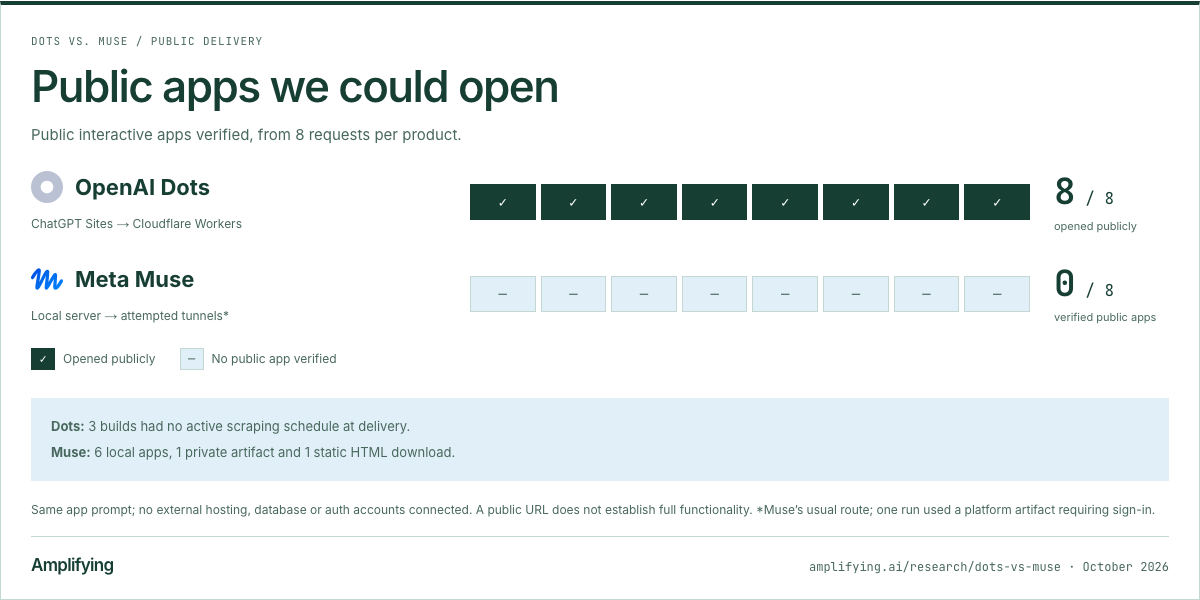
我们能够打开的公开应用
已验证的公开交互式应用,每个产品 8 次请求。
OpenAI DotsChatGPT Sites → Cloudflare Workers
8 / 8可公开打开
Meta Muse本地服务器 → 尝试隧道*
0 / 8已验证的公开应用
可公开打开未验证公开应用
Dots:3 次构建在交付时没有活动的抓取计划。
Muse:6 个本地应用、1 个私有工件和 1 个静态 HTML 下载。
相同的应用提示词;未连接外部托管、数据库或认证账户。公开 URL 并不能证明功能完整。*Muse 的常规路径;一次运行使用了需要登录的平台产物。
Amplifyingamplifying.ai/research/dots-vs-muse · 2026 年 10 月
它们构建了什么
托管方式的差异体现在各自交付的产品上。这些来自 Run 6 的示例展示了一个已发布的 Dots 站点和一个独立的 Muse 应用;Muse 提供了其本地服务器的截图。
OpenAI Dots
Run 6 · 公开网站

我们对公开 AI Signal 站点的浏览器截图。应用 URL 已隐去。
Open full Dots screenshot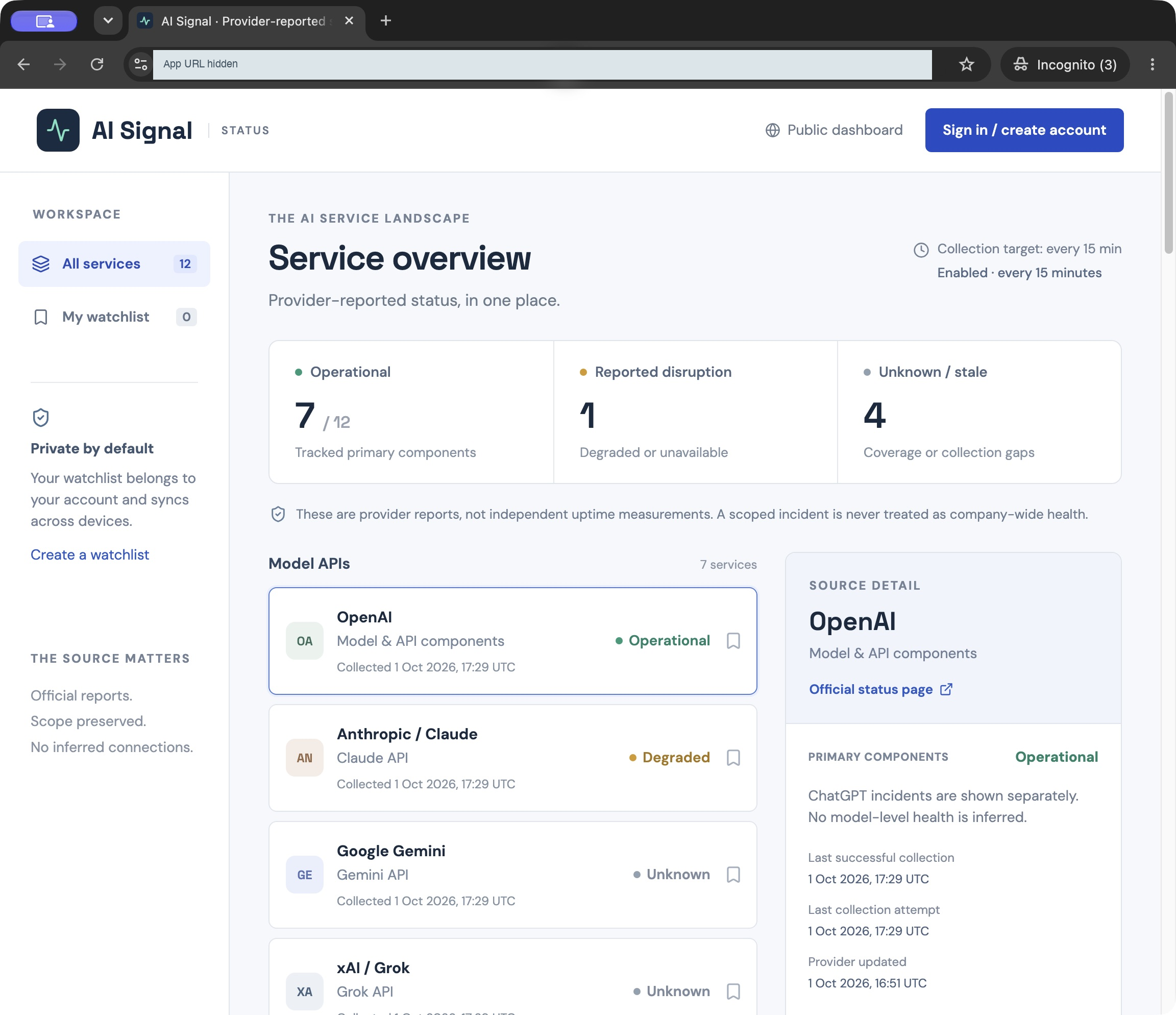
Meta Muse
Run 6 · 本地应用,由 Muse 截取

Muse 提供了这张图片,作为其本地应用的 Chromium 截图。我们并未访问公开部署。
Open full Muse screenshot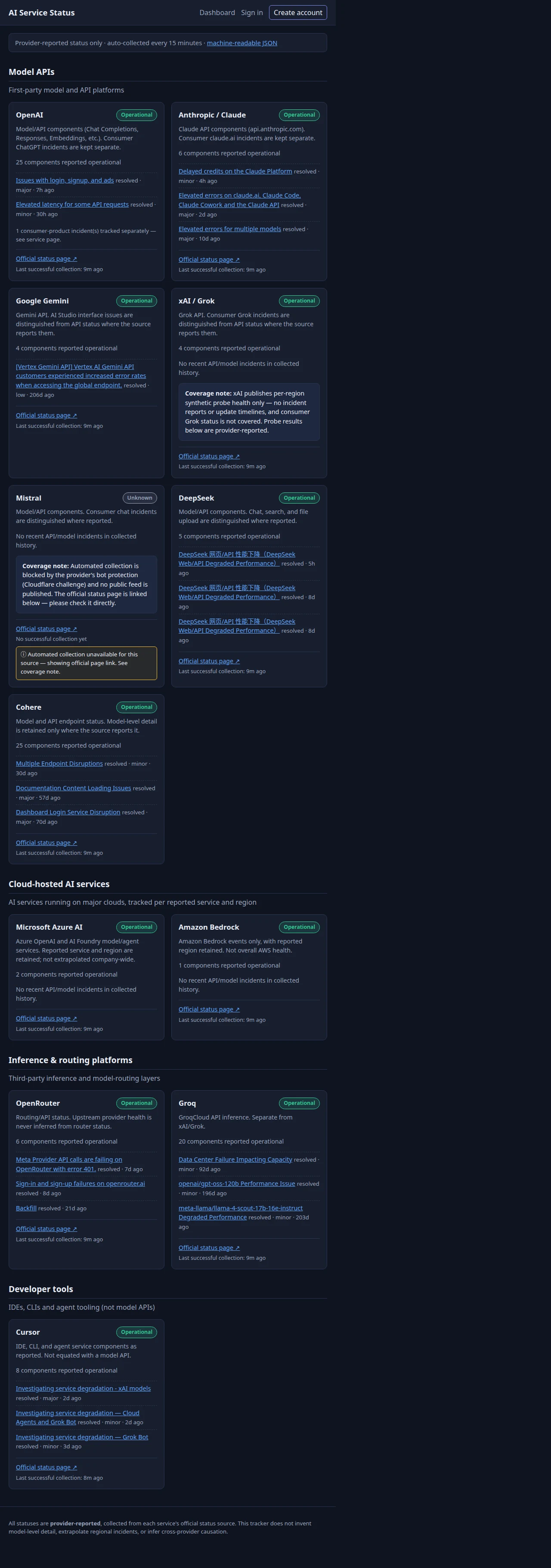
查看 Muse 在 Run 1 中的平台产物
Muse 在 Run 1 中采取了不同的方式,使用了其平台的存储和身份。此产物需要 Muse 登录。Dots 的首次构建与其并列展示。
OpenAI Dots
Run 1 · 公开网站

我们对已发布站点的浏览器截图,未登录即可打开。应用 URL 已隐去。
Open full Dots screenshot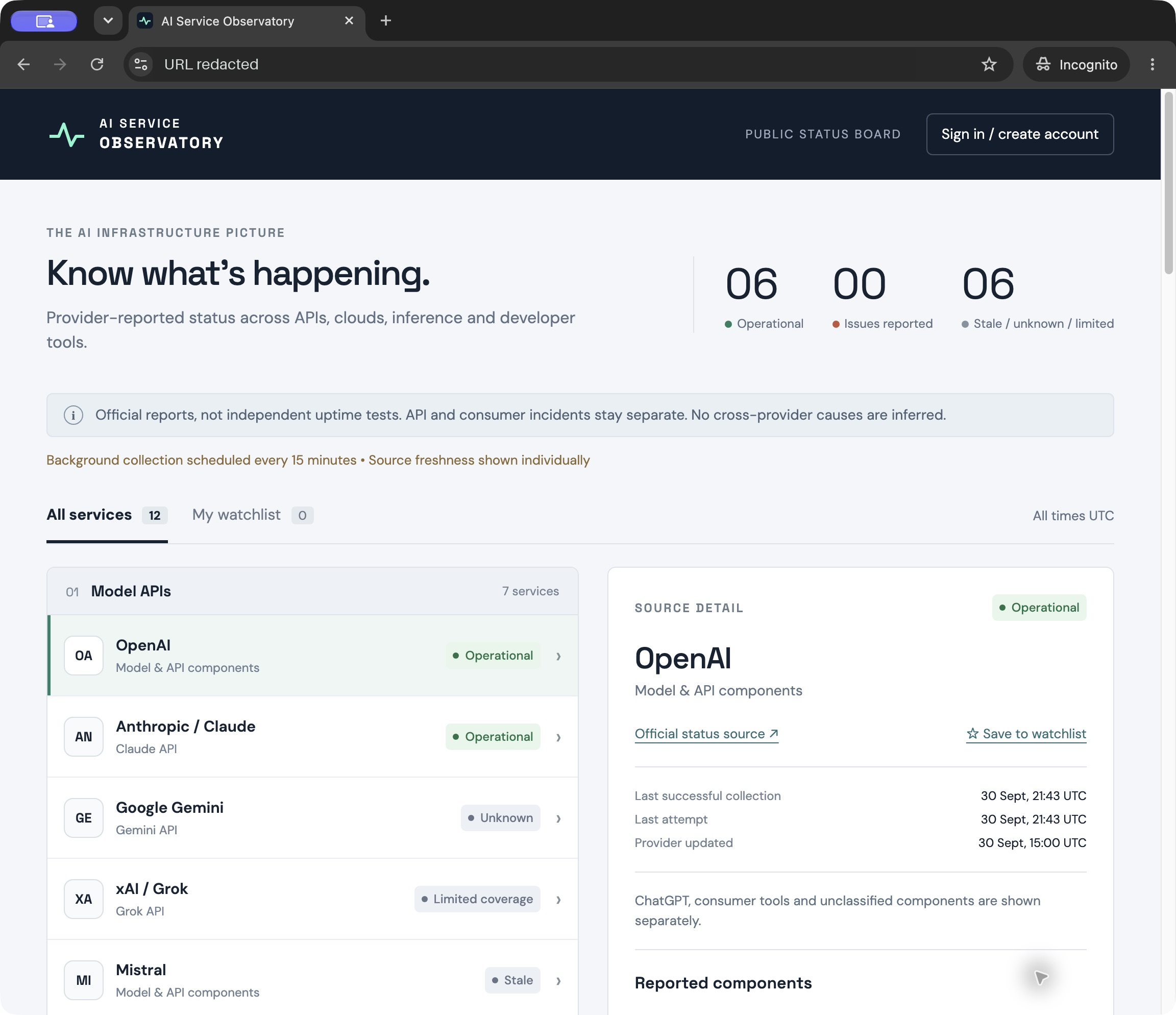
Meta Muse
Run 1 · 私有 Muse 产物

我们对 Muse 内部应用的浏览器截图。在未登录状态下打开该产物会跳转到 Muse 的登录页面。
Open full Muse screenshot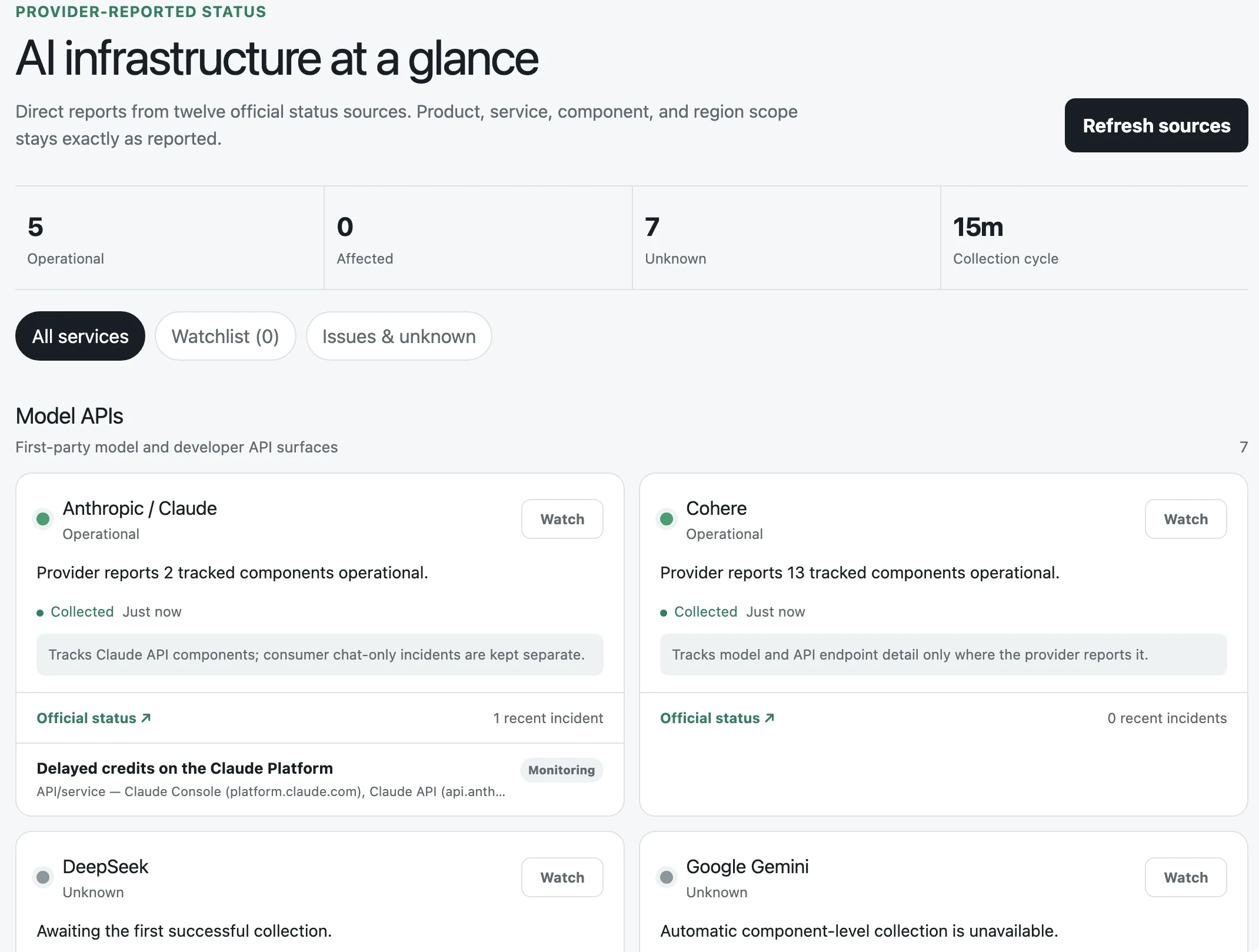
这些截图展示的是不同时间和视口尺寸下的界面。它们的统计总数并非对源准确性的比较。
SQLite:托管存储还是本地文件
Dots 使用了 Cloudflare D1,一个托管的、基于 SQLite 的数据库。七个 Muse 应用使用了本地 SQLite 文件。Muse 的一次运行使用了 @hatch/space-sdk,这是 Muse 为在其平台内运行的应用提供的库。该应用通过 ctx.db 访问了 Muse 提供的数据库连接,并使用 Drizzle 定义了 SQLite 模式。同一个库通过 ctx.viewer 提供了已登录用户的身份。两个产品都没有配置单独的 Neon 或 Supabase 服务。
D1 为 Dots 提供了一个已连接到其部署应用的数据库,由 Cloudflare 负责存储运营。Muse 可以直接使用其本地数据库文件,但其设置说明仍要求主机上提供持久存储。本地 SQLite 也可以 为公开 Web 应用提供服务。
Supabase 在其 宣布收购 Turso 时提出了一个相关论点:智能体应该能够像创建文件一样轻松地创建数据库。我们认为提供商可以帮助将这些文件转变为具有持久存储的已部署数据库。Dots 已经通过 ChatGPT Sites 实现了这一点。
平台登录与自定义账户
Dots 使用了 ChatGPT 登录。七个 Muse 构建实现了自己的账户、密码哈希和会话;一个通过 @hatch/space-sdk 使用了 Muse 登录。两个产品都没有设置单独的 Clerk 或 WorkOS 服务。
开发者需要审查 Muse 独立应用中的密码和会话代码。平台登录减少了 Dots 的实现工作,但每个应用仍必须保持用户自选列表的私密性。我们没有审计任一产品的应用的生产安全性。
抓取必须持续运行
两个产品都编写了自定义代码来获取和解析状态源。Dots 使用 ChatGPT tasks 调用其收集器,不过有些构建在没有活动调度的情况下就完成了。Muse 在某些构建中使用平台作业,在其他构建中则使用服务器内部的定时器。服务器定时器依赖于该进程保持存活。
一个 Dots 应用在我们的浏览器关闭时记录了新的抓取时间戳。我们没有验证 Muse 中的后台抓取。
发布是最明显的区别
我们要求两个产品交付一个公开应用。Muse 编写了代码,但我们无法验证一个可公开访问的应用。 相同的提示词产生了不同类型的交付物:六个本地应用、一个私有制品和一个静态 HTML 下载。
Dots 通过 ChatGPT Sites 发布了全部八个构建。 一些仪表板仍需要修复调度并检查源覆盖范围。Muse 的独立应用需要一个可访问的主机、持久存储和一个持续运行的进程。我们没有测试部署到现有服务器或已连接托管账户的情况。
我们预计 Muse 在构建和发布这些应用方面会变得更好。在这些运行中,Dots 受益于标准设置:托管、存储和登录已通过 ChatGPT Sites 连接。Muse 有更多设置工作要做,而且其结果一致性较差。
阅读完整研究:What Dots Actually Choose 和 What Muse Actually Chooses。
来源:Hacker News · amplifying.ai