Mastro 发布:把浏览器会话变成任意 Web 应用的 CLI
Show HN: Mastro – Turn the browser session into a CLI for any web app
Mastro 发布开源工具 mastro-connect,通过 Chrome 扩展捕获已登录会话,把 Web 应用自身的 API 转成 mastro <app> <command> 形式的 CLI 命令,输出 JSON,供 Claude Code、Codex、Gemini CLI、Cursor 等可执行 shell 命令的智能体调用。
把你的浏览器会话变成任意 Web 应用的 CLI —— 这样你的 agent 就能通过应用自己的 API 来使用它,而不是靠点击操作。
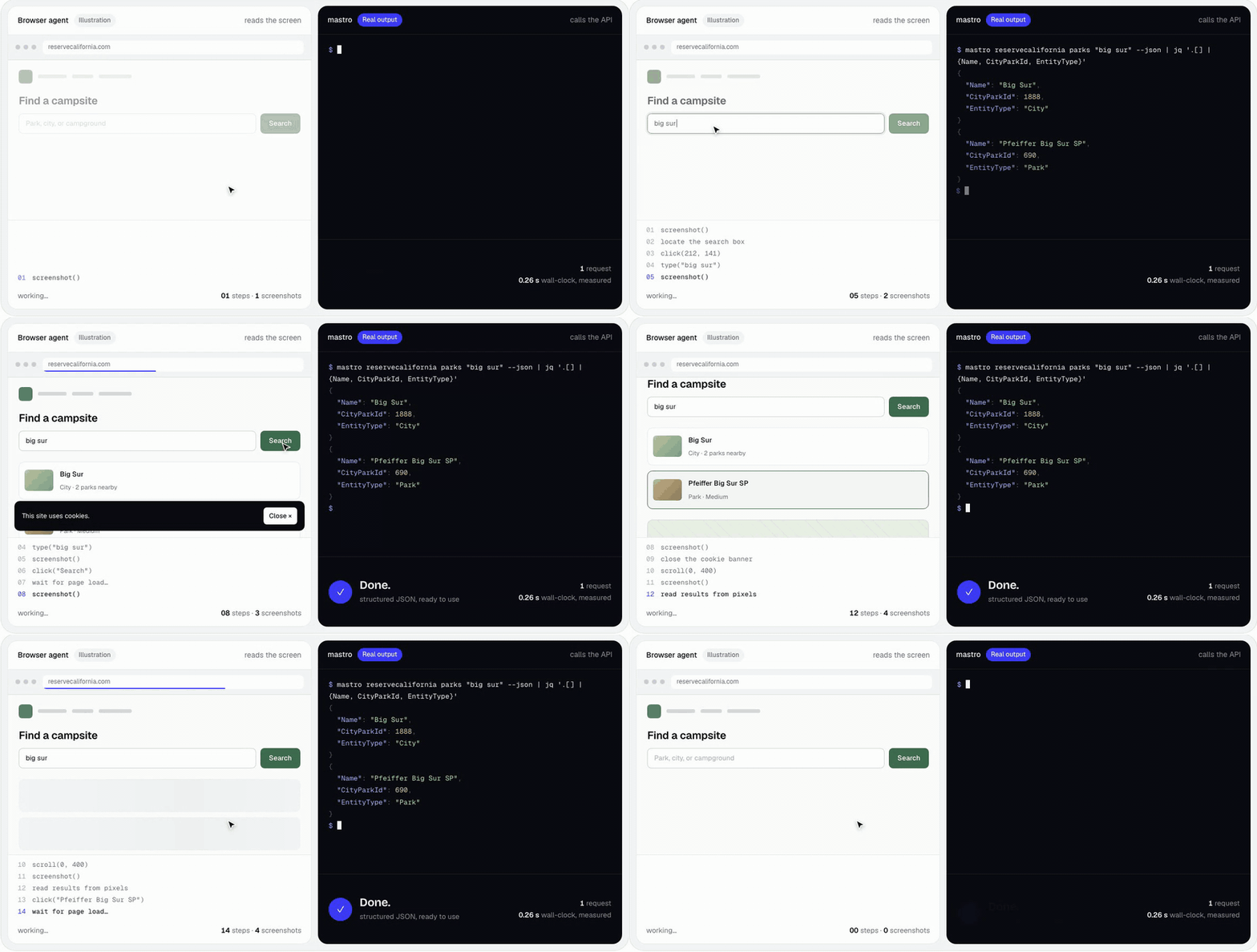
同样的任务,同样的时钟。浏览器 agent 只是示意;mastro 命令和输出是真实的。
npx mastro-connect hackernews top --limit 5            # no install, no login
npx mastro-connect reservecalifornia parks "big sur"   # campsite search
npx mastro-connect setup                               # pick connectors, extension, agent skills
trymastro.com · 交给你的 agent · 试一试 · 工作原理 · 安全性 · 构建连接器 · Agent 技能 · 为什么用 CLI · 文档
理念
Agent 越来越多地替用户在 Web 上行动,大多是通过一步步驱动浏览器点击:缓慢、脆弱且昂贵。但你已登录的 Web 应用其实已经通过一个相当不错的 API 与自己的后端通信。mastro 让你只需描述一次该 API,就能把你现有的会话变成干净、可供 agent 使用的命令 —— 从你自己的机器上,JSON 进,JSON 出。
- 捕获 —— 一个小型 Chrome 扩展读取你浏览器已持有的会话。无需输入密码,无需抓取。
- 存储 —— 只在本地保存最小凭证,并绑定到你登录过的站点。
- 重放 —— 每个端点都变成一个带标志、帮助和
--json的mastro <app> <command>,从你的机器或通过你自己的浏览器标签页发送。
关键的设计选择:连接器是数据,不是代码。它是一个标准的 OpenAPI 3.1 文档(外加几个 x-mastro-* 扩展,用于表达 OpenAPI 无法表达的内容)和一份捕获清单。同一套轨道处理登录、标志、过滤、分页和多步流程 —— 而且因为它是数据,agent 可以自己写一个:mastro-author 技能会引导它从“看我如何在浏览器里做这件事”一路走到一个经过验证的连接器。
交给你的 agent
把这段粘贴到 Claude Code、Codex、Gemini CLI、Cursor —— 任何能在你机器上运行 shell 命令的 agent:
Set up mastro for me (https://github.com/mastro-hq/mastro-connect). It turns
web apps I use into CLI commands you can call, using my own browser session.

1. Run `npx -y mastro-connect --version` to check it works (it only needs Node).
2. Install its skills where you load skills from:
   `npx -y mastro-connect skills add mastro mastro-author --global` for Claude Code,
   or add `--dir <your skills folder>` instead of `--global`. Read them.
3. Run `npx -y mastro-connect hackernews top --limit 5 --json` and summarize it,
   so we know it works.
4. Run `npx -y mastro-connect providers available` and ask me which of those
   apps I use. Install their skills too (`skills add <id>`).
5. For any that need a login, run `npx -y mastro-connect extension install` and
   walk me through loading it in Chrome, then I'll run `mastro login <id>`.
   Never type my passwords.
6. Ask me which other apps I wish you could use. For those, offer to build a
   connector with the mastro-author skill.

Always use --json, and run --dry-run and ask me before anything that changes
state (posting, buying, booking).
而要为一个尚未收录在目录中的应用构建连接器:
Use mastro's mastro-author skill to build a connector for <app> so you can
<what you want to do>. Install it with
`npx -y mastro-connect skills add mastro-author --global` if you don't have it.
Start read-only. I'll do the task once in my browser so you can capture the
requests (or I'll export a HAR for you), and dry-run anything that changes
state before asking me.
试一试
你只需要 Node 18+。mastro 运行在 Bun 上,npm 会随它一起为你安装。
npm install -g mastro-connect # or prefix every command with: npx -y mastro-connect连接器存放在社区目录 mastro-hq/connectors 中,并且在你第一次调用时自行安装:
mastro hackernews top --limit 5 --json
mastro reservecalifornia parks "pfeiffer" --json
mastro reservecalifornia availability --facility 518 --start 2026-11-06 --end 2026-11-09 --json
mastro hackernews item --id 8863 --dry-run     # any command: print the request, send nothing
| 连接器 | 功能 | 登录 |
|---|---|---|
hackernews |
首页、条目、用户(示例,基于 HN 的官方 API) | — |
reservecalifornia |
加州州立公园营地搜索和逐夜可用性;你的预订 | 可选 |
depop |
搜索房源、你的个人资料、列出你自己的待售物品 | 是 |
mastro providers available 显示当前目录。想要引导式开始?mastro setup 会列出目录、安装你选择的内容,并在你需要时提供浏览器扩展和 agent 技能。
需要登录的连接器
加载一次捕获扩展:
mastro extension install # copies it to ~/.mastro/extension, opens chrome://extensions切换 开发者模式,点击 加载已解压的扩展程序,然后粘贴(路径已在你剪贴板中)。接着,在 Chrome 中登录该应用:
mastro login depop           # a localhost tab opens, then the app's; mastro verifies the session
mastro depop search "carhartt jacket" --json
mastro status                # what's logged in, and whether it verified
从你的 agent 使用它
给你的 agent 装上技能,然后直接问:
mastro skills add reservecalifornia --global # into ~/.claude/skills (or --dir for other agents)“Julia Pfeiffer Burns 下周末有空位吗?”
任何能运行 shell 命令的 agent 都可以 —— Claude Code、Codex、Gemini CLI、Cursor —— 只要它运行在你的机器上(你的会话就在那里)。
工作原理
        ┌──────────┐   login    ┌──────────────┐   manifest   ┌────────────────┐
        │  mastro  │──────────▶ │  Auth Broker │────────────▶ │  Chrome ext    │
        │   CLI    │            │  + Receiver  │ ◀──capture── │  (MV3, generic)│
        └────┬─────┘            └──────┬───────┘   bundle     └───────┬────────┘
             │                         │                              │ observes
             │ <provider> <command>    ▼                              ▼
             │                  ┌──────────────┐               ┌────────────────┐
             └────────────────▶ │  Mastro SDK  │               │   the web app  │
                                │  • auth load │               │  (your session)│
                                │  • replay    │◀──────────────┤                │
                                │  • workflows │  browser-proxy └────────────────┘
                                └──────┬───────┘  (your own tab)
                                       │ reads
                                ┌──────▼────────┐
                                │ providers/<p> │  openapi.yaml + auth.manifest.json
                                └───────────────┘
- 扩展程序(
extension/)是通用的——没有针对每个应用的代码。 在mastro login期间,它遵循连接器的清单来查看你何时 已登录,只捕获清单指定的内容(cookies、headers、storage keys),并将其发送到回环接收器。在登录之外,它只为你已登录的网站运行 代理请求。 - 核心(
@mastro/core)运行捕获、验证 凭据,并将其存储在~/.mastro/中(模式0600)。 - SDK(
@mastro/sdk)将 OpenAPI 操作加上 your flags 转换为请求,应用认证绑定,解析人类友好的 过滤值,并运行多步骤工作流。 - CLI(
@mastro/cli)直接从每个连接器的规范生成其 命令、标志和帮助。
有些应用只响应真实的浏览器会话。对于这些,mastro 会在
你已登录的标签页内运行请求——就像应用自己的前端
调用其 API 一样——并转发响应。无需无头浏览器,无需
解决挑战。 → docs/BROWSER-PROXY.md
多步骤流程(上传每张照片 → 轮询 → 创建列表;填充
购物车 → 交给你的浏览器支付)在规范中声明,
--dry-run 会先打印每个计划的请求。 → docs/WORKFLOWS.md
安全与隐私
mastro 持有你的会话,因此它的构建宗旨是让它们始终属于你:
- 仅本地。凭据存储在你的机器上,仅发送到 应用本身。没有 mastro 服务器、账户或遥测。
- 绑定到你登录的位置。凭据记录你在登录时 同意的网站。mastro 拒绝将其发送——或在你的 浏览器中运行任何内容——到其他任何地方,即使连接器更新要求这样做。
- 最小化捕获。扩展程序仅捕获连接器清单 指定的内容,仅在你发起的登录期间,且存储的凭据是 重放所需的最小值。认证头在日志和试运行中会被脱敏。
- 锁定的本地桥接。回环代理仅接受 扩展程序(网页和 DNS 重绑定会被拒绝),且扩展程序仅 作用于你已登录的网站。
- 连接器是数据,经过验证。
mastro validate在 CI 中检查每个目录 连接器——包括它绝不会将会话发送到其 清单未指定的主机,以及它不包含任何捕获的机密。
详情:docs/BROWSER-PROXY.md#security-model。
构建连接器
连接器是一个文件夹——没有代码:
providers/<name>/
  auth.manifest.json   # what the extension captures in the browser
  openapi.yaml         # the API surface — OpenAPI 3.1 + x-mastro-* extensions
  README.md            # how it works, endpoints, drift symptoms
  skills/<skill>/      # agent playbooks (SKILL.md)
使用代理:mastro skills add mastro-author,然后要求它“为 <app> 制作一个
mastro 连接器”。它观察你在浏览器中执行一次任务,
找到最小认证,编写清单和规范,验证并
测试——先只读,任何改变状态的操作都在--dry-run
和你的确认之后。
手动:在 DevTools → Network 中观察应用的请求,然后描述 它们。边做边检查你的工作:
mastro validate providers/<name>   # schema, references, credential hosts, no committed secrets
mastro <name> --help               # the generated commands
完整演练:docs/AUTHORING.md。最小的完整
示例:hackernews。
欢迎向目录贡献:
mastro-hq/connectors。
x-mastro-* 扩展
OpenAPI 涵盖了每个 API 共有的内容(路径、方法、枚举、数组参数、
认证清单)。它无法表达的内容存在于规范合法的x-键中,因此
文档保持有效的 OpenAPI:
| 扩展 | 解决的问题 |
|---|---|
x-mastro-auth |
捕获的凭据如何变成实时请求:header/cookie 模板、每请求生成的值(${uuid}、${now})、登录后验证调用。 |
x-mastro-replay |
传输:在用户的标签页中运行,重试和重新登录状态码,速率限制。 |
x-mastro-resolve |
动态枚举,其值来自另一个端点(应用的尺码或品牌)或捆绑的参考数据。 |
x-mastro-extract |
从服务器渲染的 HTML 或 React Server Components 流中提取结构化对象。 |
x-mastro-workflow |
多步骤流程,包含 foreach、poll、上传以及浏览器交接。 |
x-mastro-command / -result / -hidden |
CLI 投影:命令名称、要打印的内容、辅助端点。 |
连接器的存放位置
mastro 会搜索 $MASTRO_PROVIDERS(以冒号分隔的目录),然后搜索
~/.mastro/providers;该包本身不附带任何连接器。调用一个未安装的连接器会从目录中获取它,并固定到某个提交。任何根目录下带有 providers/<id>/ 的 GitHub 仓库都可以通过 --repo 使用,包括私有仓库(通过 GITHUB_TOKEN / GH_TOKEN 或你的 gh 登录):
mastro providers available --repo you/connectors
mastro providers add myapp --repo you/connectors
mastro providers update                            # re-fetch everything you've added
Agent 技能
连接器附带 agent 技能——SKILL.md 操作手册,教 agent 何时以及如何驱动它们:前置条件、--json 形态、速率限制,以及诸如“花钱前先试运行”之类的安全规则。它们与规范放在一起,因此对漂移 API 的修复及其操作手册会一起更新。
mastro skills list                       # what's available
mastro skills add depop                  # ./.claude/skills (this project)
mastro skills add depop/search --global  # ~/.claude/skills (everywhere)
mastro skills add depop --dir .agents/skills
mastro skills update                     # refresh everything installed here
每次安装都包含根 mastro 技能(会话、退出码、约定),连接器技能在此基础上构建。
为什么用 CLI?
- 不是浏览器自动化:向应用自己的 API 发起请求只需毫秒级并返回结构化数据;而点击 UI 每一步都要花几秒钟,并且布局一变就会失效。
- 不是 MCP 服务器:CLI 是每个 agent 都已经能调用的东西,可以与管道和脚本组合,不需要运行中的服务器,而且你也能同样使用它。技能为 agent 提供 MCP 工具描述会提供的上下文。
- 不是托管 API:你的会话永远不会离开你的机器——这也是为什么 mastro 能与运行在你电脑上的 agent 配合使用,而不是别人云端的 agent。
状态
早期阶段(0.2)且发展迅速。在 macOS 上使用 Chrome 开发和测试;Linux 应该可用,Windows 和其他 Chromium 浏览器尚未测试。非官方连接器会在应用变化时失效——每个连接器的 README 都列出了其漂移症状,而 mastro login 通常能修复其中大部分问题。
伦理与范围
mastro 用于个人自动化:一个 agent 代表你,在你已登录的应用中,做你手动也能做的事——不是抓取他人的数据,不是批量收集,不是绕过机器人防御。连接器以人类的速度运行(每个规范都带有速率限制),任何改变状态的操作都先试运行。在存在官方 API 的地方优先使用官方 API。目录中的连接器是非官方的,与其所通信的服务无关联;任何连接器都会应服务运营方的要求被移除。你需要为自己的使用方式以及各项服务的条款负责。
开发
bun install
bun test            # run the test suite
bun run typecheck   # TypeScript + the extension's checkJs
bun run mastro …    # the CLI from source
bun run build       # bundle dist/ for npm
packages/core/   schemas, OpenAPI loader, registry, credential store, broker, proxy server
packages/sdk/    connector, transports, credential guard, resolver, workflow runner, templating
packages/cli/    the `mastro` binary
extension/       generic MV3 capture + browser-proxy runtime
skills/          the root `mastro` skill and `mastro-author`
docs/            AUTHORING · BROWSER-PROXY · WORKFLOWS
欢迎为框架做贡献——在提交 PR 之前先运行 bun test 和 bun run typecheck。连接器请提交到
mastro-hq/connectors。
文档
| 文档 | 涵盖内容 |
|---|---|
docs/AUTHORING.md |
构建连接器:清单、OpenAPI、x-mastro-* 参考 |
docs/BROWSER-PROXY.md |
在你的标签页中运行请求,以及安全模型 |
docs/WORKFLOWS.md |
多步骤流程:步骤、foreach、poll、交接、试运行 |
extension/README.md |
捕获扩展的内部机制 |
skills/mastro-author |
用于构建连接器的 agent 操作手册 |
为什么叫“mastro”?在意大利语中,mastro 是一门手艺的大师——mastro falegname,木匠大师。给人们合适的工具,他们就能成为所用任何应用的大师,而不必等待官方 API。
许可证
MIT © Giulio Colleluori
来源:Hacker News · github.com