在 AWS 上用 A2A 构建可组合、可互操作的多智能体系统
Build composable, interoperable multi-agent systems with A2A on AWS
AWS 发布基于 A2A 协议的多智能体参考架构,让 LangChain 企业编排器与 Strands Agents 构建的 SaaS 智能体跨组织边界协作,双方部署在独立 AWS 账号中,互不依赖对方框架或 SDK 且不共享密钥。
Agents in multi-agent systems that span organizational boundaries often need to collaborate in a composable, interoperable way, with agents that other organizations build and run. They need a way to discover each other, communicate, and exchange tasks without exposing internals or requiring the same framework on both sides.
The Agent-to-Agent (A2A) protocol addresses this constraint. Without A2A, building composable multi-agent systems across organizational boundaries requires custom integration code for each customer and framework. Independent software vendors (ISVs) can instead build composable, interoperable agents that work with the A2A-compatible frameworks their customers already use.
While we frame this post around the ISV use case, the pattern also applies to organizations that expose agents across boundaries, whether to partners, customers, or internal teams that use different frameworks. As your system grows, you add skills by registering Agent Cards with the orchestrator, without changing the agents already running.
In this post, we walk through a deployed reference architecture on AWS. A LangChain-based enterprise orchestrator communicates with a Strands Agents-based software as a service (SaaS) agent across organizational boundaries using A2A, with the enterprise and the SaaS provider in separate AWS accounts. Neither side depends on the other’s framework or SDK, and the two sides share no secrets. We cover the architecture and implementation patterns, then deploy the system from three Jupyter notebooks and run an end-to-end test.
The A2A protocol is now a Linux Foundation project, and AWS is among the organizations that support it. With A2A, agents can discover each other, negotiate tasks, and collaborate across organizational boundaries through a standardized protocol. The protocol uses existing authentication standards such as OAuth 2.0 and OpenID Connect (OIDC) for cross-boundary security, and is designed to work across A2A-compatible frameworks.
In Open Protocols for Agent Interoperability Part 4: Inter-Agent Communication on A2A, we introduced A2A concepts and demonstrated two Strands agents communicating using the protocol on AWS. That post established the foundation with Agent Card discovery, structured task execution, and the A2A server pattern. This post builds on that foundation with cross-framework interoperability, cross-organizational trust boundaries, and OAuth in both directions.
Solution overview
Three agents run in two AWS accounts, one for the enterprise and one for the SaaS provider. The A2A protocol connects them, with OAuth authentication in both directions. Each account has its own Amazon Cognito user pool, so each side authenticates with its own identity provider.
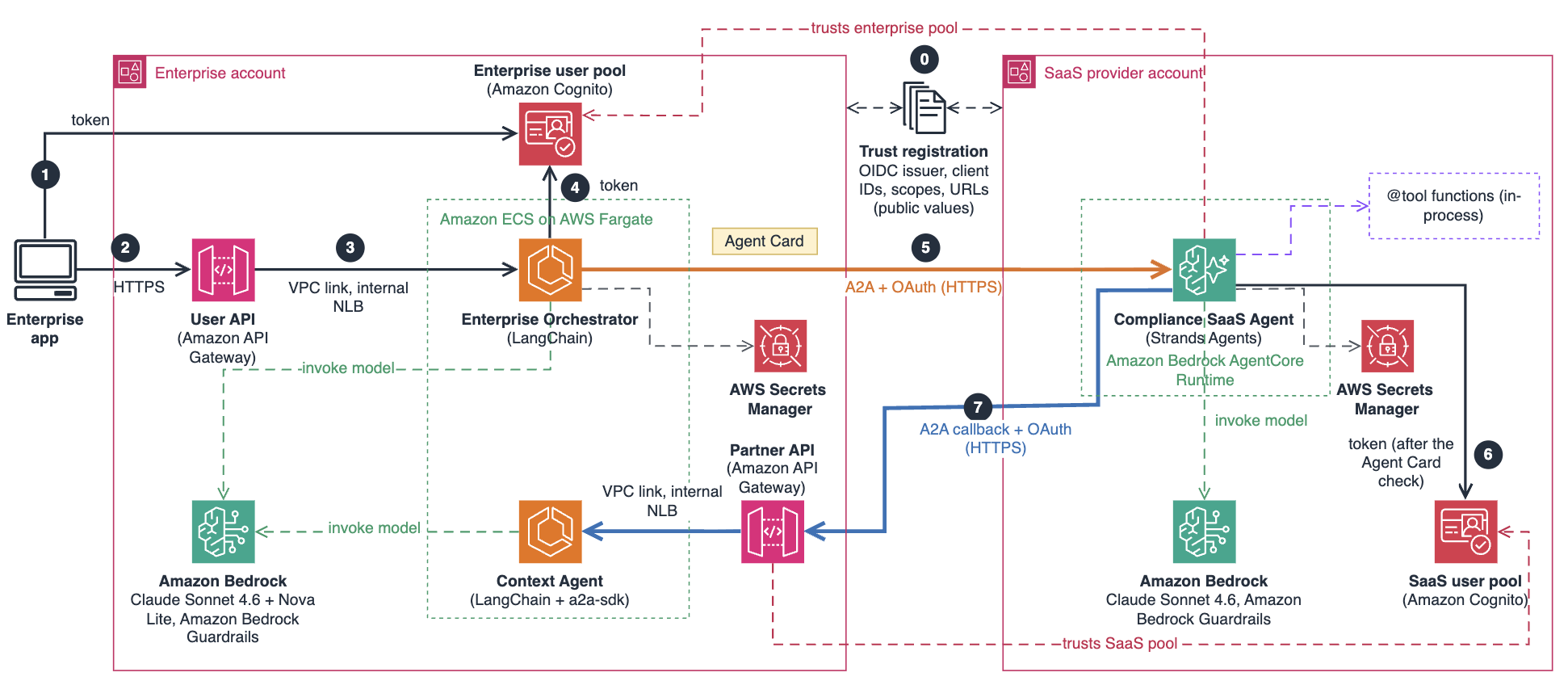
Figure 1: A2A agents across an enterprise account and a SaaS provider account
During onboarding, the enterprise and the SaaS provider exchange only public values, such as identity provider URLs, client IDs, scopes, and endpoint URLs. Each side then trusts tokens from the other side’s user pool, and no secrets are shared.
After onboarding, each request follows these steps:
- The enterprise app gets an access token from the enterprise’s Amazon Cognito user pool.
- The app sends a question over HTTPS to the user API in Amazon API Gateway, then polls for the answer.
- Amazon API Gateway forwards the request privately, through a VPC link and an internal Network Load Balancer, to the Enterprise Orchestrator, a LangChain agent.
- When its model decides that the question needs a compliance scan, the orchestrator gets its own token from the enterprise user pool, using a client secret stored in AWS Secrets Manager.
- The orchestrator sends an A2A request to the compliance SaaS agent on Amazon Bedrock AgentCore runtime, using the skill it read from the agent’s Agent Card at startup.
- The compliance agent checks the enterprise context agent’s Agent Card at the callback URL registered at onboarding, then gets a token from the SaaS provider’s own pool.
- The compliance agent calls back to the enterprise context agent for account metadata, finishes its scan, and returns the answer to the orchestrator and then to the app.
On the enterprise side, two agents run on Amazon Elastic Container Service (Amazon ECS) with AWS Fargate. The Enterprise Orchestrator is the entry point for users. LangChain provides the agent framework and tool-calling abstractions, and Amazon Bedrock provides the foundation models (FMs) that power each agent’s reasoning. The orchestrator uses LangChain and Amazon Bedrock (Anthropic Claude Sonnet 4.6). At startup, the orchestrator fetches the SaaS agent’s Agent Card from its well-known URL and creates a LangChain tool for each skill described on the card. The model then decides which tool to call based on the user’s question, so the orchestrator needs no hardcoded routing logic. It sends compliance scan requests over A2A with OAuth bearer tokens and summarizes the results for leadership. Users reach the orchestrator through an Amazon API Gateway HTTPS endpoint that accepts only tokens from the enterprise’s own pool.
The second enterprise agent provides internal context. The Enterprise Context Agent is built with LangChain and Amazon Bedrock (Amazon Nova Lite). It provides internal account metadata such as internal policy rules, data classification, business criticality, and escalation contacts (team on-call rotations). The deployed agent uses the official a2a-sdk (AgentCard, AgentExecutor, and spec-conformant JSON-RPC routes), pinned to a2a-sdk[http-server]==1.2.2. The SaaS agent reaches the context agent through an API Gateway partner API that accepts only the SaaS provider’s callback token.
Both enterprise agents run in private subnets of an Amazon Virtual Private Cloud (Amazon VPC), with no public IP addresses.
On the SaaS provider side, the Compliance SaaS Agent runs on Amazon Bedrock AgentCore in the SaaS provider’s own AWS account. Built with the Strands Agents SDK, it checks AWS accounts against the enterprise’s own internal policies, such as no public storage in production and encryption at rest for confidential data. In production, the scanning tools would connect to services such as AWS Config, AWS Security Hub, or Amazon GuardDuty. For this demo, the agent uses synthetic data that simulates compliance findings across multiple accounts.
Before it scans, the SaaS agent calls back to the Enterprise Context Agent for enterprise context, such as which accounts are production, which internal policies apply, and who to escalate to. This bidirectional pattern makes the agents true peers instead of a client and a server. The callback goes only to the address the customer registered at onboarding.
The key design decision is to use A2A for all cross-boundary communication. The enterprise has no access to the SaaS agent’s internal tools, system prompt, or model choice. This separation means the ISV can change its internal architecture without changing customer integrations, as long as its Agent Card and A2A interface stay compatible. The SaaS card publishes one curated skill, not its internal tool names.
Amazon Bedrock provides API access to multiple foundation models, so each agent can use the model that fits its workload. In this solution, the orchestrator and SaaS agent use Anthropic Claude Sonnet 4.6 for complex reasoning, while the context agent uses Amazon Nova Lite for metadata lookups. You can choose different models based on your own requirements.
A2A and the Model Context Protocol (MCP) solve different problems in this architecture. MCP connects an agent to its own tools and data sources in a client-server model. A2A connects agents to other agents as peers, where neither side exposes its internals. In production, the SaaS agent could use MCP internally to connect to its compliance scanning tools while exposing itself externally through A2A. The external interface stays the same regardless of how the agent connects to its internal tools.
Prerequisites
The notebooks contain the complete deployment procedure. Before you run them, you need the following:
- Two AWS accounts, one for the enterprise and one for the SaaS provider, in the same AWS Region: us-east-1, us-east-2, or us-west-2. In both accounts, access to Anthropic Claude Sonnet 4.6 in Amazon Bedrock, and in the enterprise account, access to Amazon Nova Lite. Before the first run, submit the Anthropic first-time use form in each account, and give the identity you run the notebooks with the AWS Marketplace permissions listed in the Amazon Bedrock model access documentation. Model availability varies by Region. Check the Amazon Bedrock model availability documentation for the current list.
- A Jupyter environment with Python 3.10 or later, either:
- On your computer: JupyterLab, the AWS Command Line Interface (AWS CLI) version 2, and an AWS IAM Identity Center profile for each account, set up with aws configure sso. You don’t need Docker: AWS CodeBuild builds the container images.
- Or an Amazon SageMaker AI notebook instance in each account (ml.t3.medium is enough). See the Guide to getting set up with Amazon SageMaker AI.
- In each account, an AWS Identity and Access Management (IAM) role with permissions to create AWS CloudFormation stacks and the resources in them. Each notebook lists the exact permissions in its Reference section. See the IAM User Guide.
Notebook 3 also runs the end-to-end test described later in this post, so you can verify the deployment.
Running this solution incurs charges for the resources it creates. In the enterprise account, the main always-on resources are a NAT gateway, two AWS Fargate tasks, the internal Network Load Balancer, and two interface VPC endpoints. Amazon Bedrock and Amazon Bedrock AgentCore charge for what you use. Prices vary by AWS Region. See the pricing pages for Amazon VPC, AWS Fargate, Amazon Bedrock, Amazon Bedrock AgentCore, and Elastic Load Balancing. Run the Clean up sections when you finish.
Implement the solution
Deploy the system with three notebooks, run in order with Jupyter, one cell at a time. Notebook 1 (enterprise account, about 3 minutes) creates the enterprise identity and writes an onboarding request. Notebook 2 (SaaS provider account, about 5 minutes) deploys the compliance agent and writes an onboarding response. Notebook 3 (enterprise account, about 20 minutes) deploys the enterprise agents and runs the tests. The onboarding files hold only public values.
- Clone the GitHub repository, and set up two AWS profiles for local runs, or one notebook instance per account with the repository cloned to each.
- Run notebook 1 in the enterprise account.
- Give
onboarding-request.jsonto the SaaS provider. - Run notebook 2 in the SaaS provider account.
- Give
onboarding-response.jsonback to the enterprise. - Run notebook 3 in the enterprise account.
- After testing, run notebook 3’s Clean up, then notebook 2’s.
The following sections explain the key implementation patterns behind the deployment. Together, they demonstrate three capabilities:
- Interoperability across frameworks – A LangChain orchestrator calls a Strands agent using A2A, with neither side depending on the other’s SDK.
- Composability across organizational boundaries – An ISV’s compliance agent and an enterprise’s context agent compose into a workflow that neither team built alone.
- Bidirectional collaboration with OAuth – Agents act as peers, calling each other across trust boundaries with token-based authentication.
With A2A, the ISV in this scenario replaces multiple custom integration paths with a single protocol-based interface.
Build the SaaS compliance agent
Build the ISV’s compliance agent with the Strands Agents SDK and deploy it to Amazon Bedrock AgentCore. For this demo, the scanning tools return synthetic compliance findings.
The agent exposes three compliance tools using the Strands @tool decorator (listing available accounts, running compliance scans, and retrieving remediation steps), plus a fourth that calls back to the enterprise, covered in the next section. The Agent Card doesn’t list these tools. It publishes one curated skill, so callers’ models see what the product does, not how it’s built. This simplified example shows the scanning tool:
from strands import Agent, ToolContext, tool
from strands.models.bedrock import BedrockModel
from strands.multiagent.a2a import A2AServer

@tool
def run_compliance_scan(account_id: str) -> dict:
    """Run a compliance scan on a specific AWS account.

    Args:
        account_id: The AWS account ID to scan (e.g., acc-12345)
    """
    if account_id not in ACCOUNTS:
        return {"error": f"Account {account_id} not found."}
    findings = COMPLIANCE_FINDINGS.get(account_id, [])
    non_compliant = [f for f in findings if f["status"] == "NON_COMPLIANT"]
    return {
        "account_id": account_id,
        "account_name": ACCOUNTS[account_id]["name"],
        "scan_summary": {
            "total_rules_checked": len(findings),
            "compliant": len(findings) - len(non_compliant),
            "non_compliant": len(non_compliant),
            "critical_findings": len([f for f in non_compliant if f["severity"] == "CRITICAL"]),
            "high_findings": len([f for f in non_compliant if f["severity"] == "HIGH"]),
        },
        "findings": findings,
    }
Enable the bidirectional callback
This is where the solution goes beyond typical agent integrations. Most agent-to-agent demos show one-way request and response, where a client agent calls a server agent and waits for the result. That pattern breaks down when the called agent needs information that only the caller has. In production, agents need to be peers that can call each other.
The SaaS compliance agent needs enterprise context. Examples include which accounts are production, which internal policies apply, and who to escalate to. This is information that only the enterprise has.
The SaaS agent calls back over A2A, but only to the callback URL the customer registered at onboarding. It first verifies the customer’s public context card there, then gets a token from the SaaS provider’s own Cognito pool, and sends message/send to the enterprise partner API:
def _call_enterprise_context(message_text: str, inbound_task_id: str = "-") -> str:
    if not CALLBACK_URL_VALID: # checked once at import
        raise CallbackUnavailable("CALLBACK_URL is not a registered callback URL")
    cfg = _load_callback_config() # this SaaS provider's own client, from Secrets Manager
    _verify_context_card(cfg) # anonymous GET of the card at CALLBACK_URL, no redirects
    rpc_id = f"req-{uuid4().hex}"
    payload = {
        "jsonrpc": "2.0",
        "id": rpc_id,
        "method": "message/send",
        "params": {
            "message": {
                "role": "user",
                "parts": [{"kind": "text", "text": message_text}],
                "messageId": uuid4().hex,
            }
        },
    }

    for attempt in (1, 2):
        token = _fetch_token(cfg, force=attempt > 1) # from the SaaS provider's own Cognito pool
        try:
            resp = _post_callback(CALLBACK_URL, payload, token)
            ...
Every failure, from an unverified card to a rejected token, gives the model one message, “Enterprise context unavailable”, and the details stay in the SaaS provider’s logs.
Expose the agent over A2A on AgentCore
The A2AServer class from the Strands SDK handles the A2A protocol, Agent Card generation, and JSON-RPC message handling. The server publishes one curated skill and declares on the card how a caller gets a token:
a2a_server = SecuredA2AServer( # A2AServer plus the card's securitySchemes
    agent_factory=create_compliance_agent,
    http_url=AGENT_URL,
    serve_at_root=True,
    skills=[COMPLIANCE_SCAN_SKILL], # one curated skill, not the internal tools
    enable_a2a_compliant_streaming=True,
)
When deployed to AgentCore, this automatically generates an Agent Card at /.well-known/agent-card.json. The Agent Card is a JSON document that describes the agent’s name, capabilities, and skills. A2A-compatible clients can fetch this card and understand what the agent can do without documentation or SDK integration.
Build the enterprise orchestrator with LangChain
This is the interoperability proof. The enterprise orchestrator uses LangChain, deliberately different from the Strands-based SaaS agent. It uses raw httpx HTTP calls with A2A JSON-RPC and doesn’t depend on the Strands SDK. If the ISV switched from Strands to another A2A-compatible framework, the enterprise orchestrator would keep working without changes, as long as the SaaS agent still speaks A2A and publishes a compatible Agent Card. That is what protocol-level interoperability means in practice.
The orchestrator gets a token from the enterprise’s own Cognito pool and sends the JSON-RPC payload over HTTPS only to the agent URL pinned to the address it fetched the Agent Card from. This abridged code shows the core A2A client:
from langchain_aws import ChatBedrock
from langchain_core.tools import tool as langchain_tool
from langchain.agents import create_agent

llm = ChatBedrock(
    model_id="us.anthropic.claude-sonnet-4-6",
    region_name=AWS_REGION,
    max_tokens=4096,
    config=BEDROCK_CLIENT_CONFIG, # timeouts and standard retries
    guardrails=GUARDRAIL_CONFIG, # this account's guardrail on every model call
)

def send_a2a_message(agent_url: str, message_text: str) -> str:
    # agent_url is the pinned agent URL from discovery: the address the Agent Card
    # was fetched from, never a value from a caller or a message.
    rpc_id = f"lc-{uuid4().hex}"
    payload = {
        "jsonrpc": "2.0",
        "id": rpc_id,
        "method": "message/send",
        "params": {
            "message": {
                "role": "user",
                "parts": [{"kind": "text", "text": message_text}],
                "messageId": uuid4().hex,
            }
        },
    }
    def _post(token: str, attempt: int) -> httpx.Response:
        headers = {"Content-Type": "application/json", "Authorization": f"Bearer {token}"}
        with httpx.Client(timeout=_A2A_TIMEOUT) as client: # Timeout(300.0, connect=5.0); httpx doesn't follow redirects by default
            resp = client.post(agent_url, json=payload, headers=headers)
            resp.raise_for_status()
            return resp

    # get_bearer_token() raises when there is no valid client config and never returns
    # an empty token, so no request goes out without one (fail closed).
    token = get_bearer_token()
    try:
        resp = _post(token, 1)
    except httpx.HTTPStatusError as e:
        # On a 401, force one token refresh and retry once.
        if e.response.status_code == 401:
            resp = _post(_fetch_token(force=True), 2)
        else:
            raise
    ...
Discover agents and route requests with the LLM
At startup, the orchestrator fetches Agent Cards from configured ISV URLs. It reads the skill descriptions from each card and creates a LangChain tool for each skill. The orchestrator’s large language model (LLM), Anthropic Claude Sonnet 4.6, then decides which tool to call based on the user’s question. This simplified code shows the pattern:
def _tool_name_part(text: str) -> str:
    """Reduce card text to the characters Bedrock allows in a tool name (letters, digits, _)."""
    return re.sub(r"[^A-Za-z0-9_]+", "_", str(text)).strip("_") or "agent"

def build_langchain_tools(agents: list[dict]) -> list:
    """Create a LangChain tool for each skill in each discovered agent."""
    tools = []

    for agent in agents:
        agent_url = agent["url"]
        agent_name = _tool_name_part(agent["name"])

        for skill in agent["skills"]:
            skill_name = _tool_name_part(skill["name"])
            skill_description = skill.get("description", "")
            examples = skill.get("examples", [])

            # Build a descriptive tool name and description
            tool_name = f"{agent_name}__{skill_name}"[:64]
            tool_description = (
                f"{skill_description} "
                f"(External agent: {agent['name']})"
            )
            if examples:
                tool_description += f" Examples: {'; '.join(examples[:3])}"

            # Create a closure to capture agent_url for this specific tool
            def make_tool(name: str, desc: str, url: str):
                def call_external_agent(question: str) -> str:
                    """Send a natural language question to an external agent via A2A protocol."""
                    return send_a2a_message(url, question)
                call_external_agent.__name__ = name
                call_external_agent.__doc__ = desc
                return langchain_tool(call_external_agent)

            tools.append(make_tool(tool_name, tool_description, agent_url))

    # (A catch-all tool for an agent whose card lists no skills is omitted here.)
    return tools

agent_tools = build_langchain_tools(discovered_agents) # from the Agent Cards fetched at startup
agent_executor = create_agent(llm, agent_tools, system_prompt=SYSTEM_PROMPT)
As a result, when the ISV adds or changes a capability, its Agent Card changes with it, and the orchestrator picks up the new skills the next time it restarts. The two teams don’t need to coordinate the change.
Build the enterprise context agent
The enterprise context agent uses LangChain and Amazon Nova Lite for enterprise metadata lookups, and exposes its capabilities over A2A using the official a2a-sdk. The SDK handles Agent Card serving, JSON-RPC routing, and protocol conformance. Because A2A is JSON-RPC over HTTP, a standard web framework can serve it. The orchestrator shows the client side: it sends A2A requests with plain httpx and no A2A SDK.
The agent also publishes its own Agent Card at /.well-known/agent-card.json, which the SaaS agent checks before it calls back. This is the same discovery mechanism used in the other direction. The A2A specification defines Agent Cards, so they don’t depend on the framework that builds the agent.
Set up cross-boundary OAuth with Amazon Cognito
Agent-to-agent communication across organizational boundaries without authentication isn’t acceptable to most enterprises. Every A2A task request (message/send) in this solution carries a JSON Web Token (JWT). Each side authenticates with a token from its own identity provider, and the receiving side accepts only that provider, one client, and one scope. The only unauthenticated endpoint is the enterprise context agent’s Agent Card, which publishes descriptive metadata so callers can discover the agent.
The solution uses Amazon Cognito as the OAuth provider. The same pattern can use another OpenID Connect (OIDC) identity provider that issues signed JWT access tokens, after you update the sample’s Cognito-specific checks.
The authentication flow involves four components:
Amazon Cognito: one user pool per account. The enterprise pool issues tokens to the orchestrator and to the enterprise app, and the SaaS pool issues tokens to the SaaS agent for its callback. You can view them in the Amazon Cognito console.
Amazon Bedrock AgentCore is configured with the enterprise pool’s discovery URL, the orchestrator’s client ID, and one scope. It validates the JWT on every incoming A2A request:
{"customJWTAuthorizer": {
    "discoveryUrl": "https://cognito-idp.us-east-1.amazonaws.com/<enterprise pool ID>/.well-known/openid-configuration",
    "allowedClients": ["<a2a-enterprise-orchestrator-saas client ID>"],
    "allowedScopes": ["a2a-enterprise-compliance-saas/invoke"]
}}
Amazon API Gateway uses JWT authorizers. The partner API accepts only the SaaS provider’s callback token, and the user API accepts only the enterprise app’s token. View the configuration in the Amazon API Gateway console.
AWS Secrets Manager in each account stores that account’s client secret, and an IAM grant and a resource policy that denies every other principal limit each secret to the one workload that uses it. No secret is hardcoded or shared with the other account. You can manage secrets in the AWS Secrets Manager console.
This AWS CloudFormation snippet shows the partner API’s JWT authorizer:
# Trusts only the SaaS provider's pool, its callback client, and its callback scope.
ContextApiAuthorizer:
  Type: AWS::ApiGatewayV2::Authorizer
  Properties:
    ApiId: !ImportValue
      Fn::Sub: '${IdentityStackName}-PartnerApiId'
    AuthorizerType: JWT
    Name: saas-jwt
    IdentitySource:
      - '$request.header.Authorization'
    JwtConfiguration:
      Audience: [!Ref SaasCallbackClientId]
      Issuer: !Ref SaasIssuer
ContextApiRoute:
  Type: AWS::ApiGatewayV2::Route
  Properties:
    RouteKey: 'POST /'
    AuthorizationType: JWT
    AuthorizerId: !Ref ContextApiAuthorizer
    AuthorizationScopes: [!Ref SaasCallbackScope]
    # ApiId and Target omitted
One detail of machine-to-machine authentication is a common source of errors when you wire OAuth between API Gateway and AgentCore. An Amazon Cognito client-credentials access token carries client_id and scope, but no aud claim. When aud is absent, the API Gateway JWT authorizer checks client_id against the audience list. On the AgentCore side, configure allowedClients and leave allowedAudience unset.
Deploy the system with notebooks
The notebooks run the whole deployment from Jupyter. They deploy five AWS CloudFormation stacks, three in the enterprise account and two in the SaaS provider account. The enterprise infrastructure and services stacks are separate because of a chicken-and-egg problem: the ECS services need Docker images, but CloudFormation creates the Amazon Elastic Container Registry (Amazon ECR) repositories that hold those images. You can monitor the stacks in the AWS CloudFormation console.
The notebooks surface failures early. Each notebook first checks Amazon Bedrock model access with a short test call, before anything is deployed, and each step stops at the first error with clear output. The Clean up sections sit at the bottom of notebooks 2 and 3, after a stop cell, so Run All never reaches them.
Understand Agent Cards and discovery
Agent Cards make discovery possible without agreeing on tool definitions in advance. Without them, the enterprise would need documentation, an SDK, or a meeting with the ISV’s engineering team to understand what the compliance agent can do. With Agent Cards, the enterprise orchestrator fetches a single JSON document. It immediately knows the agent’s name, capabilities, and skills, programmatically, at runtime. This is the card the compliance agent publishes for one customer, abridged:
{
    "name": "Compliance SaaS Agent",
    "description": "Scans AWS accounts for compliance with your organization's policies and returns findings by severity with remediation steps.",
    "url": "https://bedrock-agentcore.us-east-1.amazonaws.com/runtimes/.../invocations/",
    "protocolVersion": "0.3.0",
    "capabilities": { "streaming": true },
    "skills": [
        {
            "id": "compliance-scan",
            "name": "Compliance scan",
            "description": "Scans your AWS accounts against your organization's policies and returns findings by severity, remediation steps with estimated effort, and your escalation contacts when available."
        }
    ],
    "securitySchemes": {
        "cognito": {
            "type": "oauth2",
            "description": "OAuth 2.0 client credentials from the customer's identity provider, registered at onboarding.",
            "flows": { "clientCredentials": {
                "tokenUrl": "https://a2a-enterprise-<account-id>.auth.us-east-1.amazoncognito.com/oauth2/token",
                "scopes": { "a2a-enterprise-compliance-saas/invoke": "Invoke the compliance agent" }
            } }
        }
    },
    "security": [ { "cognito": ["a2a-enterprise-compliance-saas/invoke"] } ]
}
Each skill’s description becomes a tool docstring, so the orchestrator’s model routes each request to the right agent. The two teams never had to agree on tool definitions or share an SDK. The card also declares how a caller authenticates. The orchestrator checks that declaration rather than following it: it keeps the card only if it names the token endpoint and scope registered at onboarding.
Test end-to-end
Notebook 3 runs one end-to-end test through both accounts. It gets a token for the enterprise app, submits a question, and polls for the result:
# A token for the enterprise's own user client. The secret is read from this account's
# Cognito pool in memory and discarded; it is never printed or typed.
secret = cognito.describe_user_pool_client(
    UserPoolId=ENT_POOL_ID, ClientId=ORCH_USER_CLIENT_ID)["UserPoolClient"]["ClientSecret"]
r = requests.post(TOKEN_ENDPOINT, auth=(ORCH_USER_CLIENT_ID, secret), allow_redirects=False, timeout=15,
                  data={"grant_type": "client_credentials", "scope": "a2a-enterprise-orchestrator/ask"})
del secret
auth = {"Authorization": f"Bearer {r.json()['access_token']}"}

# Submit (HTTP 202 and a job ID), then poll every 5 seconds
r = requests.post(f"{ORCH_API_URL}/jobs", headers=auth, allow_redirects=False, timeout=30,
                  json={"question": "Scan our production accounts for compliance with our internal "
                                    "policies, and include escalation contacts "
                                    "for critical findings."})
job_id = r.json()["job_id"]
while (job := requests.get(f"{ORCH_API_URL}/jobs/{job_id}", headers=auth,
                           allow_redirects=False, timeout=30).json())["status"] not in ("succeeded", "failed"):
    time.sleep(5)
del auth
print(job["response"])
The orchestrator discovers the SaaS agent through its Agent Card and routes the request over A2A. The SaaS agent calls back to the enterprise context agent for account metadata (bidirectional A2A), runs compliance scans with its internal tools, combines everything into an enriched report, and sends it back. The response contains data from both agents. This shows that two independently built agents, on different frameworks and different infrastructure, can compose into a workflow that neither produces alone.
The test passes only if the reply has compliance findings, includes an on-call rotation code that only the enterprise context agent knows, and the partner API’s access log shows a 200 from the SaaS callback client. Together they show that the callback worked. Notebook 3 then runs seven trust boundary checks that send a wrong, missing, or forged token to each gate, and every call must be rejected. This is abridged output from a test run (IDs are placeholders):
[22:53:27] INFO Step E11 End-to-end test: submit a job and poll it (usually about 1 to 3 min; waits up to 10) ...
[22:53:27] INFO POST /jobs: HTTP 202 (apigw-requestid=<request-id>)
[22:53:27] INFO job_id=<job-id>
[22:53:27] INFO job status: running
[22:54:08] INFO job status: succeeded
------------------------------------------------------------------
[22:54:19] INFO partner API access log: 28/Oct/2026:22:53:31 +0000 POST / status=200 clientId=<callback-client-id> requestId=<request-id>
[22:54:19] INFO [ok ] Compliance findings (SaaS agent)
[22:54:19] INFO [ok ] Context-only marker (context agent, through the callback)
[22:54:19] INFO [ok ] Partner API access log: 200 for POST / from the SaaS callback client
[22:54:19] INFO PASS E11: job <job-id> has compliance findings and a context-only marker, and the partner API logged the callback
[22:54:19] INFO done in 52.5s

[22:54:51] INFO Step E12 Trust boundary checks: each token works only where it's trusted ...
[22:54:52] INFO 1 orchestrator-saas token on the partner API POST /: 401 as expected (www-authenticate='Bearer scope="a2a-saas-customer-callback/invoke" error="invalid_token" error_description="unable to find an appropriate key in the JWKS. ..."', apigw-requestid=<request-id>, x-amzn-requestid=-)
[22:54:52] INFO 2 orchestrator-user token on the partner API POST /: 401 as expected (www-authenticate='Bearer scope="a2a-saas-customer-callback/invoke" error="invalid_token" error_description="unable to find an appropriate key in the JWKS. ..."', apigw-requestid=<request-id>, x-amzn-requestid=-)
[22:54:52] INFO 3a orchestrator-user token on the SaaS runtime Agent Card: 401 as expected (www-authenticate='Bearer resource_metadata="...", scope="a2a-enterprise-compliance-saas/invoke"', apigw-requestid=-, x-amzn-requestid=<request-id>)
[22:54:53] INFO 3b orchestrator-user token on the SaaS runtime message/send: 401 as expected (www-authenticate='Bearer resource_metadata="...", scope="a2a-enterprise-compliance-saas/invoke"', apigw-requestid=-, x-amzn-requestid=<request-id>)
[22:54:53] INFO 4 no token on POST /jobs: 401 as expected (www-authenticate='Bearer', apigw-requestid=<request-id>, x-amzn-requestid=-)
[22:54:53] INFO 5 orchestrator-saas token on the user API POST /jobs: 401 as expected (www-authenticate='Bearer scope="a2a-enterprise-orchestrator/ask" error="invalid_token" error_description="the token does not have a valid audience"', apigw-requestid=<request-id>, x-amzn-requestid=-)
[22:54:53] INFO 6 forged SaaS-issuer token (invalid signature) on the partner API POST /: 401 as expected (www-authenticate='Bearer scope="a2a-saas-customer-callback/invoke" error="invalid_token" error_description="unable to find an appropriate key in the JWKS. ..."', apigw-requestid=<request-id>, x-amzn-requestid=-)
[22:54:53] INFO PASS E12: all seven trust boundary checks passed; each token works only where it's trusted
[22:54:53] INFO done in 1.4s
In that run, the report covered two production accounts and six findings, with the escalation contacts for each account. You can send the same request from any HTTP client, without an A2A SDK.
Production considerations
This demo simplifies several areas for clarity. For production, consider these changes:
- One runtime per customer, or a front door that accepts several customer identity providers, with per-customer callback clients.
- Key-based client authentication (private_key_jwt or mutual TLS) instead of client secrets.
- AWS PrivateLink for private connectivity, and TLS inside the VPC for end-to-end encryption.
- Customer managed AWS Key Management Service (AWS KMS) keys for Amazon Simple Storage Service (Amazon S3), Amazon ECR, AWS Secrets Manager, Amazon CloudWatch Logs, and Amazon Bedrock Guardrails.
- VPC Flow Logs and Network Load Balancer access logs. Both API Gateway stages already write access logs.
- A Secrets Manager rotation function for the Cognito client credentials.
- An authenticated onboarding portal or API instead of files.
If calls through API Gateway intermittently return HTTP 503, check that cross-zone load balancing is on for the internal Network Load Balancer. Each ECS service runs a single task that can start in either Availability Zone.
The repository’s README covers the full list in Security controls and Considerations for production.
Security considerations
Deploy this solution only in sandbox accounts with no customer or business data, and delete the stacks after testing. The sample uses synthetic data only, with no personal data. Its compliance agent checks example internal policies. It doesn’t assess or certify compliance with any law, regulation, or standard. The sample includes the following controls. You’re responsible for reviewing and adapting them before you use this pattern in production:
- Transport encryption. Every cross-account call uses HTTPS to Amazon API Gateway or Amazon Bedrock AgentCore, and every route except the context agent’s public Agent Card requires a Cognito JWT.
- Guardrails. In this sample, each model call uses an Amazon Bedrock guardrail with prompt-attack and harmful-content filters, and text from the other organization is checked against the same guardrail before a model uses it.
- Least-privilege IAM. Each workload has its own role that names exact ARNs. Only the orchestrator and the compliance agent can read a secret, each only its own.
- Container hardening. ECS containers run with a read-only root filesystem and all Linux capabilities dropped. The base image is pinned by digest.
- Account isolation. The two accounts share no secret, key, or IAM permission. They exchange only public values.
Clean up resources
To avoid ongoing charges, delete all resources when you have finished testing. Run the Clean up section at the bottom of notebook 3, then notebook 2, one cell at a time. The last cell in each section confirms that nothing is left. After cleanup, check the AWS CloudFormation, Amazon ECR, and Amazon Cognito consoles in both accounts, and the Amazon Bedrock AgentCore console in the SaaS provider account, to confirm that no resources remain.
Conclusion
This post showed how to build a multi-agent system where agents from different organizations, built on different frameworks, collaborate through A2A on AWS.
A LangChain orchestrator on Amazon ECS communicates with a Strands agent on Amazon Bedrock AgentCore. Neither side needs the other’s framework or SDK. The SaaS agent calls back to the enterprise context agent for account metadata, and each side authenticates with its own identity provider. A new skill from the same ISV requires no changes to the code. Adding a second ISV takes one extension, because the orchestrator holds a single OAuth client today: give it one client and scope per ISV, as the README’s Considerations for production describes. Then run the same onboarding exchange, add its Agent Card URL, and restart the orchestrator.
To get started, clone the GitHub repository and run the three notebooks, in two accounts, with Jupyter on your computer or on Amazon SageMaker AI notebook instances. They handle infrastructure provisioning, agent deployment, and end-to-end testing.
To learn more about the services and protocol in this post, see the following resources:
- Amazon Bedrock AgentCore Developer Guide
- Amazon Bedrock User Guide
- Strands Agents SDK documentation
- Open Protocols for Agent Interoperability Part 4: Inter-Agent Communication on A2A
If you have questions or feedback, leave them in the comments section.
About the author

Amit Chaudhary
Amit is a Senior Solutions Architect at Amazon Web Services, where he works with ISVs and enterprise customers to design and build generative AI solutions that run in production. He specializes in multi-agent architectures, large language models, and AI application development on AWS.
来源:AWS Machine Learning Blog · aws.amazon.com