在 Bedrock AgentCore Gateway 上实现 ServiceNow 的 on-behalf-of 令牌交换
ServiceNow on-behalf-of token exchange with Bedrock AgentCore Gateway
Amazon Bedrock AgentCore Gateway 可配置 on-behalf-of(OBO)令牌交换,让 AI 智能体在调用 ServiceNow REST API 时保留发起请求用户的身份。
代表用户与企业 API 交互的 AI 代理需要在整个请求链中保持用户身份。如果没有身份传播,API 调用到达下游服务时,身份会是应用程序本身,而不是发起操作的用户。这会破坏审计追踪、绕过用户级访问控制,并违反最小权限原则。
Amazon Bedrock AgentCore 是一个平台,可使用任意框架或模型大规模构建、连接和优化代理。本文介绍如何配置 AgentCore Gateway(Amazon Bedrock AgentCore 的一项能力),以与 Microsoft Entra ID 进行代表用户(OBO)令牌交换。随后,AI 代理可以在保留调用用户身份的同时调用 ServiceNow REST API。你在网关目标上配置令牌交换,AgentCore Gateway 会在每次请求时执行交换。该模式可应用于其他受 OAuth 保护的 REST API。
在生产环境中,你还可以将身份传播与 Amazon Bedrock Guardrails 配合使用,以过滤有害内容并验证代理的输入和输出。
解决方案概述
该架构涉及通过 AgentCore Gateway 连接的三个关键组件:
- 一个 AI 代理应用程序,通过 OAuth 应用程序注册受 Microsoft Entra ID 保护。
- 一个模型上下文协议(MCP)服务器,使用 AgentCore Gateway 实现,位于代理和 ServiceNow 之间。
- ServiceNow REST API,配置了与 Microsoft Entra ID 关联的入站 OAuth 集成。
下图展示了端到端解决方案架构,包括 AWS、Microsoft Entra ID 和 ServiceNow 中的组件。
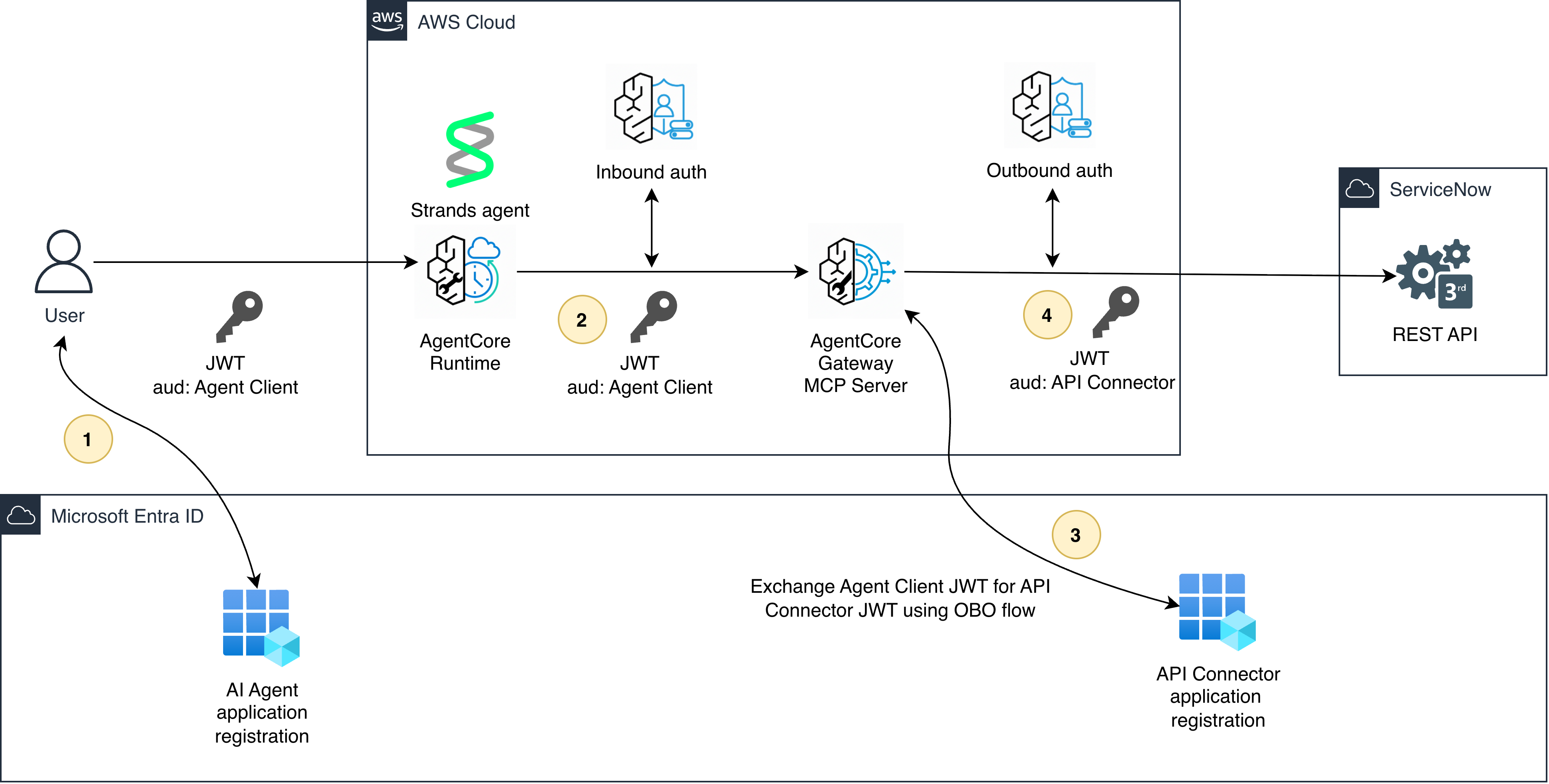
图 1:跨 AWS、Microsoft Entra ID 和 ServiceNow 的解决方案架构
如图 1 所示,用户获取 JSON Web Token(JWT)以调用代理 1。代理使用作用域为其自身应用程序注册的 JWT 令牌向网关进行身份验证 2。然后,网关使用 OBO 流程将该令牌交换为作用域为 ServiceNow API 连接器的新令牌,同时保留原始用户身份 3。ServiceNow 收到一个有效令牌,其 preferred_username 声明映射到现有 ServiceNow 用户,并将该用户的权限应用于 API 调用 4。
OBO 令牌交换在此上下文中的工作方式
当代理调用网关时,它会出示一个 JWT,其 audience 声明与代理的客户端 ID 匹配(例如 3ff88e17-XXXX-XXXX-XXXX-XXXXXXXXXXXX)。然而,ServiceNow 期望令牌的 audience 声明与其自己的 API 连接器客户端 ID(5d4a7a11-XXXX-XXXX-XXXX-XXXXXXXXXXXX)匹配。
OBO 流程弥合了这一差距。AgentCore Gateway 将入站令牌连同代理应用程序的客户端凭证、目标作用域以及参数 requested_token_use: on_behalf_of 发送到 Entra 令牌端点。Entra 验证调用用户已同意该委托,然后为 ServiceNow API 颁发新令牌,并保留原始用户的声明。
先决条件
开始之前,你需要以下内容:
- 一个有权访问 AgentCore Gateway 的 AWS 账户。
- 一个 Microsoft Entra ID 租户,具有创建 应用程序注册 的权限。你的账户至少需要 应用程序开发者角色 才能注册应用程序。
- 一个具有管理访问权限的 ServiceNow 实例,用于配置入站 OAuth 集成。你可以在 ServiceNow 个人开发者实例注册页面 https://developer.servicenow.com/ 创建 ServiceNow 个人开发者实例(PDI)。
- 两个 Entra 应用注册:一个代表 AI agent,另一个代表 ServiceNow API 连接器。
配置 Microsoft Entra ID
首先创建一个应用注册,用于代表 ServiceNow API 连接器。以下截图显示了 Microsoft Entra ID 中 ServiceNow API Connector 的应用注册页面。
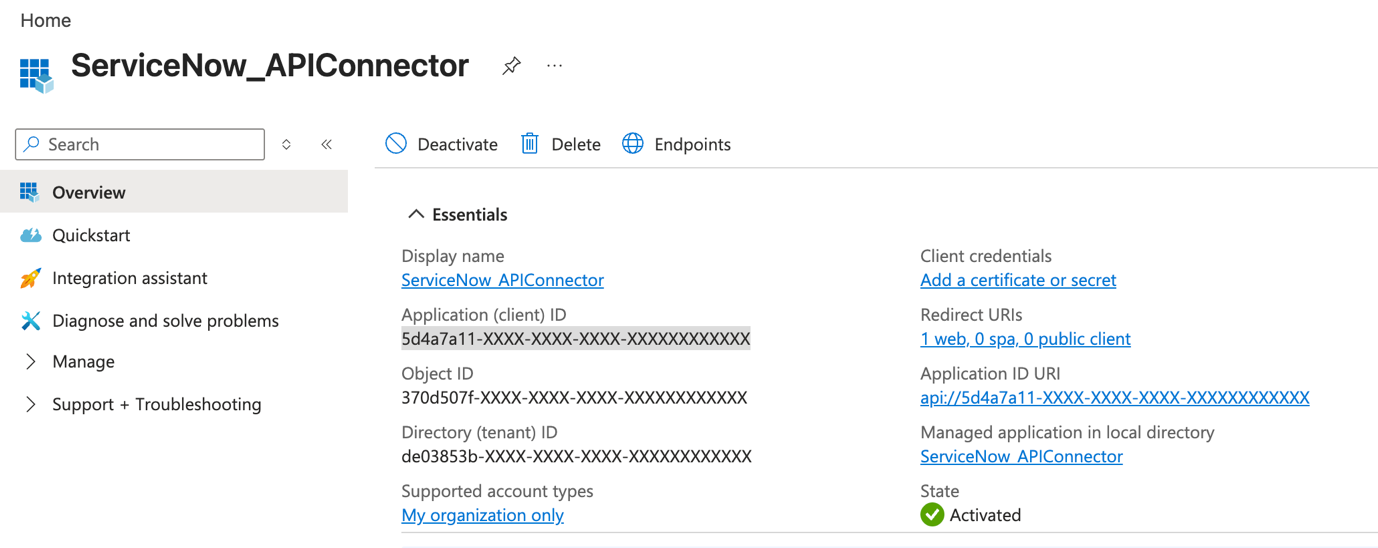
图 2:Microsoft Entra ID 中 ServiceNow API 连接器的应用注册
创建完成后,在“概述”页面记下 Application (client) ID。
在导航菜单中展开 Manage,选择 Expose an API,并使用默认的 Application ID URI 添加一个名为 user_impersonation 的作用域。该作用域正是 OBO 流程在交换令牌时所请求的。以下截图显示了如何在 Microsoft Entra ID 中公开 API。
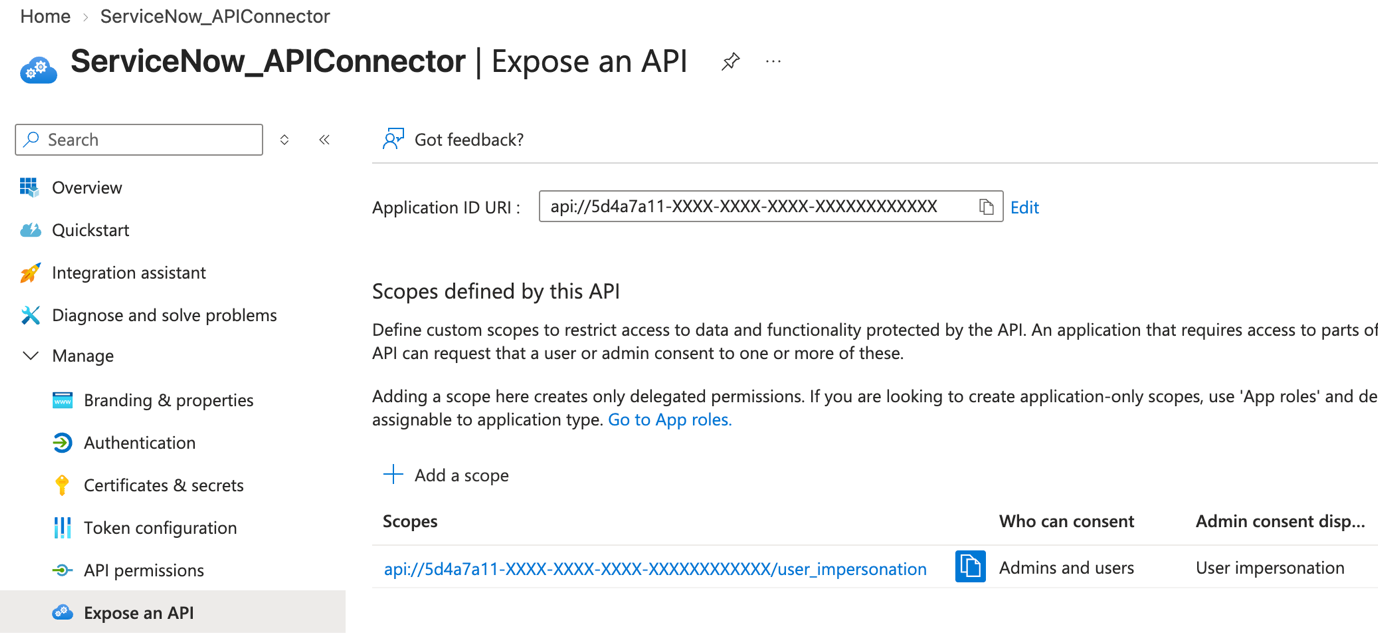
图 3:在 Microsoft Entra ID 中公开 user_impersonation 作用域
接下来,为 AI agent 创建一个应用注册。以下截图显示了 Microsoft Entra ID 中 ServiceNow Agent 应用的应用注册页面。
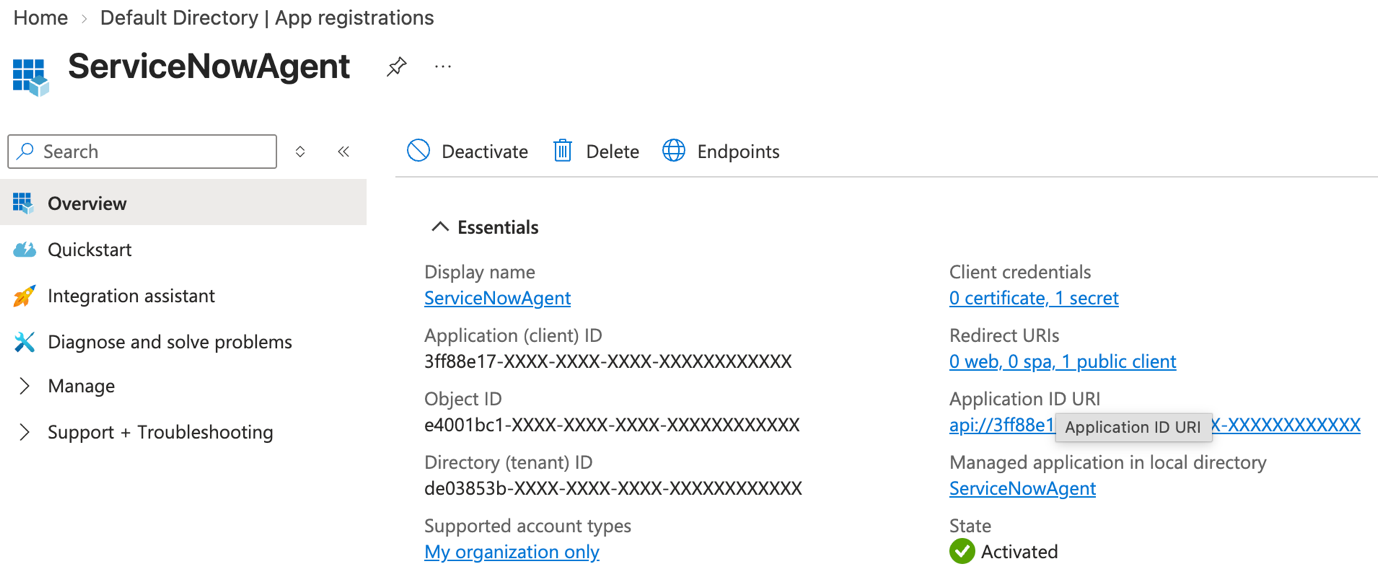
图 4:Microsoft Entra ID 中 ServiceNow Agent 的应用注册
记下 ServiceNowAgent 的 Application (client) ID。
在此注册上创建客户端密码。网关需要这些凭据来执行 OBO 交换。以下截图显示了如何在 Microsoft Entra ID 中的 ServiceNow Agent 应用注册上创建客户端密码。
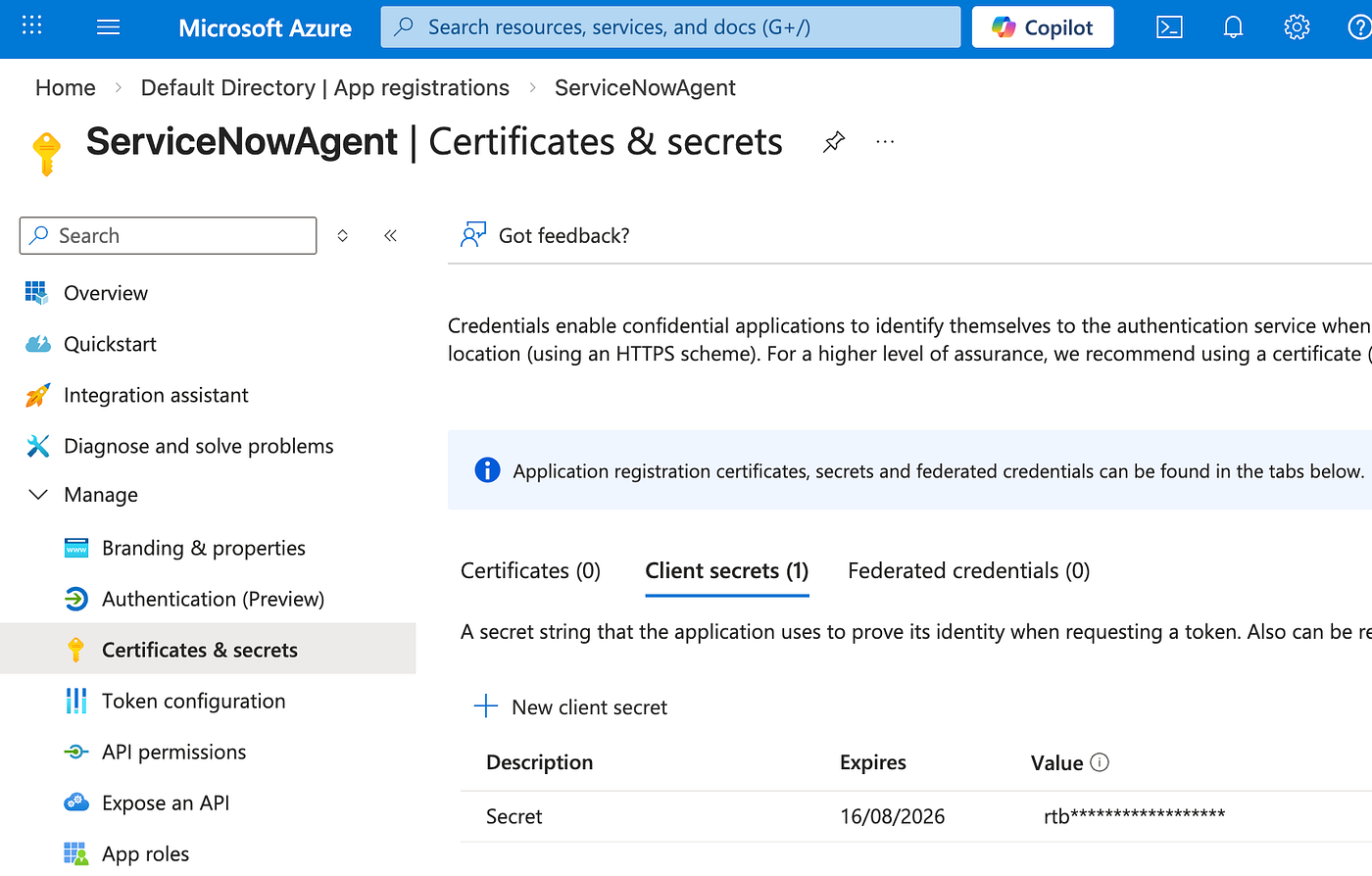
图 5:在 ServiceNow Agent 应用注册上创建客户端密码
然后配置该 agent 应用,使其具有调用 ServiceNow API 连接器应用的 API 权限。以下截图显示了需要在 Microsoft Entra ID 中的 ServiceNow Agent 应用注册上配置的 API 权限。
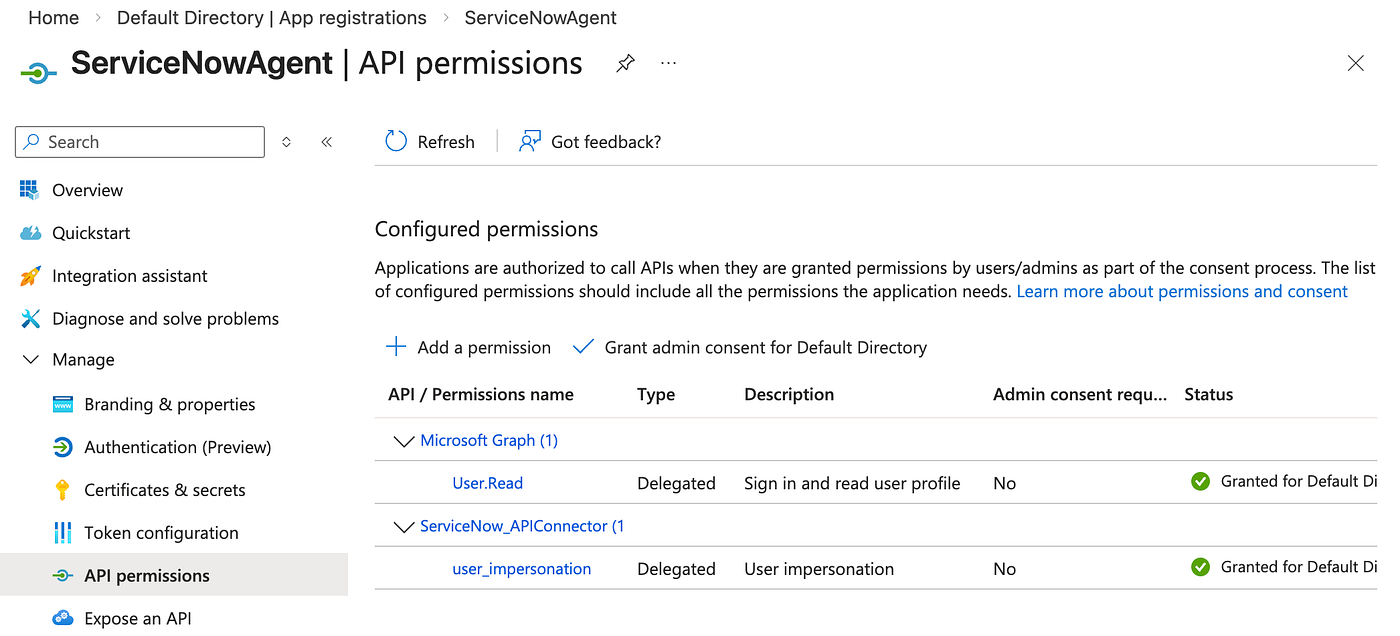
图 6:Microsoft Entra ID 中的 API 权限配置
除了为两个应用之间的任何标准 OBO 集成所设置的配置之外,无需对 Entra 配置做任何更改。
配置 ServiceNow
在 ServiceNow 管理控制台中,导航到 System OAuth > Inbound Integrations,并创建一个新的入站集成(由支持 OIDC 的身份提供方签发的第三方 ID 令牌)。指定你在 Entra 中创建的 ServiceNow API 连接器应用注册中的客户端 ID。以下截图显示了 ServiceNow 中入站集成的配置。
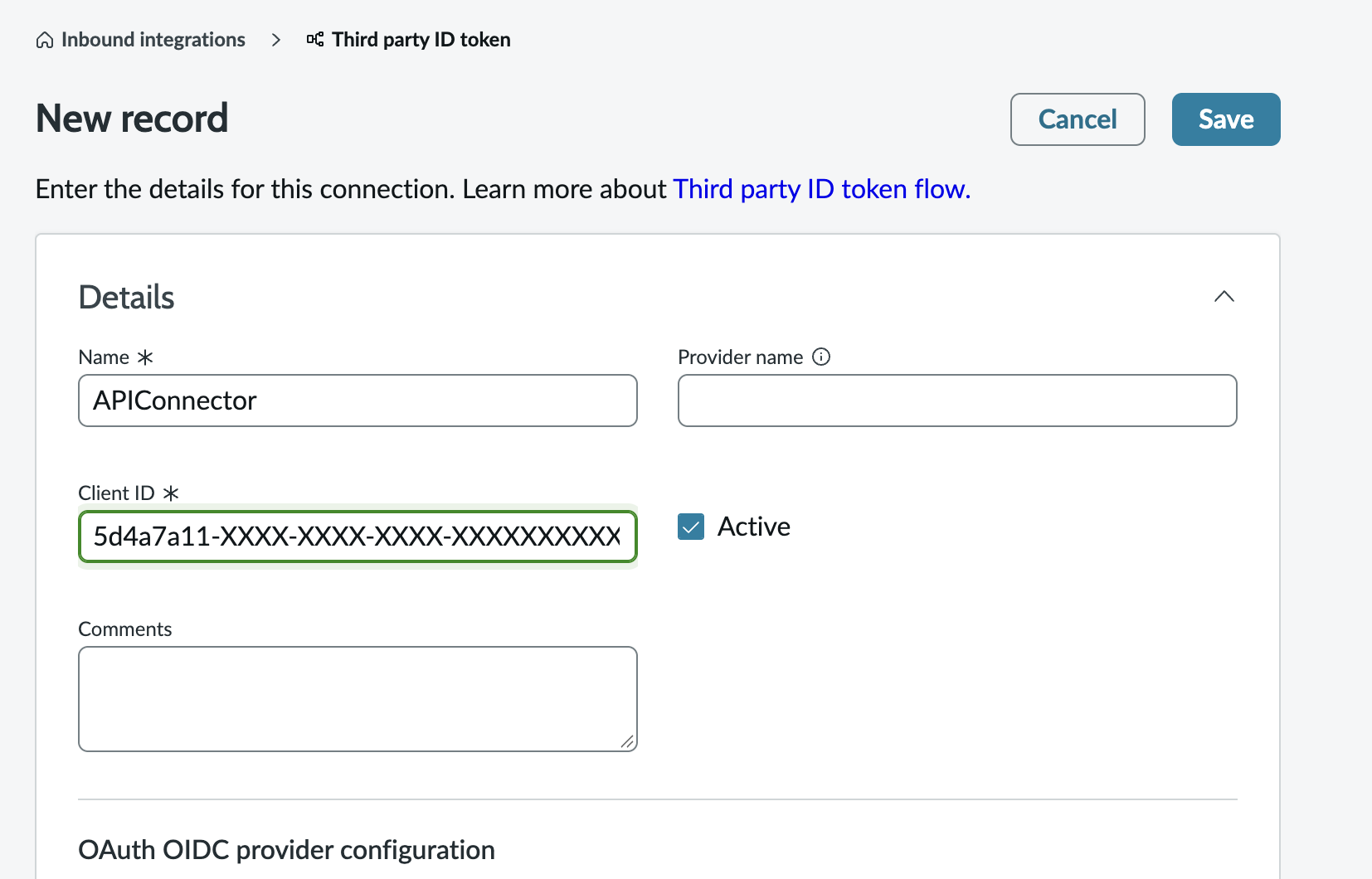
图 7:在 ServiceNow 中配置入站集成
在同一屏幕中,创建一个新的 OpenID Connect (OIDC) 提供方配置,并输入你的 Entra 租户的 OIDC 元数据 URL。将用户声明映射到相应的用户字段。例如,如果你的 Entra 租户将用户电子邮件放在 preferred_username 声明中,则将其映射到 ServiceNow 中的 Email 字段。如果你的 Entra 租户不在令牌中包含 JTI,请清除 JTI 验证。Entra 在其签发的令牌上使用名为 uti 的内部声明,它等同于 JTI。考虑将此 uti 声明映射到 jti 声明,以提供额外的重放防护和拒绝列表功能。以下截图显示了如何在 ServiceNow 中配置 OIDC 提供方。
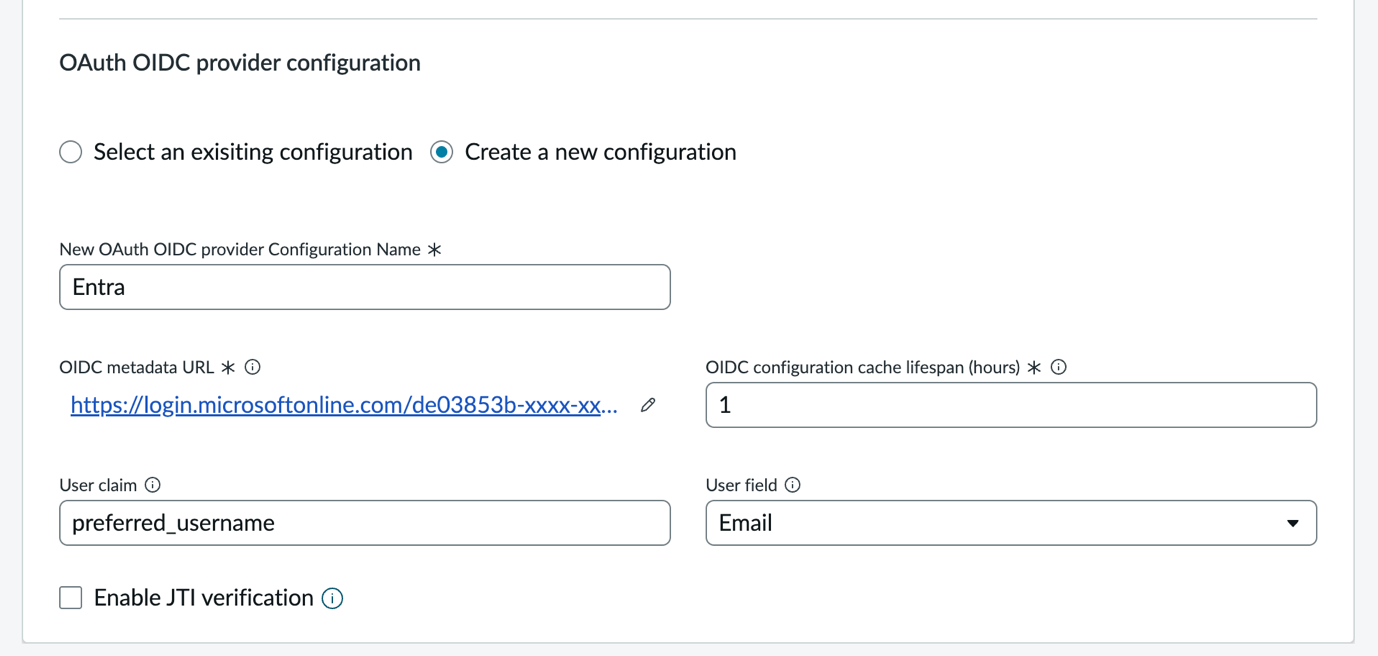
图 8:在 ServiceNow 中配置 OAuth OIDC 提供方
最后,在同一屏幕中,为该集成创建一个授权作用域(例如 APIConnector)。以下截图显示了如何在 ServiceNow 中创建新的授权作用域。
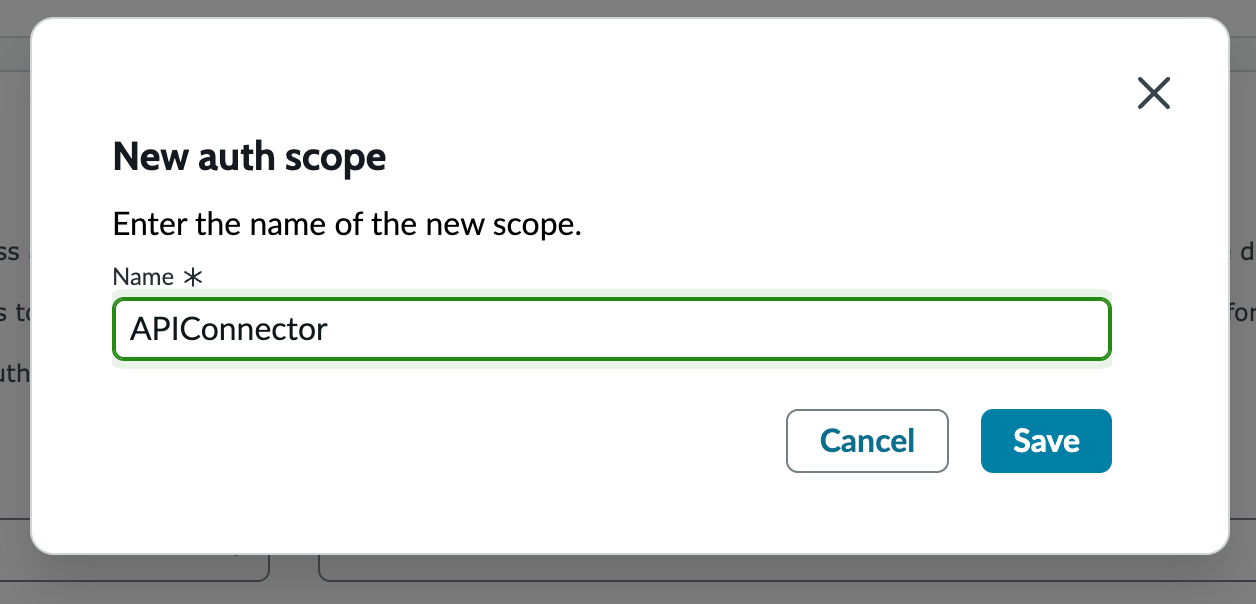
图 9:在 ServiceNow 中创建新的授权作用域
将认证范围限制为 Table API,或你的代理需要访问的任何 ServiceNow API,如下图所示。
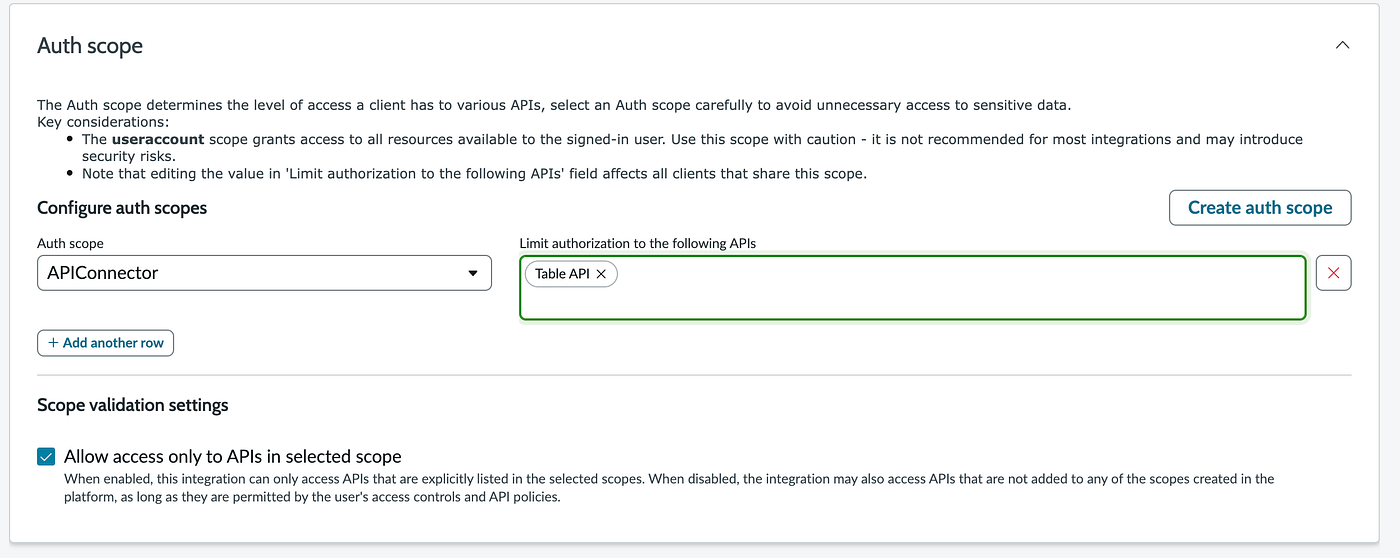
图 10:在 ServiceNow 中将认证范围限制为 Table API
完成此配置后,ServiceNow 会接受带有你的 API 连接器客户端 ID 的 audience 的授权令牌,并根据 preferred_username 声明解析调用用户。
配置 AgentCore Gateway
在 Entra 和 ServiceNow 配置完成后,你现在可以设置 AgentCore Gateway 来原生处理 OBO 交换。
步骤 1:创建出站认证配置
在 AgentCore 中创建新的出站认证配置(选择 Build > Identity > Add Outbound Auth > Add OAuth client),然后选择 Customized provider。输入你的代理应用注册中的客户端 ID 和客户端密钥,以及 Entra 发现 URL,如下图所示。
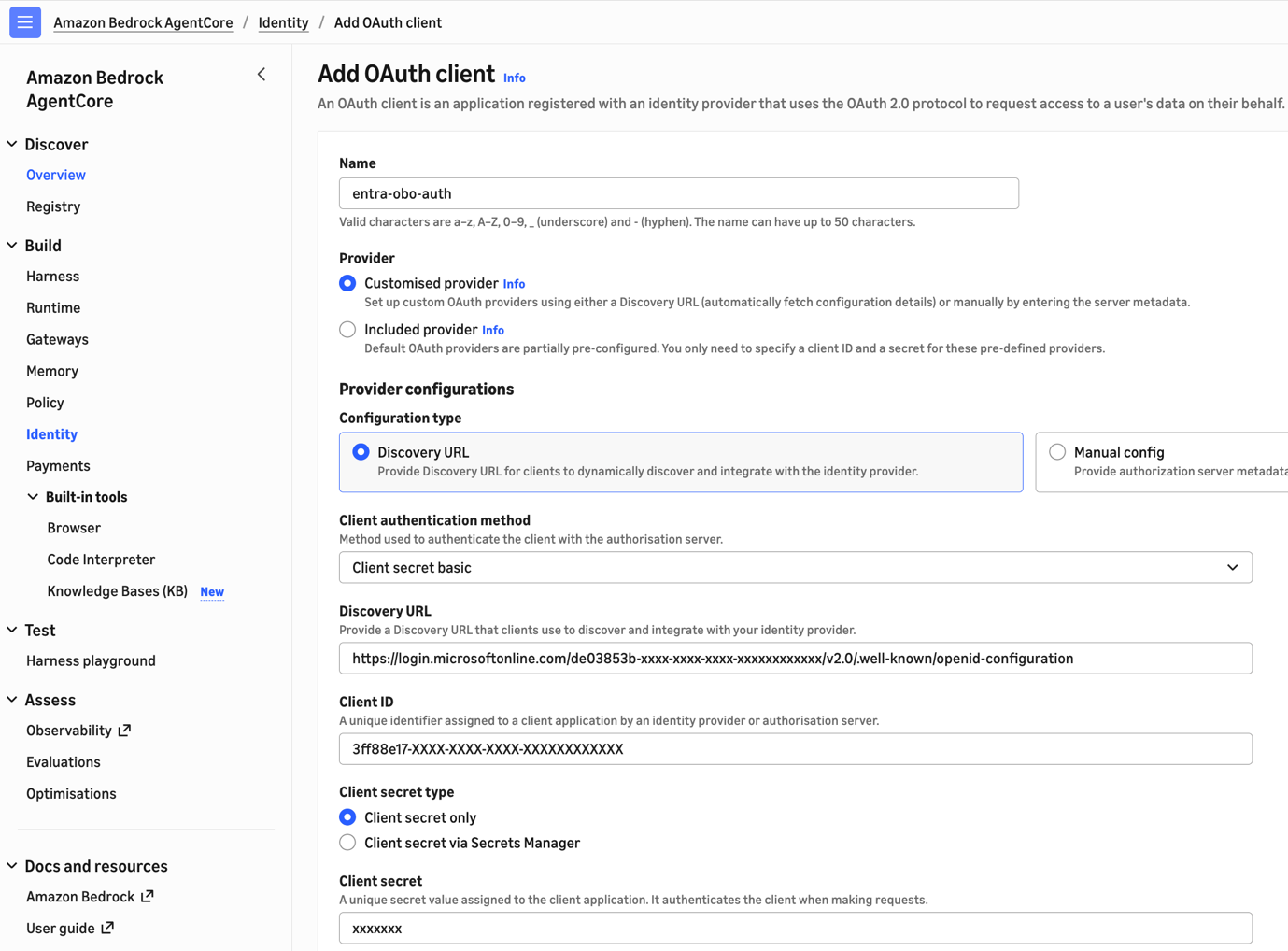
图 11:在 AgentCore Gateway 中添加 OAuth 客户端
展开 Additional configurations 并选择 JWT authorization grant,如下图所示。这会告诉网关使用基于 JWT 的授权类型进行令牌交换。
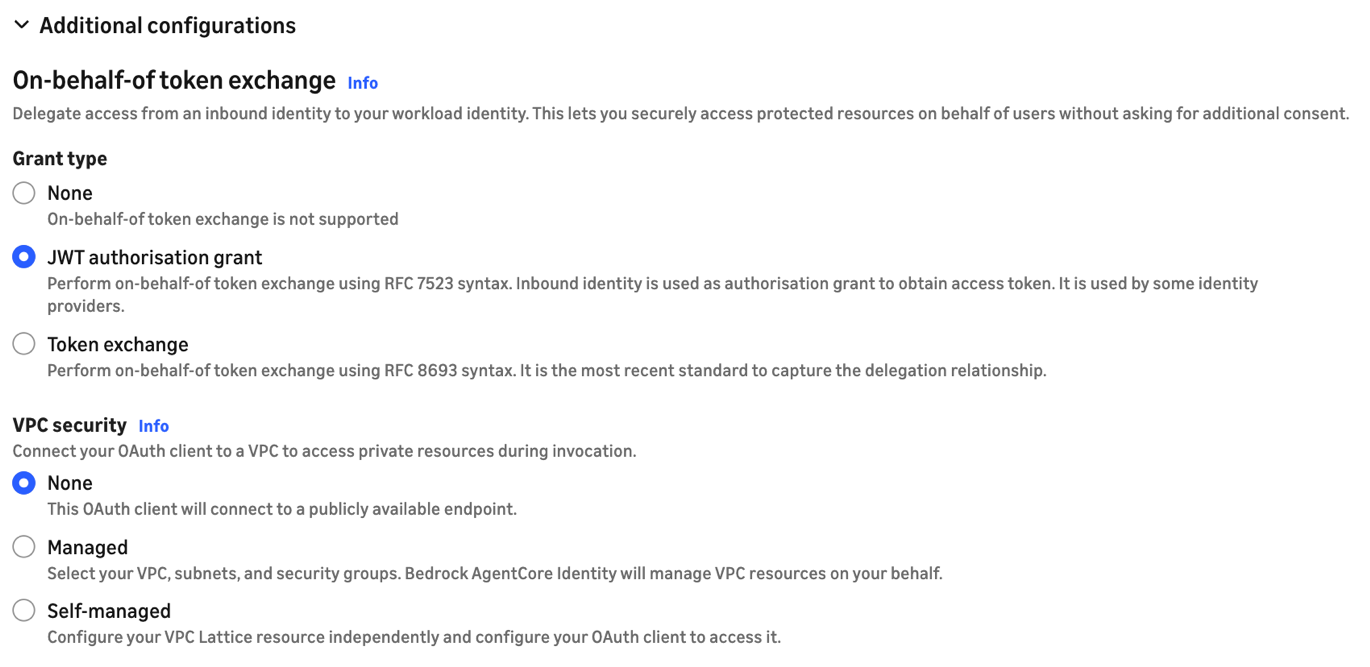
图 12:配置 JWT 授权授予
步骤 2:使用 MCP 版本 2025-11-25 创建网关
创建新的 AgentCore Gateway(Build > Gateways > Create gateway)。在定义网关详细信息时,展开 Additional configurations — optional 并选择 MCP 版本 2025-11-25,如下图所示。此版本是原生 OBO 支持所必需的。你无法为使用早期 MCP 版本创建的网关开启原生 OBO。

图 13:选择 MCP 版本 2025-11-25
使用你的代理的应用注册配置入站身份(选择 Use existing identity provider configurations),就像你对任何接受 Entra 认证请求的网关所做的那样。
在 JWT Authorization Configuration 下,添加我们之前为 ServiceNowAgent 记录的 Application ID,如下图所示。
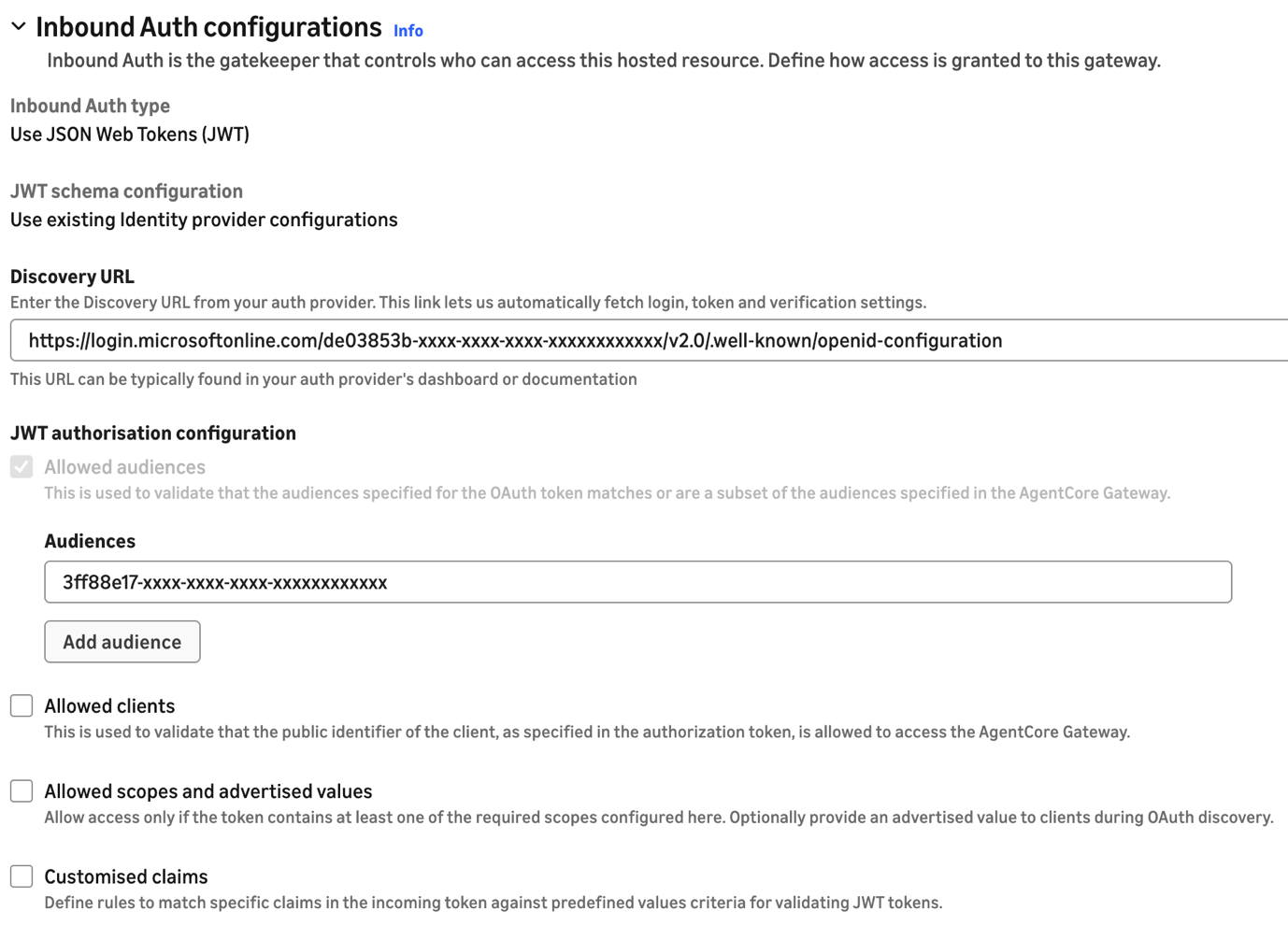
图 14:在 AgentCore Gateway 中配置入站授权
步骤 3:添加带令牌交换的目标
向网关添加一个指向你的 ServiceNow REST 端点的目标。内联定义架构。例如,要公开一个名为 ListIncidents 的工具来调用 ServiceNow Table API,你可以使用以下 OpenAPI 规范(将服务器 URL 替换为你的 PDI 的 URL)。
{
  "openapi": "3.0.0",
  "info": {
    "title": "ServiceNow Incident API (Minimal)",
    "description": "A subset of the ServiceNow Table API for listing incident records.",
    "version": "1.0.0"
  },
  "servers": [
    {
      "url": "https://devxxx.service-now.com/api/now/table",
      "variables": {
        "instance": {
          "default": "devxxx",
          "description": "Your ServiceNow instance name."
        }
      }
    }
  ],
  "paths": {
    "/incident": {
      "get": {
        "operationId": "getIncidents",
        "summary": "List incidents",
        "description": "Retrieves a list of incident records from the ServiceNow instance.",
        "parameters": [
          {
            "name": "sysparm_limit",
            "in": "query",
            "description": "Maximum number of records to return.",
            "schema": {
              "type": "integer",
              "default": 10
            }
          },
          {
            "name": "sysparm_query",
            "in": "query",
            "description": "An encoded query string to filter results (e.g., active=true).",
            "schema": {
              "type": "string"
            }
          },
          {
            "name": "sysparm_fields",
            "in": "query",
            "description": "A comma-separated list of fields to return.",
            "schema": {
              "type": "string"
            }
          }
        ],
        "responses": {
          "200": {
            "description": "A successful response containing an array of incidents.",
            "content": {
              "application/json": {
                "schema": {
                  "type": "object",
                  "properties": {
                    "result": {
                      "type": "array",
                      "items": {
                        "$ref": "#/components/schemas/Incident"
                      }
                    }
                  }
                }
              }
            }
          },
          "401": {
            "description": "Unauthorized - Invalid credentials."
          }
        },
        "security": [
          {
            "bearerAuth": []
          }
        ]
      }
    }
  },
  "components": {
    "securitySchemes": {
      "bearerAuth": {
        "type": "http",
        "scheme": "bearer",
        "bearerFormat": "JWT"
      }
    },
    "schemas": {
      "Incident": {
        "type": "object",
        "properties": {
          "sys_id": {
            "type": "string",
            "description": "Unique identifier for the incident."
          },
          "number": {
            "type": "string",
            "description": "Incident ID (e.g., INC0000001)."
          },
          "short_description": {
            "type": "string",
            "description": "A brief summary of the incident."
          },
          "severity": {
            "type": "string",
            "description": "The severity level of the incident."
          },
          "state": {
            "type": "string",
            "description": "The current state of the incident (e.g., New, In Progress, Closed)."
          },
          "sys_created_on": {
            "type": "string",
            "format": "date-time",
            "description": "The timestamp when the incident was created."
          }
        }
      }
    }
  }
}
以下截图展示了如何使用 OpenAPI 架构在 AgentCore Gateway 中配置 REST API 目标。
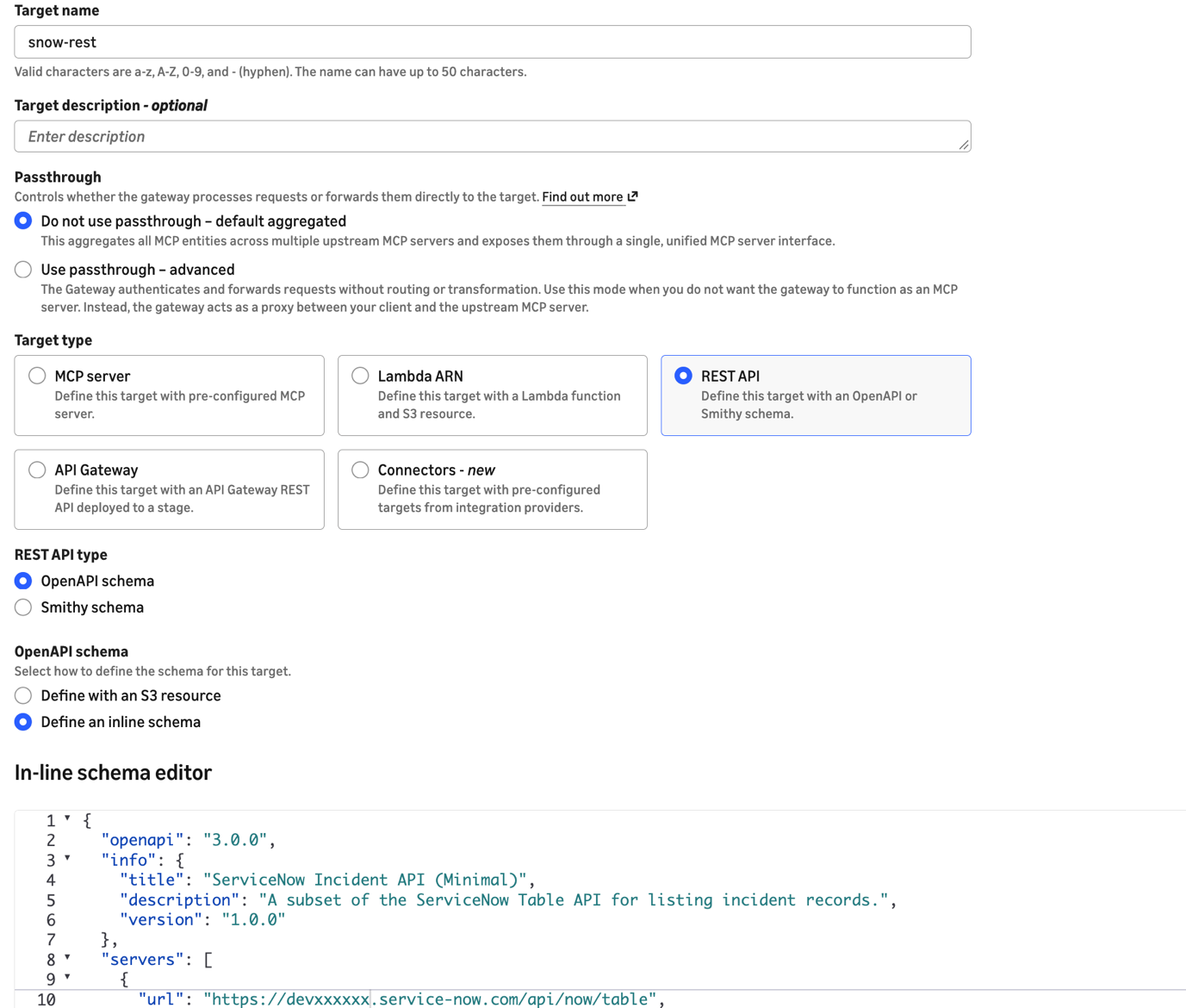
图 15:使用 ServiceNow OpenAPI 架构配置 REST API 目标
对于目标上的 Outbound Auth configuration,选择 OAuth 作为出站身份提供程序,并选择你在步骤 1 中创建的出站认证配置。
现在展开 Additional configurations 部分并选择 Token exchange grant。配置以下内容:
Scope: api://5d4a7a11-xxxx-xxxx-xxxx-xxxxxxxxxxxx/user_impersonation
这是你在 Entra 中的 ServiceNow API 连接器应用注册上公开的范围。
Custom parameter (key-value pair): requested_token_use:on_behalf_of
此参数至关重要。没有它,Entra 不会执行 OBO 交换,对 ServiceNow 的调用会因认证错误而失败。
最终配置如下图所示。
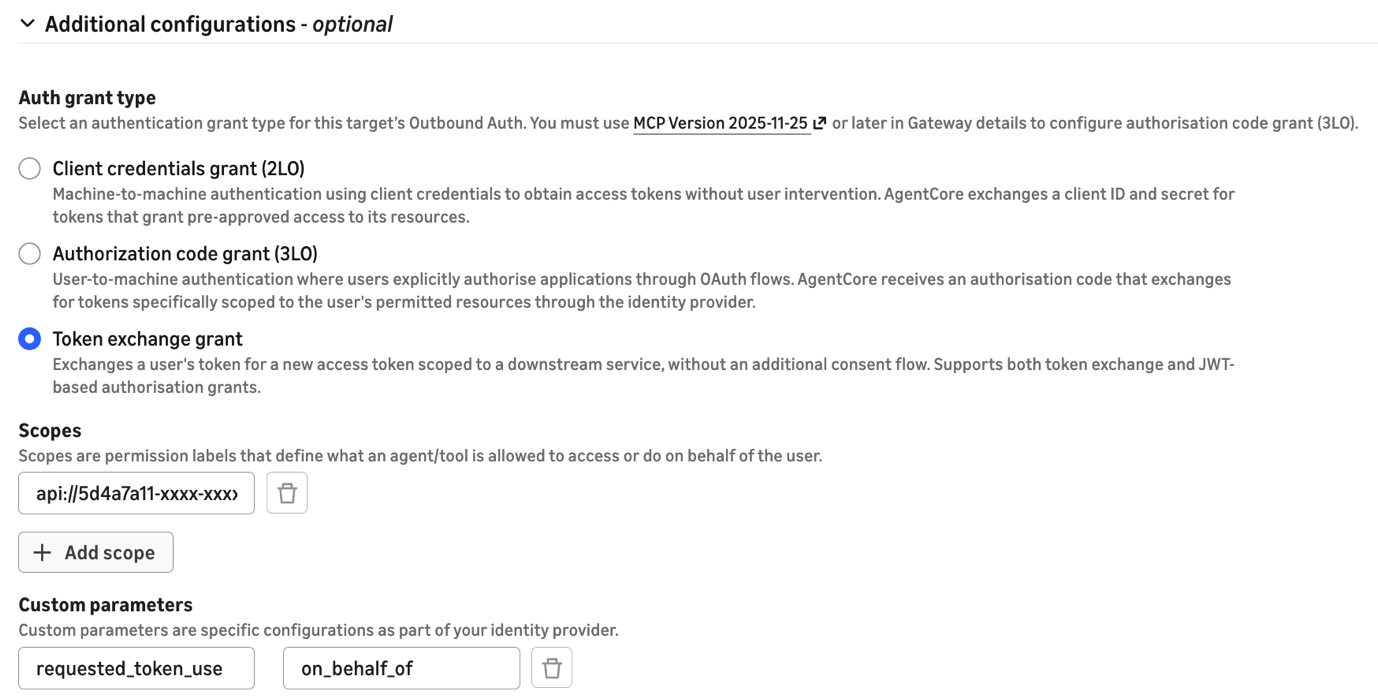
图 16:AgentCore Gateway 目标上的令牌交换授予配置
步骤 4:保存并测试
保存目标配置。AgentCore Gateway 现在会自动将入站令牌交换为有效的 ServiceNow 令牌,保留用户身份,无需自定义代码。
当代理调用网关时,以下过程会透明地发生:
- 网关接收代理的 JWT(
audience:代理客户端 ID)。 - 网关使用 OBO 授权类型将令牌发送到 Entra 的令牌端点。
- Entra 签发一个新令牌(
audience:ServiceNow API 连接器客户端 ID),其中包含原始用户的声明。 - 网关使用交换后的令牌将请求转发到 ServiceNow。
- ServiceNow 从令牌中解析用户并应用其权限。
以下代码片段展示了一个通过 MCP 服务器与 ServiceNow 交互的最小聊天代理。
import sys
import strands
from strands.models import BedrockModel
from strands.tools.mcp import MCPClient
from mcp.client.streamable_http import streamablehttp_client

token = sys.argv[1] if len(sys.argv) > 1 else sys.exit("Usage: python snow_agent.py <TOKEN>")
MCP_URL = "<GATEWAY_URL>"
mcp_client = MCPClient(lambda: streamablehttp_client(url=MCP_URL, headers={"Authorization": f"Bearer {token}"}))
agent = strands.Agent(
    model=BedrockModel(model_id="global.anthropic.claude-sonnet-4-6", streaming=False),
    system_prompt=(
        "You have a tool called 'target-snow___getIncidents'. "
        "When asked about incidents, call it immediately with no parameters. "
        "Never ask the user for credentials or instance details --- the tool is pre-configured."
    ),
    tools=[mcp_client],
)

while (user_input := input("\nYou: ")).lower() not in ("quit", "exit", "q"):
    print(f"\nAgent: {agent(user_input)}")
故障排除
如果收到来自 ServiceNow 的身份验证错误,请验证:
- 交换后令牌中的
preferred_username声明映射到 ServiceNow 中的有效用户电子邮件。 - ServiceNow 入站集成上的授权范围允许访问代理正在调用的 API 端点。
- 代理应用程序在 Entra 中具有对 ServiceNow API 连接器应用程序的 API 权限。
清理
为避免持续产生费用,如果以下资源是为测试而创建的,请将其删除:
- AgentCore Gateway 及其目标。
- 出站身份验证配置。
- Entra 应用程序注册(如果专门为此演练创建)。
- ServiceNow 入站集成和 OIDC 提供程序配置。
结论
AgentCore Gateway 的原生 OBO 支持消除了对自定义 AWS Lambda 拦截器执行令牌交换的需求。您可以直接在网关目标上配置令牌交换,网关会在每个请求上透明地处理它。此方法在代理到 API 的链中保持用户身份,支持 ServiceNow 的用户级访问控制,并消除了需要单独维护的自定义代码。
要开始使用 AgentCore Gateway,请参阅 Amazon Bedrock AgentCore 文档。有关 Microsoft Entra 的 OBO 流程的更多信息,请参阅 Microsoft 身份平台文档。
关于作者

Greg Biegel
Greg 是 AWS 的高级解决方案架构师,常驻西澳大利亚。他热衷于帮助客户利用数据和 AI 实现有价值的业务成果,并最近出版了相关主题的著作《Digital Twins in Action》。

Jose Guzman
Jose 是 AWS 的高级合作伙伴解决方案架构师,为北美的银行客户提供服务。他专注于迁移、现代化和 Microsoft 技术,包括 Azure 和 Microsoft 365。Jose 热衷于利用技术解决银行业的复杂业务挑战。工作之余,他喜欢徒步旅行并与家人共度美好时光。

Arnab Chakraborty
Arnab 是 AWS 的高级解决方案架构师,常驻俄亥俄州辛辛那提。他热衷于企业 & 解决方案架构、数据分析、无服务器和机器学习等主题。业余时间,他喜欢看电影、旅游节目和体育赛事。

Hasan Mehdi
Hasan 是 AWS 的解决方案架构师,帮助金融服务组织在 AWS 上迁移、现代化和构建代理式 AI 解决方案。他专注于应用程序现代化、基于容器的架构和多代理系统设计。
来源:AWS Machine Learning Blog · aws.amazon.com