用 AWS CDK 编排 SageMaker AI 端点自动扩缩容
Orchestrating SageMaker AI endpoint auto scaling with AWS CDK
针对 SageMaker AI 端点更新时自动扩缩容导致 CloudFormation/CDK 部署失败的问题,AWS 给出一个可复用 CDK construct,用三个自定义资源在端点更新前后自动注销并重新注册扩缩容目标。
更新 Amazon SageMaker AI 实时端点配置(更改实例类型、实例数量或环境变量)会导致通过 AWS CloudFormation 或 AWS Cloud Development Kit(AWS CDK)进行的部署失败。SageMaker AI 要求您在更新端点之前注销可扩展目标,但注销后,CloudFormation 无法跟踪 AWS Application Auto Scaling 资源。
在本文中,我们将展示如何使用可复用的 CDK 构造与 AWS CloudFormation 自定义资源,在端点更新期间自动编排注销和注册自动扩缩。您可以在一次部署中更新端点配置和自动扩缩参数,无需人工干预。
为什么会出现此问题
当您使用原生 CloudFormation 自动扩缩资源部署 SageMaker AI 端点,然后更改端点配置并重新部署时,会出现多种失败模式。具体失败取决于您更改的内容以及采用的规避方式。
在自动扩缩已注册的情况下更改端点配置
CloudFormation 尝试在可扩展目标仍处于注册状态时更新端点。SageMaker AI 会拒绝该更新并返回以下错误:
The variant(s) "[AllTraffic]" must be deregistered as scalable targets with Application Auto Scaling before they can be removed or have their instance type updated.SageMaker AI 会在 CloudFormation 到达自动扩缩资源之前阻止端点更新。
手动注销自动扩缩,然后仅更改端点配置
如果您通过 AWS Command Line Interface(AWS CLI)注销可扩展目标,并仅更改端点配置后重新部署,部署会成功。但是,即使自动扩缩位于 CloudFormation 模板中,CloudFormation 也不会注册自动扩缩。由于 CloudFormation 模板中的自动扩缩参数没有变化,CloudFormation 不会注册可扩展目标,也不会重新应用扩缩策略。此时端点在没有自动扩缩的情况下运行,并且没有任何错误提示出现了问题。
手动注销自动扩缩,然后更改自动扩缩参数
如果您通过 AWS CLI 注销可扩展目标,并在更改自动扩缩参数后重新部署,CloudFormation 会尝试更新已不存在的 ScalableTarget 资源:
Resource of type 'AWS::ApplicationAutoScaling::ScalableTarget' with identifier 'endpoint/<name>/variant/AllTraffic|sagemaker:variant:DesiredInstanceCount|sagemaker' was not found.此失败值得注意,因为回滚也会失败(UPDATE_ROLLBACK_FAILED),使堆栈处于损坏状态,需要在 CloudFormation 控制台中进行人工干预才能恢复。
解决方案概述
您可以使用此 CDK 构造,将原生的 AWS::ApplicationAutoScaling::ScalableTarget 和 AWS::ApplicationAutoScaling::ScalingPolicy CloudFormation 资源替换为三个自定义资源。这些自定义资源在端点更新前后执行注销和注册自动扩缩,并通过 CDK 中的 node.add_dependency 调用强制实施显式依赖顺序。完整顺序如下:
- 注销(自定义资源):在端点更新开始前移除可扩展目标。首次部署时尚不存在可扩展目标,因此处理程序会妥善处理该错误并继续。
- 端点更新(由 CDK 管理):CDK 正常更新端点资源,切换到新的端点配置。
- 注册可扩展目标(自定义资源):等待端点达到
InService状态,然后注册可扩展目标。 - 附加扩缩策略(自定义资源):等待可扩展目标可查询,然后应用目标跟踪策略。
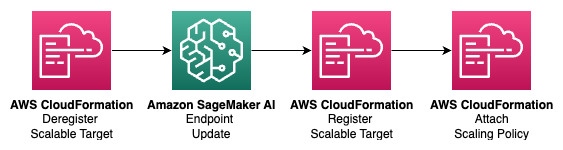
图 1:围绕 CDK 管理的端点更新,对 SageMaker AI 端点自动扩缩进行自定义资源编排。
Register Scalable Target 和 Attach Scaling Policy 使用 CDK provider 的异步完成模式。每个自定义资源都有一个立即返回的 on_event 处理程序和一个 is_complete 处理程序。provider 的 waiter 会按间隔(每 30 秒)重新调用 is_complete 处理程序,直到其就绪检查通过。provider 的 total_timeout(Register Scalable Target 为 1 小时,Attach Scaling Policy 为 15 分钟)限定了等待时间,因此它不受任何单个 Lambda 调用超时的限制。
每个自定义资源上的 ConfigHash 属性会强制 CloudFormation 在配置值发生变化时重新调用 Lambda 函数。端点配置和自动扩缩参数一起定义,因为单个 ConfigHash 驱动自动扩缩编排。
虽然该构造定义了三个自定义资源,但部署的堆栈包含的 Lambda 函数超过三个。每个自定义资源都由一个 CDK cr.Provider 支持,而 provider 框架会生成自己的辅助 Lambda 函数。同步 provider(Deregister)会增加一个框架函数。异步 provider(Register Scalable Target 和 Attach Scaling Policy)会增加三个(onEvent、isComplete 和 onTimeout),外加一个驱动 waiter 的 AWS Step Functions 状态机。因此,部署的堆栈包含三个自定义资源、两个 Step Functions 状态机和十二个 Lambda 函数。其中五个资源承载该构造自身的处理程序代码(一个用于 Deregister,每个异步资源各有一对 on_event 和 is_complete),其余七个由 provider 框架生成。你无需编写或维护框架生成的函数,但它们存在于堆栈中,在查看已部署资源时值得纳入考虑。
演练
在本演练中,你将使用提供的示例堆栈部署一个带自动扩缩的 SageMaker AI 端点,然后验证配置更新能否正常工作。
本演练包括以下步骤:
- 克隆仓库并安装依赖项。
- 配置你的端点和自动扩缩设置。
- 部署并验证。
- 测试更新。
源代码可在链接的 GitHub 仓库中获取。
先决条件
本演练需要以下内容:
- 一个具有 Amazon SageMaker AI、AWS Lambda、AWS Identity and Access Management (IAM)、Application Auto Scaling 和 Amazon CloudWatch 权限的 AWS 账户。
- 已安装 AWS CDK v2。
- Python 3.12 或更高版本。
- 用于 Python 依赖管理的 uv。
- Amazon Simple Storage Service (Amazon S3) 中的 SageMaker AI 模型构件和 Amazon Elastic Container Registry (Amazon ECR) 中的容器镜像,或 SageMaker AI 内置算法容器。
克隆仓库并安装依赖项
- Clone the repository:
git clone https://github.com/aws-samples/sample-sagemaker-endpoint-autoscaling.git cd sample-sagemaker-endpoint-autoscaling - Install dependencies:
uv sync
配置你的端点和自动扩缩设置
端点和自动扩缩设置一起定义在 config/config.yaml 中,因为单个 config_hash 驱动自动扩缩编排。对任一部分的更改都会触发完整序列。
使用你的值编辑 config/config.yaml:
endpoint:
  endpoint_name: "my-model-endpoint"
  image: "123456789012.dkr.ecr.us-east-1.amazonaws.com/my-model:latest"
  model_data_url: "s3://my-bucket/models/model.tar.gz"
  instance_type: "ml.m5.large"
  initial_instance_count: 1
  environment: {}
autoscaling:
  min_capacity: 1
  max_capacity: 10
  target_value: 100
  scale_in_cooldown: 600
  scale_out_cooldown: 120
端点参数映射到 SageMaker AI CreateModel 和 CreateEndpointConfig API。自动扩缩参数映射到 Application Auto Scaling RegisterScalableTarget 和 PutScalingPolicy API。
部署并验证
- Bootstrap your AWS environment if you haven’t already:
uv run cdk bootstrap - Deploy the stack:
uv run cdk deploy InferenceStack
CloudFormation 创建 SageMaker AI 模型、端点配置和端点,然后按顺序运行三个自定义资源以注册自动扩缩。
- Verify that the deployment registered the scalable target:
aws application-autoscaling describe-scalable-targets --service-namespace sagemaker --resource-ids endpoint/my-model-endpoint/variant/AllTraffic - Verify that the deployment applied the scaling policy:
aws application-autoscaling describe-scaling-policies
--service-namespace sagemaker
--resource-id endpoint/my-model-endpoint/variant/AllTraffic
测试更新
更改 config/config.yaml 中的某个值,例如将实例类型从 ml.m5.large 更新为 ml.m5.xlarge,然后重新部署:
uv run cdk deploy InferenceStack部署完成后,验证自动扩缩容是否仍处于注册状态并具有更新后的值:
aws application-autoscaling describe-scalable-targets
--service-namespace sagemaker
--resource-ids endpoint/my-model-endpoint/variant/AllTraffic
与现有堆栈集成
如果您是全新开始或想要一个参考实现,请使用示例堆栈。如果您已有包含 SageMaker AI 资源的 CDK 堆栈,请直接使用该构造。
要与现有堆栈集成,请将 sagemaker_autoscaling/constructs/ 目录复制到您的项目中,并将该构造与您的端点资源一起添加:
import json
from sagemaker_autoscaling.constructs.sagemaker_autoscaling_construct import (
    AutoscalingConfig,
    SagemakerAutoscalingConstruct,
    SagemakerAutoscalingProps,
)

# Both endpoint and auto scaling values must be in config_hash so that
# a change to either triggers the auto scaling orchestration.
config_hash = json.dumps({
    "endpoint": {
        "image": "123456789012.dkr.ecr.us-east-1.amazonaws.com/my-model:latest",
        "modelDataUrl": "s3://my-bucket/models/model.tar.gz",
        "instanceType": "ml.m5.large",
        "initialInstanceCount": 1,
    },
    "autoscaling": {
        "minCapacity": 1,
        "maxCapacity": 10,
        "targetValue": 100,
        "scaleInCooldown": 600,
        "scaleOutCooldown": 120,
    },
})

SagemakerAutoscalingConstruct(
    self, "Autoscaling",
    props=SagemakerAutoscalingProps(
        endpoint=your_endpoint,  # your CfnEndpoint
        autoscaling=AutoscalingConfig(
            min_capacity=1,
            max_capacity=10,
            target_value=100,
            scale_in_cooldown=600,
            scale_out_cooldown=120,
        ),
        config_hash=config_hash,
    ),
)
该构造的工作原理
本节将逐步介绍 SagemakerAutoscalingConstruct 的关键实现细节。
注销
Deregister 自定义资源会在端点更新之前调用 deregister_scalable_target。它会处理首次部署时不存在可扩缩目标的情况下的 ObjectNotFoundException:
def handler(event, context):
    resource_id = event["ResourceProperties"]["ResourceId"]
    if event["RequestType"] in ("Create", "Update"):
        try:
            client.deregister_scalable_target(
                ServiceNamespace="sagemaker",
                ResourceId=resource_id,
                ScalableDimension="sagemaker:variant:DesiredInstanceCount",
            )
        except client.exceptions.ObjectNotFoundException:
            pass  # No scalable target on first deploy
    return {"PhysicalResourceId": f"deregister-{resource_id}"}
该依赖关系在 CDK 中建立:
props.endpoint.node.add_dependency(deregister)注册可扩缩目标
尽管 CloudFormation 在更新被接受后就将端点资源视为完成,但可扩缩目标只能在端点达到 InService 之后才能注册。Register Scalable Target 不会让单次 Lambda 调用阻塞在该等待上,而是使用提供程序的异步完成模式。on_event 处理程序立即返回,提供程序的等待器会在 query_interval 上重新调用 is_complete 处理程序,直到端点处于 InService 状态。提供程序的 total_timeout(1 小时)限制的是等待时间,而不是任何单次 Lambda 调用的超时时间:
def handler(event, context):
    props = event["ResourceProperties"]
    resource_id = props["ResourceId"]
    endpoint_name = resource_id.split("/")[1]
    if event["RequestType"] == "Delete":
        return {"IsComplete": True}
    status = sm_client.describe_endpoint(EndpointName=endpoint_name)["EndpointStatus"]
    if status == "Failed":
        raise Exception("Endpoint in Failed state")
    if status != "InService":
        return {"IsComplete": False}
    as_client.register_scalable_target(
        ServiceNamespace="sagemaker",
        ResourceId=resource_id,
        ScalableDimension="sagemaker:variant:DesiredInstanceCount",
        MinCapacity=int(props["MinCapacity"]),
        MaxCapacity=int(props["MaxCapacity"]),
    )
return {"IsComplete": True}在堆栈删除时,on_event 处理程序会注销可扩缩目标以进行清理。
附加扩缩策略
在 RegisterScalableTarget 返回后存在一个短暂的时间窗口,此时目标尚不可查询。Attach Scaling Policy 使用相同的异步完成模式:on_event 处理程序立即返回,而 is_complete 处理程序仅在可扩缩目标可查询时才报告完成,此时它会应用该策略。提供程序的 total_timeout(15 分钟)限制的是等待时间:
def handler(event, context):
    props = event["ResourceProperties"]
    resource_id = props["ResourceId"]
    if event["RequestType"] == "Delete":
        return {"IsComplete": True}
    resp = client.describe_scalable_targets(
        ServiceNamespace="sagemaker",
        ResourceIds=[resource_id],
        ScalableDimension="sagemaker:variant:DesiredInstanceCount",
    )
    if not resp.get("ScalableTargets"):
        return {"IsComplete": False}
    client.put_scaling_policy(
        PolicyName=props["PolicyName"],
        ServiceNamespace="sagemaker",
        ResourceId=resource_id,
        ScalableDimension="sagemaker:variant:DesiredInstanceCount",
        PolicyType="TargetTrackingScaling",
        TargetTrackingScalingPolicyConfiguration=json.loads(props["ScalingPolicyConfig"]),
    )
return {"IsComplete": True}在堆栈删除时,on_event 处理程序会删除扩缩策略以进行清理。
清理
为避免产生未来费用,请删除这些资源:
uv run cdk destroy InferenceStack这会删除 SageMaker AI 端点、端点配置、模型、Lambda 函数、IAM 角色、由目标跟踪扩缩策略创建的 Amazon CloudWatch 告警,并注销可扩缩目标。
结论
在本文中,我们展示了如何使用可复用的 CDK 构造来自动注销和注册自动扩缩容,从而编排 SageMaker AI 端点更新。该构造使用三个 CloudFormation 自定义资源,具有显式的依赖顺序和一个 ConfigHash 属性,以在部署之间保持自动扩缩容完好无损。
要开始使用,请克隆 sample-sagemaker-endpoint-autoscaling 仓库并按照设置说明操作。该仓库包含一个可直接部署的示例堆栈,或者您可以将该构造集成到现有的 CDK 堆栈中。
有关 SageMaker AI 的 Application Auto Scaling 的更多信息,请参阅自动扩缩 Amazon SageMaker AI 模型。有关 CloudFormation 自定义资源的更多信息,请参阅 AWS CloudFormation 用户指南中的自定义资源。
关于作者

Lauren Eterno
Lauren 是 Amazon Web Services 的副交付顾问,专攻 AI/ML。她与客户团队合作设计、构建、部署和扩展机器学习与生成式 AI 解决方案。她拥有凯斯西储大学数据科学与分析学士学位以及计算机科学硕士学位。
来源:AWS Machine Learning Blog · aws.amazon.com