用事件驱动架构自动同步 AWS Agent Registry 的 MCP 服务器更新
Automating AWS Agent Registry updates with push-based architecture
AWS 提出一套基于 CloudTrail、EventBridge 和 Lambda 的事件驱动架构,在 MCP 服务器调用 UpdateAgentRuntime API 后自动同步 AWS Agent Registry 记录。
每当发布在 AWS Agent Registry(Amazon Bedrock AgentCore 的一项能力)中的 Model Context Protocol (MCP) 服务器新增工具或更新其 schema 时,注册表记录也必须随之更新。如果没有基于推送的自动同步,使用方就会发现元数据已过时。对于跨账户管理多个 MCP 服务器的组织而言,这种同步可在现有治理工作流内保持目录记录为最新状态。
在大多数企业部署中,目录的价值取决于其新鲜度。如果开发者在周一部署了新工具,但注册表记录仍反映上周的 schema,使用方就会对目录失去信任。过时的元数据会直接降低注册表的可靠性,导致团队无意中基于不准确的信息构建依赖关系。
当工程师向 MCP 服务器添加工具却忘记更新目录时:
- 使用方会完全错过这项新能力。
- 应用可能使用过时的 schema 调用该工具,导致意外的运行时行为或静默的工作流偏差。
在多个团队中累积后,这种缺乏自动化的情况会侵蚀对注册表的信任。组织最终会退回到临时性的发现机制,例如硬编码端点、非正式的知识共享和过时的文档。
在本文中,我们概述一种事件驱动架构,它使用 AWS CloudTrail、Amazon EventBridge 和 AWS Lambda 自动完成这些更新。
架构概览
以下解决方案将这些服务整合为一条事件驱动流水线,用于检测运行时变更并自动将其同步到注册表。
该架构同时支持多账户和单账户环境:
- 单账户设置:对于简单部署,所有组件都位于账户 A 中。由于事件直接在账户 A 内流转,因此不需要跨账户转发设置。
- Multi-account setup: This involves two accounts where runtime events from Account B are securely forwarded to Account A.
- 账户 A(注册表账户)拥有 AWS Agent Registry、Amazon EventBridge 规则、推送同步 Lambda 函数和 CloudTrail 日志。
- 账户 B(MCP 服务器账户)托管 MCP 服务器运行时以及用于身份验证的 Amazon Cognito OAuth 提供程序。
该示例使用两个账户,但你可以扩展该架构以支持多个账户,其中账户 A 作为注册表账户,多个类似账户 B 的 AWS 账户用于不同的 MCP 服务器。
下图展示了账户 B 中 MCP 服务器更新时的端到端事件流。捕获的事件会转发到账户 A,在那里由 Lambda 函数查询 MCP 服务器的工具并更新匹配的注册表记录。
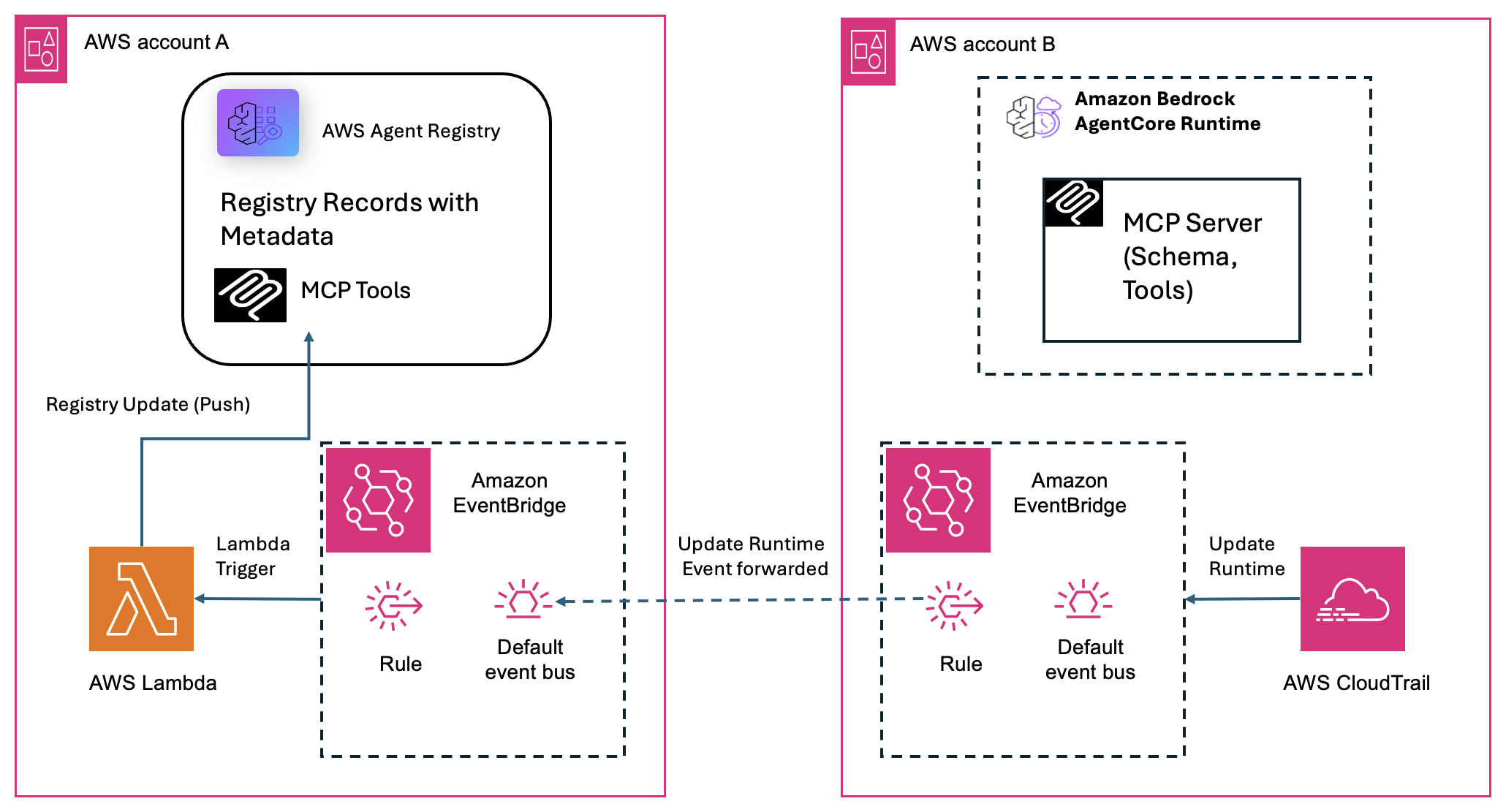
图 1:跨账户 MCP 服务器更新的端到端事件流,从账户 B 中的 CloudTrail 事件到账户 A 中的注册表记录更新。
该架构使用五项 AWS 服务:
- AWS CloudTrail 将
UpdateAgentRuntimeAPI 调用捕获为管理事件。 - Amazon EventBridge 将匹配的事件路由到 Lambda 函数,并支持跨账户转发。
- AWS Lambda 查询 MCP 服务器当前的工具,与注册表进行差异比较,并在发生变化时更新记录。
- AWS Agent Registry 存储 MCP 服务器记录及其工具 schema,作为中央事实来源。
- AgentCore Identity(Amazon Bedrock AgentCore 的一项能力)安全地代理 OAuth 令牌交换,使 Lambda 无需存储密钥即可完成身份验证。
工作原理:业务逻辑流程
部署后,该流水线会运行以下端到端工作流:
- 触发:Account B 中的开发者更新了一个 MCP 服务器,该服务器调用 Amazon Bedrock AgentCore 中的
UpdateAgentRuntimeAPI,AWS CloudTrail 捕获该事件。 - 路由:Amazon EventBridge 捕获 CloudTrail 事件并将其转发到 Account A 中的中央事件总线。
- 解析:Account A 中的同步 Lambda 从事件负载中提取运行时 Amazon Resource Name(ARN),并动态构造 MCP 服务器的调用 URL。这样它就知道要查询 Account B 中的哪个服务器。
- 身份验证:Lambda 通过 AgentCore Identity 生成安全的 OAuth 持有者令牌。
- 获取:Lambda 调用 MCP 服务器(
initialize,然后tools/list)以获取最新的工具信息。 - 同步:Lambda 通过 ARN 找到匹配的注册表记录,评估差异,并在 schema 发生变化时更新注册表。
此流程假设 Account A 中的 Agent Registry 已包含 MCP 服务器的预注册记录(在初始接入期间创建)。此示例中的 Lambda 函数仅更新现有记录,不会生成新记录。
同样的流程也适用于单账户设置,即所有资源(注册表、Lambda、Amazon EventBridge 规则和 MCP 服务器)都位于一个账户中。在这种情况下,跳过跨账户转发步骤。事件直接在同一账户的 Amazon EventBridge 总线内流转。
技术详解
本节以架构图所示的双账户场景为例,逐步介绍单个 MCP 服务器更新的工作流程。
对于每个发出 UpdateAgentRuntime 事件的服务器,同样的流程会独立执行。Lambda 一次处理一个事件,并随 Amazon EventBridge 的调用模型自然扩展。
步骤 1:跨账户设置的事件捕获与路由
当开发者部署或更新 MCP 服务器时,会调用 UpdateAgentRuntime API,调用方可以是 AgentCore CLI(agentcore deploy)或直接调用。
AWS CloudTrail 将其记录为 Account B 中的管理事件,投递延迟约为 5–15 分钟。随后该事件被投递到 Account A 的默认 Amazon EventBridge 总线。
对于跨账户设置,Account B 的 Amazon EventBridge 通过跨账户规则将匹配的事件转发到 Account A 的事件总线。
Account A 中的 Amazon EventBridge 规则目标会调用同步 Lambda,并将完整的 CloudTrail 事件 JSON 作为输入负载传递。
Amazon EventBridge 规则模式:
{
  "source": ["aws.bedrock-agentcore"],
  "detail-type": ["API Call via AWS CloudTrail"],
  "detail": { "eventName": ["UpdateAgentRuntime"] }
}
步骤 2:提取 MCP 服务器 URL
Lambda 从事件中解析运行时 ARN。它提取托管账户 ID 和 AWS Region,以动态构造目标 MCP 服务器的 URL 编码调用端点。
# Extract the runtime ARN from the AWS CloudTrail event payload
def _extract_mcp_url(event):
    detail = event.get("detail", {})
    runtime_arn = detail.get("responseElements", {}).get("agentRuntimeArn", "")
    if not runtime_arn:
        return None, None
    # Parse the account ID from the ARN (5th colon-separated segment)
    arn_parts = runtime_arn.split(":")
    account_id = arn_parts[4] if len(arn_parts) > 4 else None
    region = detail.get("awsRegion", "us-west-2")
    # URL-encode the ARN and build the MCP invocation endpoint
    encoded_arn = runtime_arn.replace(":", "%3A").replace("/", "%2F")
    mcp_url = (f"https://bedrock-agentcore.{region}.amazonaws.com"
               f"/runtimes/{encoded_arn}/invocations?qualifier=DEFAULT")
    return mcp_url, account_id
步骤 3:使用 AgentCore Identity 进行安全身份验证
Lambda 使用两步身份流程进行身份验证。它将自己的执行身份换取临时工作负载令牌。然后,Lambda 通过目标账户的凭证提供程序,用此令牌换取限定范围的 OAuth 持有者令牌。
def get_bearer_token(account_id=None):
    """Get OAuth bearer token via AgentCore Identity credential provider.

    Two-step process:
    1. Get a workload access token from AgentCore Identity (identifies this Lambda)
    2. Use it to fetch an OAuth token from the credential provider (M2M flow)

    The credential provider stores the Cognito/OAuth config securely in AgentCore
    Identity, so no client secrets are needed in Lambda env vars.
    """
    acct = account_id or ""
    provider_name = os.environ.get(f"CREDENTIAL_PROVIDER_{acct}") or os.environ.get("CREDENTIAL_PROVIDER", "")
    scope_str = os.environ.get(f"CREDENTIAL_SCOPE_{acct}") or os.environ.get("CREDENTIAL_SCOPE", "")
    scopes = [s.strip() for s in scope_str.split(",") if s.strip()] if scope_str else []
    workload_name = os.environ.get("WORKLOAD_IDENTITY_NAME", "")
    if not provider_name:
        raise ValueError(f"No CREDENTIAL_PROVIDER configured for account {acct}")
    if not workload_name:
        raise ValueError("WORKLOAD_IDENTITY_NAME env var not set")
    region = os.environ.get("AWS_REGION", "us-west-2")
    client = boto3.client("bedrock-agentcore", region_name=region)
    # Step 1: Get workload access token (identifies this Lambda as a trusted workload)
    wat_response = client.get_workload_access_token(
        workloadName=workload_name,
    )
    print(f"Workload access token response keys: {list(wat_response.keys())}")
    workload_token = wat_response.get("workloadAccessToken") or wat_response.get("accessToken", "")
    if not workload_token:
        raise ValueError(f"No access token in workload response: {list(wat_response.keys())}")
    # Step 2: Use workload token to get OAuth token from the credential provider
    response = client.get_resource_oauth2_token(
        workloadIdentityToken=workload_token,
        resourceCredentialProviderName=provider_name,
        oauth2Flow="M2M",
        scopes=scopes,
    )
return response["accessToken"]凭证提供程序按账户划分(CREDENTIAL_PROVIDER_{ACCT_ID}),因此一个 Lambda 可以跨多个账户对 MCP 服务器进行身份验证。
步骤 4:查询 MCP 服务器
使用标准 MCP 可流式 HTTP 机制,Lambda 通过 initialize 请求建立活动会话。会话激活后,它调用 tools/list 以获取当前公开的完整工具和 schema 数组。
def call_tools_list(mcp_url, token):
    """Call the MCP server's initialize + tools/list methods and return the result.

    MCP streamable-http requires initialize before tools/list.
    The session_id from initialize is passed to tools/list if the server uses sessions.
    """
    # Validate URL scheme to prevent file:// or custom scheme access
    if not mcp_url.startswith("https://"):
        raise ValueError(f"Only HTTPS URLs are allowed, got: {mcp_url[:50]}")
    # Step 1: Initialize MCP session
    init_payload = {
        "jsonrpc": "2.0",
        "id": "init-1",
        "method": "initialize",
        "params": {
            "protocolVersion": "2025-03-26",
            "capabilities": {},
            "clientInfo": {"name": "tool-sync-lambda", "version": "1.0.0"},
        },
    }
    init_resp = requests.post(
        mcp_url,
        json=init_payload,
        headers=_mcp_headers(token),
        timeout=30,
    )
    init_resp.raise_for_status()
    session_id = init_resp.headers.get("Mcp-Session-Id")
    init_result = _parse_sse_json(init_resp.text)
    print(f"MCP session initialized, session_id={session_id}")
    # Step 2: Call tools/list
    list_payload = {
        "jsonrpc": "2.0",
        "id": "list-1",
        "method": "tools/list",
        "params": {},
    }
    list_resp = requests.post(
        mcp_url,
        json=list_payload,
        headers=_mcp_headers(token, session_id),
        timeout=30,
    )
    list_resp.raise_for_status()
    return _parse_sse_json(list_resp.text)
步骤 5:查找匹配的注册表记录
Lambda 会查询中央 Agent Registry 以定位对应的记录。它在 APPROVED 记录中搜索这样一条记录:其 mcpServer.data 包含在创建记录时嵌入的运行时 ARN(参见 Deployment 部分)。
# Decode the runtime ARN from the MCP URL for matching
def _find_record_by_mcp_url(client, registry_id, mcp_url):
    """Search registry records to find one whose server schema contains the runtime ARN.

    Tries three matching strategies:
    1. Decoded ARN (e.g. arn:aws:bedrock-agentcore:...:runtime/TrimMCP-xxx)
    2. URL-encoded ARN (e.g. arn%3Aaws%3Abedrock-agentcore%3A...%2FTrimMCP-xxx)
    3. Full MCP URL match

    Returns:
        (record_id, full_record) tuple. Both None if no match found.
    """
    # Extract the runtime ARN from the MCP URL for matching
    # URL format: .../runtimes/arn%3A...%2Fruntime%2F<id>/invocations...
    # Decode to get: arn:aws:bedrock-agentcore:region:account:runtime/id
    try:
        decoded_url = urllib.parse.unquote(mcp_url)
        # Extract just the runtime path: arn:aws:bedrock-agentcore:...:runtime/xxx
        runtime_marker = "/runtimes/"
        idx = decoded_url.find(runtime_marker)
        if idx >= 0:
            runtime_arn = decoded_url[idx + len(runtime_marker) :].split("/invocations")[0]
        else:
            runtime_arn = None
    except Exception:  # noqa: BLE001
        runtime_arn = None
    records = client.list_registry_records(registryId=registry_id)
    record_list = records.get("registryRecords", [])
    print(f"Found {len(record_list)} registry records")
    for rec in record_list:
        record_id = rec.get("registryRecordId") or rec.get("recordId") or rec.get("id", "")
        record_name = rec.get("name", "?")
        record_status = rec.get("status", "?")
        print(f" Record: {record_id} | {record_name} | status={record_status} | keys={list(rec.keys())}")
        if not record_id:
            print(f" Warning: could not get record ID from: {list(rec.keys())}")
            continue
        if record_status == "DRAFT":
            print(f" Skipping DRAFT record {record_id} ({record_name}) — must be APPROVED first")
            continue
        try:
            full = client.get_registry_record(
                registryId=registry_id,
                recordId=record_id,
            )
            descriptors = full.get("descriptors", {})
            mcp_desc = descriptors.get("mcpServer", {})
            inline = mcp_desc.get("data", "")
            # Match on runtime ARN (decoded or encoded) in the server schema
            if runtime_arn and runtime_arn in inline:
                print(f"Found matching record (by ARN): {record_id} ({rec.get('name', '?')})")
                return record_id, full
            # Also check URL-encoded ARN
            encoded_arn = runtime_arn.replace(":", "%3A").replace("/", "%2F") if runtime_arn else None
            if encoded_arn and encoded_arn in inline:
                print(f"Found matching record (by encoded ARN): {record_id} ({rec.get('name', '?')})")
                return record_id, full
            if mcp_url in inline or urllib.parse.unquote(mcp_url).replace("?qualifier=DEFAULT", "") in inline:
                print(f"Found matching record (by URL): {record_id} ({rec.get('name', '?')})")
                return record_id, full
        except Exception as e:  # noqa: BLE001
            print(f"Error checking record {record_id}: {e}")
            continue
    print(f"No matching record found among {len(record_list)} records.")
    print(f" Looking for runtime ARN: {runtime_arn}")
    print(f" Looking for MCP URL: {mcp_url}")
    return None, None
步骤 6:差异比对与更新
为尽量减少不必要的写入,工具列表会被规范化(按名称排序,使用名称 + 描述 + inputSchema 进行比较)。仅当检测到变更时才会触发注册表更新。如果 schema 不同,Lambda 会记录具体的添加或删除项,并将新的定义推送到注册表记录。
# Normalize tool definitions for comparison (sort by name, extract key fields)
def _normalize_tools(tools):
    """Normalize tool list for comparison — extract name, description, inputSchema."""
    normalized = []
    for t in sorted(tools, key=lambda x: x.get("name", "")):
        normalized.append(
            {
                "name": t.get("name", ""),
                "description": t.get("description", ""),
                "inputSchema": t.get("inputSchema", {}),
            }
        )
    return normalized

def _normalize_tools(tools):
    """Normalize tool list for comparison — extract name, description, inputSchema."""
    normalized = []
    for t in sorted(tools, key=lambda x: x.get("name", "")):
        normalized.append(
            {
                "name": t.get("name", ""),
                "description": t.get("description", ""),
                "inputSchema": t.get("inputSchema", {}),
            }
        )
    return normalized

def sync_registry_if_changed(mcp_tools, mcp_url):
    """Compare MCP server tools with AWS Agent Registry record tools. Update only if different.

    Steps:
    1. Find the AWS Agent Registry record matching this MCP server's URL
    2. Extract existing tools from the record's tools.inlineContent
    3. Normalize both tool lists (sort by name, compare name/description/inputSchema)
    4. If identical → skip update
    5. If different → log the diff and update the registry record

    Returns:
        dict with 'action' key: 'no_change', 'updated', or 'skipped'
    """
    registry_id = os.environ["REGISTRY_ID"]
    client = _get_registry_client()
    # Find the matching record
    record_id, full_record = _find_record_by_mcp_url(client, registry_id, mcp_url)
    if not record_id:
        print(f"No matching registry record found for {mcp_url}")
        return {"action": "skipped", "reason": "no matching record"}
    # Get current tools from registry
    registry_tools = _get_registry_tools_from_record(full_record)
    # Compare normalized tool lists
    mcp_normalized = _normalize_tools(mcp_tools)
    registry_normalized = _normalize_tools(registry_tools)
    if mcp_normalized == registry_normalized:
        print(f"No change detected. Registry record {record_id} is up to date ({len(registry_tools)} tools).")
        return {
            "action": "no_change",
            "record_id": record_id,
            "tool_count": len(registry_tools),
        }
    # Tools differ — update the registry
    print(f"Change detected! Registry has {len(registry_tools)} tools, MCP server has {len(mcp_tools)} tools.")
    # Log the diff
    mcp_names = {t["name"] for t in mcp_normalized}
    reg_names = {t["name"] for t in registry_normalized}
    added = mcp_names - reg_names
    removed = reg_names - mcp_names
    if added:
        print(f" Added: {added}")
    if removed:
        print(f" Removed: {removed}")
    if not added and not removed:
        print(" Tool definitions changed (same names, different schemas/descriptions)")
    tool_schema_content = json.dumps({"tools": mcp_tools})
    client.update_registry_record(
        registryId=registry_id,
        recordId=record_id,
        descriptors={
            "optionalValue": {
                "mcpServer": {
                    "optionalValue": {
                        "additionalData": {
                            "optionalValue": {
                                "tools": {
                                    "optionalValue": {
                                        "data": {
                                            "optionalValue": tool_schema_content,
                                        },
                                    }
                                }
                            }
                        }
                    }
                }
            }
        },
    )
    print(f"Updated registry record {record_id} in registry {registry_id}")
    return {
        "action": "updated",
        "record_id": record_id,
        "old_count": len(registry_tools),
        "new_count": len(mcp_tools),
    }
治理与审批工作流
AWS Agent Registry 对每条记录强制执行治理生命周期:Draft -> Pending Approval -> Approved(或 Rejected/Deprecated)。管理员在注册表级别配置审批设置。这些设置控制哪些内容会被发布、由谁审核,以及记录在可被发现之前是否需要人工审批。只有处于 Approved 状态的记录才能通过搜索、目录浏览或注册表的 MCP 端点对使用者可见。
当 Lambda 用新的工具定义更新记录时,该记录会自动恢复为 Draft 状态。使用者仍可看到先前已批准的版本。随后必须由管理员或策展人批准该更新,新的元数据才能被发现。这样,自动更新就无法绕过组织审核,管理员也能对向使用者公开的内容保持完全控制。
部署
下表列出了自动化流水线中的各个步骤:
| 步骤 | 描述 |
| 定义配置 | 区域、Lambda 名称、注册表 ID 和 MCP 服务器 ARN |
| 创建并批准注册表记录 | 注册 MCP 服务器条目并将其移至 APPROVED |
| 配置 AgentCore Identity | 创建工作负载身份和 OAuth2 凭证提供程序 |
| 部署 Lambda 函数 | 创建 IAM 执行角色、打包处理程序、部署函数 |
| 创建 Amazon EventBridge 规则 | 将 UpdateAgentRuntime 事件路由到 Lambda |
| 跨账户转发(可选) | 从远程账户转发运行时事件 |
先决条件
在部署此解决方案之前,请确认以下各项已就绪:
- 一个具有创建 Lambda 函数、Amazon EventBridge 规则、AWS Identity and Access Management (IAM) 角色和 Agent Registry 资源权限的 AWS 账户。
- 已配置凭据的 AWS Command Line Interface (AWS CLI),可访问示例中使用的所有服务。有关更多信息,请参阅 AWS CLI 入门。
- Python 3.12 运行时。
- 一个现有的 AWS Agent Registry,其中至少有一条 MCP 服务器记录(在初始入门过程中创建;创建记录的说明见 Deployment 部分)。
- 一个部署在 Amazon Bedrock AgentCore 运行时上的 MCP 服务器。
- 为每个 MCP 服务器账户配置的 AgentCore Identity 工作负载身份和 OAuth2 凭证提供程序(设置方法参见 示例仓库)。
- 对于多账户设置,需在账户 B 和账户 A 之间配置跨账户 Amazon EventBridge 权限。
组织通常使用多个账户,其中注册表位于一个账户,而 MCP 服务器位于其他账户。本示例概述了多账户场景,你可以按照说明将其转换为单账户场景。
创建注册表记录
在此示例中,在同步管道能够工作之前,必须存在一条注册表记录,并且其服务器 schema 中显式嵌入了运行时 ARN。你可以使用以下代码创建注册表记录,并将运行时 ARN 包含在记录的 mcpServer.data 字段中。Lambda 正是依据该字段进行匹配,从而将 AWS CloudTrail 事件与记录关联起来:
# The websiteUrl contains the MCP server invocation URL with the encoded
# runtime ARN: this is what the Lambda matches against later.
encoded_arn = MCP_RUNTIME_ARN.replace(":", "%3A").replace("/", "%2F")
mcp_server_url = (
    f"https://bedrock-agentcore.{AWS_REGION}.amazonaws.com"
    f"/runtimes/{encoded_arn}/invocations?qualifier=DEFAULT"
)
server_schema = json.dumps({
    "name": MCP_SERVER_NAME,
    "description": MCP_SERVER_DESCRIPTION,
    "websiteUrl": mcp_server_url,
})
registry_cp.create_registry_record(
    registryId=REGISTRY_ID,
    name=MCP_SERVER_NAME,
    description=MCP_SERVER_DESCRIPTION,
    recordType="MCP",
    recordVersion="1.0",
    descriptors={"mcpServer": {"data": server_schema}}
)
批准记录
Lambda 只会同步到 APPROVED 状态的记录。
更新后,注册表记录处于 DRAFT 阶段。它必须经过治理工作流,变更才能被发现。
# Submit for approval (DRAFT → PENDING_APPROVAL)
registry_cp.submit_registry_record_for_approval(
    registryId=REGISTRY_ID,
    recordId=RECORD_ID,
)
# Approve (PENDING_APPROVAL → APPROVED)
registry_cp.update_registry_record_status(
    registryId=REGISTRY_ID,
    recordId=RECORD_ID,
    status="APPROVED",
)
Lambda 环境变量
为保持强安全态势,Lambda 环境变量中不存储任何客户端密钥。该函数完全依赖将环境变量映射到引用的运行时工作负载身份、提供商名称和权限范围。
# No client secrets here. Only provider names and scopes.
# The Lambda uses WORKLOAD_IDENTITY_NAME to get a workload token,
# then CREDENTIAL_PROVIDER_{ACCT} to fetch the OAuth token.
env_vars = {
    "REGISTRY_ID": REGISTRY_ID,
    "WORKLOAD_IDENTITY_NAME": WORKLOAD_IDENTITY_NAME,
}
for acct_id, config in ACCOUNT_CONFIGS.items():
    env_vars[f"CREDENTIAL_PROVIDER_{acct_id}"] = config["provider_name"]
    env_vars[f"CREDENTIAL_SCOPE_{acct_id}"] = config.get("scope", "")
Amazon EventBridge 规则
此规则充当管道触发器,监听本地账户内或从跨账户 Amazon EventBridge 总线转发器到达的 UpdateAgentRuntime 管理事件:
# Match UpdateAgentRuntime events from AgentCore.
# Fires when any runtime is created or updated in this account
# (or forwarded from a cross-account EventBridge bus).
event_pattern = {
    "source": ["aws.bedrock-agentcore"],
    "detail-type": ["API Call via AWS CloudTrail"],
    "detail": {"eventName": ["UpdateAgentRuntime"]}
}
events_client.put_rule(
    Name=f"{LAMBDA_NAME}-trigger",
    EventPattern=json.dumps(event_pattern),
    State="ENABLED",
)
清理
为避免持续产生费用,完成后请删除以下资源:
- Lambda 函数 – 删除 push-sync Lambda 及其 IAM 执行角色。
- Amazon EventBridge 规则 – 删除该规则及其 Lambda 目标。
- AgentCore Identity – 删除工作负载身份和 OAuth2 凭证提供商。
- 注册表记录 – 删除或弃用测试 MCP 服务器记录。
- 注册表 – 如果注册表仅为测试而创建,请将其删除。
- (多账户) 在账户 B 中移除跨账户 Amazon EventBridge 规则和资源策略。
你可以在示例仓库中找到清理代码。
已知限制和未来改进
此处概述的示例代码(以及完整示例中的代码)可以通过多种方式进行扩展:
- 自动注册新的 MCP 服务器 – 目前,必须已存在匹配的注册表记录。未来的增强功能可以在首次检测到以前未知的 MCP 服务器时自动创建记录。
- 手动“强制同步”触发器 – 对于时间敏感型部署,通过 Amazon API Gateway 或 CLI 命令的按需调用路径可以在常规 CloudTrail 交付流程之外处理变更。
- 冷启动韧性 – 如果 MCP 服务器处于冷状态并返回零个工具,Lambda 目前不会重试。添加指数退避并在工具数量为零时跳过更新将提高可靠性。
结论
AWS Agent Registry 为组织提供了一个受治理、可发现的 AI 代理和 MCP 服务器目录。
push-sync Lambda 模式弥合了新鲜度差距:当检测到服务器变更时,注册表记录会在“已知限制”部分所述约束内自动且安全地更新。更新会将记录恢复为 DRAFT 状态,并且必须通过审批工作流才能再次被发现。
随着你的代理集群从少量 MCP 服务器增长到数百个,此模式可让你的注册表作为单一事实来源,始终保持新鲜并经过审查。
开始使用
完整实现(Lambda 代码、部署脚本和架构图)以可部署示例的形式提供。要在你的环境中部署该解决方案,请克隆仓库并按照 README 中的部署步骤操作。
关于作者

Prachi Kulkarni
Prachi 是 AWS 的高级解决方案架构师。她的专长是生成式 AI 和机器学习,目前正积极利用各种 GenAI、ML、大数据和分析产品设计解决方案。Prachi 在多个领域拥有经验,包括汽车制造、医疗保健、福利、零售和教育,并曾在产品工程与架构、管理以及客户成功等多个岗位任职。

Chaitra Mathur
Chaitra 是 AWS 的首席 GenAI 解决方案架构师,专注于帮助企业在规模化场景下设计和治理智能体系统。她与各行业的客户合作构建智能体架构,涵盖从编排和工具治理到生产级 AI 环境。她经常在会议上发表演讲,并在机器学习和生成式 AI 领域发表了多篇博客文章。

Anubhav Mangal
Anubhav 是 Amazon Web Services 的首席产品经理,负责 Amazon Bedrock AgentCore,此前曾担任 AWS Marketplace 的产品管理高级经理。他的职业生涯横跨印度和美国的科技与咨询领域。他拥有计算机科学硕士学位和工商管理硕士学位。工作之余,他喜欢阅读小说、徒步、烘焙,并关注足球和一级方程式赛车。
来源:AWS Machine Learning Blog · aws.amazon.com