Modem 2.0 发布客户产品图谱,接入 Claude Code、ChatGPT 与 Cursor
Modem 2.0: The Customer Product Graph
Modem 2.0 发布,把客户在聊天、工单和通话中的反馈聚合成客户产品图谱,并通过 MCP 供 Claude Code、ChatGPT、Cursor 等智能体调用。
Modem 2.0 is out today. It connects what your customers are saying about your product to the tickets and code changes your team ships, and it works from Claude Code, ChatGPT, Cursor or whatever agent you already use.
We messed up.
Back in March we launched Modem as an AI product manager. It was an agent that listened to your customer conversations and stayed on top of your tasks. You could ask it who wanted webhooks, or tell it to file the ticket, and it did.
On paper it was a pretty solid idea. PMs were some of the most sought after and expensive people in tech, and agents had already taken on a good chunk of coding. Why not product management too?
People already have an agent
What we learned is that people don't want to use another agent. They've already got one. It's Claude Code, Codex, Cursor. Or maybe even Opencode or Pi.
On top of that, nobody could really figure out what an "AI PM" was. (In part because people seem unclear on what humans PM do.)
Customers described Modem differently anyways. What drove value for them wasn't the agent, but the data Modem collects and aggregates: customer concerns aggregated from your channels, connected to the tickets and pull requests that close the work.
So we took the most valuable part of what we'd built - the graph powering our agent's brain - and made it available to every agent. We call it the customer product graph.
The customer product graph
Modem monitors your group chat, support tickets and sales calls. When three customers complain about checkout failing – one in chat, one in a support ticket, one on a call – Modem groups them into one topic.
A topic is one customer problem with every report of it attached. If more customers bring it up next week, those reports get filed under the same topic.
Here's what one looks like in Modem:
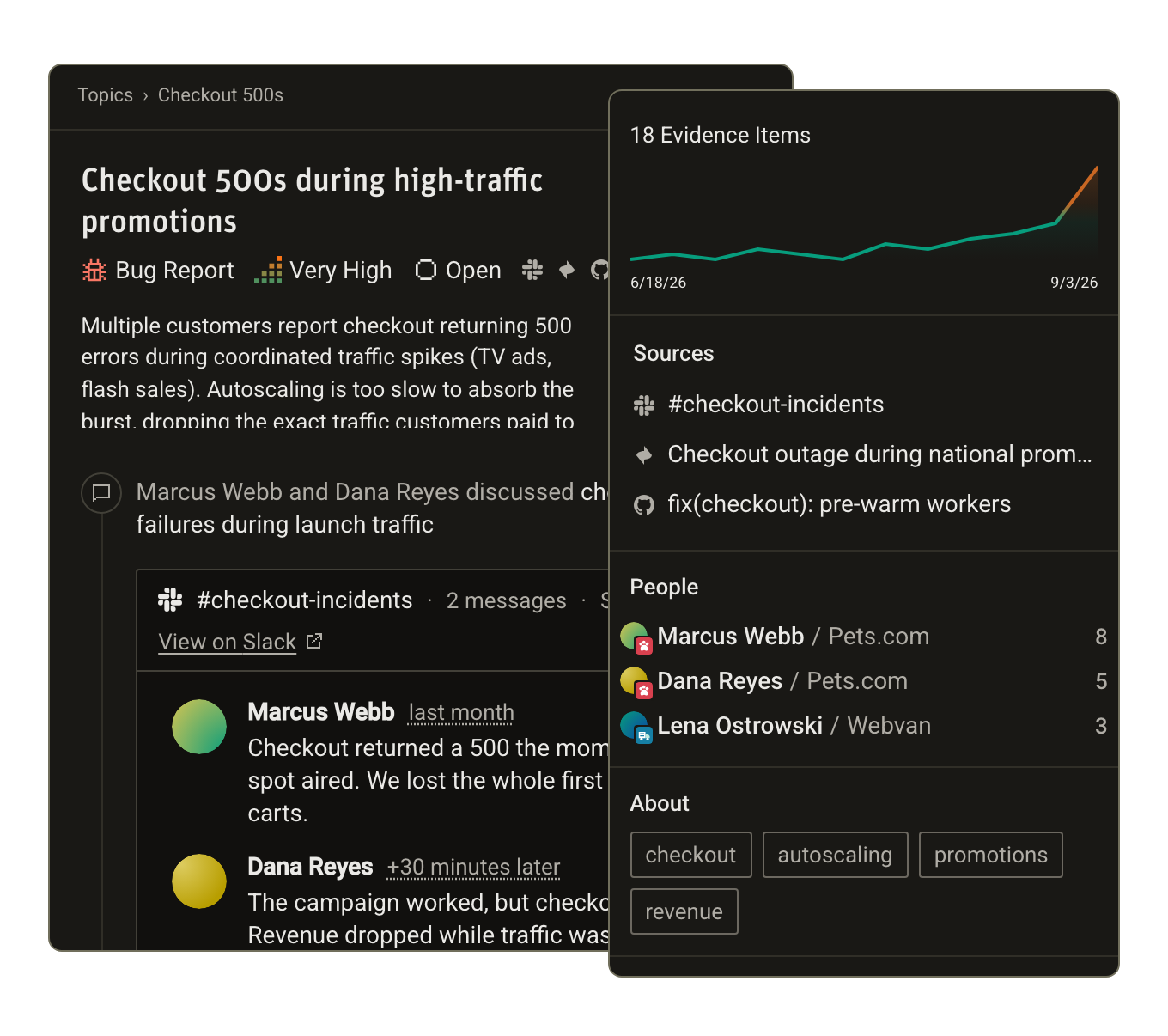
Every topic has:
- Problem statement. Modem distills scattered conversations into a summary you can actually read.
- Status. Is this concern being worked on? Is it already fixed? Modem updates the status as tickets open and fixes ship.
- People. Who raised it, when, and where they work.
- Code. The tickets that track it and the pull requests that fix it.
When we started, Modem supported a handful of customer channels. Today it builds the graph from almost 20:
- Chat – Slack, Discord and Microsoft Teams
- Support – Intercom, Zendesk, Front, Plain, Pylon and Jira Service Desk
- Call transcripts – Gong and Fathom
- Social – X (formerly Twitter)
- Feedback – Canny, Sentry user feedback, or a feedback form you can put in your own app
- Tickets and code – Linear, Jira, GitHub and GitLab
Find, fix, follow up on every customer concern
With the graph in place, Modem helps with three things: finding user problems you didn't know you had, turning them into fixes, and following up with everyone to let them know their input mattered.
Find problems
Don't let customer problems sit in a support queue waiting for escalation. Modem tells you about them as they come in:
- Alerts. Modem messages you in Slack or by email the moment a topic is created or hits high priority.
- Weekly summaries. An email every week with what customers newly asked for, who you can tell a fix shipped, and what your team already handled.
- The dashboard. Every topic in one list, with its status, the companies involved, its priority and how much it's coming up.
- Modem's agent. Ask it what customers are upset about this week, in the dashboard, Slack or Discord.
- Your own agent. Claude, ChatGPT or Cursor can ask Modem the same questions over MCP, without you leaving the tool you're already in.
Alerts and weekly summaries are on from the start. They're automations, and you can write your own: send payment bugs straight to the payments team, file a Linear issue whenever a topic hits high priority, flag an account with an open bug when its Stripe payment fails, or call a webhook on your own service. Each one is a prompt in plain English, and it can run on a schedule or when something happens.
Fix them
What happens next depends on who's fixing it.
Modem's agent can file the issue in Linear, Jira or GitHub, checking for an existing ticket first. It can hand the whole fix to Claude, Cursor or Devin, with the bug reports and affected customers written into the task. Or, if you're already in a desktop coding agent like Claude Code or Cursor, you can ask Modem over MCP and fix it yourself with the context in hand.
You can tell Modem what you want it to do when it encounters problems, curated to the way you work.
Follow up
By default, Modem monitors your pull request merges. When it sees a change go out connected to a user concern, it lets you know - as a pull request comment, a Slack message, or by email.
You'll know what shipped, who was waiting, and where each of them asked.
Works with every agent
Modem has official plugins in the Claude directory, the ChatGPT plugin directory (it covers Codex too) and the Cursor Marketplace. Any other MCP client can connect to https://mcp.modem.dev/mcp, including multiplayer cloud agents like Devin.
Over MCP, your agent hands the question to Modem's agent, which queries the graph and answers. Here it is from the terminal, on the checkout bug.
Without leaving your agent harness, the entire Modem platform is available. You ask questions of your data, you can create and update auto-triage automations, or find users to follow up with.
Try Modem 2.0 free today
So that's Modem 2.0. It turns your customer conversations into a graph of topics, people, companies, tickets and pull requests. It tells you about problems as they come in, helps you get them fixed, and lets the people who reported them know when the fix ships. And you can steer it all from the agent you already use.
Existing customers are on 2.0 already. If you're new, you can try Modem free for 14 days, and onboarding turns on the automations that fit the tools you connect.
来源:Modem Blog · modem.ai