用 Amazon SageMaker JumpStart 部署并评测模型
Deploy and evaluate models with Amazon SageMaker JumpStart
Amazon SageMaker JumpStart 提供了一套可复用流程:从模型目录部署模型、用 SageMaker Python SDK 跑轻量性能测试,测完删除端点。
为特定应用选择合适的模型,需要一种实用的方法,用具有代表性的输入对其进行测试。Amazon SageMaker JumpStart 提供了对大量已预训练模型的访问。在本文中,我们展示如何从 SageMaker JumpStart 部署一个可用模型,使用 SageMaker Python SDK 运行轻量且可重复的性能测试,并在测试完成后删除端点。对于受支持的模型和可用容量,此工作流提供了一条可重复的评估路径,不过部署时间会因模型、实例类型、配额和 AWS 区域而异。
2026 年,SageMaker JumpStart 推出了两项改进,简化了模型发现和部署。在 Amazon SageMaker AI 控制台的 Model Hub 部分,您可以浏览 SageMaker JumpStart 目录、查看示例笔记本,并直接在 SageMaker Studio 中打开它们。预配置的端点部署选项提供了命名配置,针对低成本、低延迟或通用工作负载等优先级进行了优化,覆盖一系列生成式 AI 模型,包括 Neuron 优化配置。此外,您现在可以使用新的深度链接集成,一键从 Hugging Face 模型发现转到 SageMaker AI 部署。
解决方案概述
我们的方法使用一个可复用的 Python 脚本,执行三个步骤:
- 从 SageMaker JumpStart 发现并部署模型。
- 运行特定于模型的示例提示,并测量延迟、近似输出长度和单请求生成速率。
- 清理端点。
此模式适用于许多兼容的 SageMaker JumpStart 模型,不过负载格式、所需实例类型、最终用户许可协议(EULA)要求和响应模式可能需要针对特定模型进行调整。
先决条件
- 具有 SageMaker AI 权限的 AWS 账户。
- Python 3+,并安装了 SageMaker Python SDK v3(
pip install "sagemaker>=3,<4")。 - 为您要测试的模型提供足够的 GPU 实例配额,或请求增加配额。
步骤 1.a:发现可用模型
在 SageMaker JumpStart 中查找模型的 UI 路径:
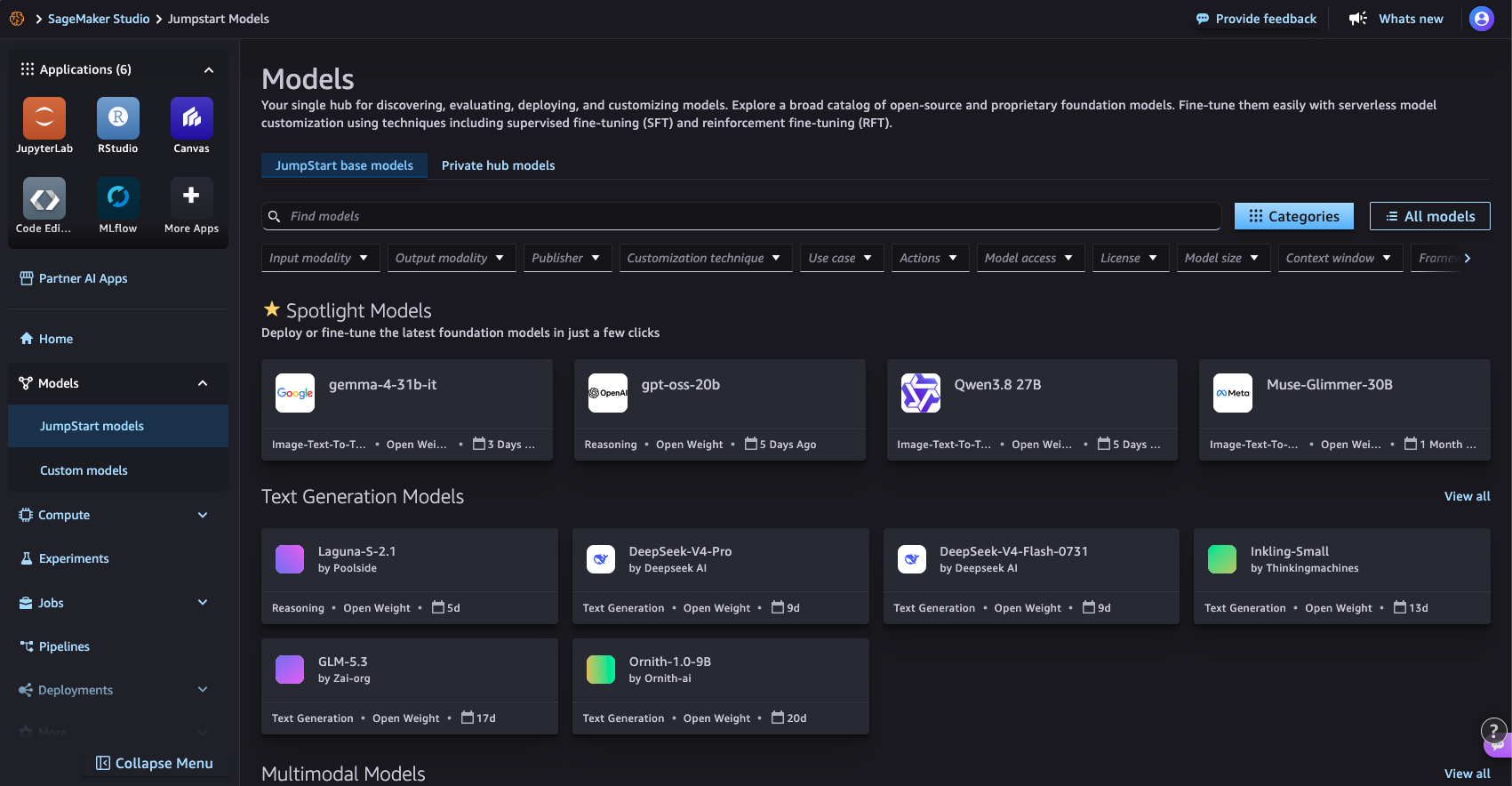
图 1:在 SageMaker Studio 的 SageMaker JumpStart Models 页面上浏览模型目录
使用 SageMaker Python SDK 的代码路径:
from sagemaker.core.jumpstart.notebook_utils import (
    list_jumpstart_models,
)

REGION = "us-east-1"

models = list_jumpstart_models(
    filter="task == textgeneration",
    region=REGION,
    list_versions=True,
)

print(f"Found {len(models)} text generation models")

for model_id, model_version in models[:10]:
    print(
        f" - {model_id} "
        f"(version {model_version})"
    )
或按模型名称搜索:
from sagemaker.core.jumpstart.notebook_utils import list_jumpstart_models

ids = list_jumpstart_models(
    filter="model_id contains qwen",
    region=REGION,
    list_versions=True,
)

print(f"{len(ids)} models matched in {REGION}\n")

for model_id, version in ids:
    print(f"{model_id:<55} v{version}")
步骤 1.b:部署模型
从 SageMaker JumpStart 部署模型的 UI 路径:
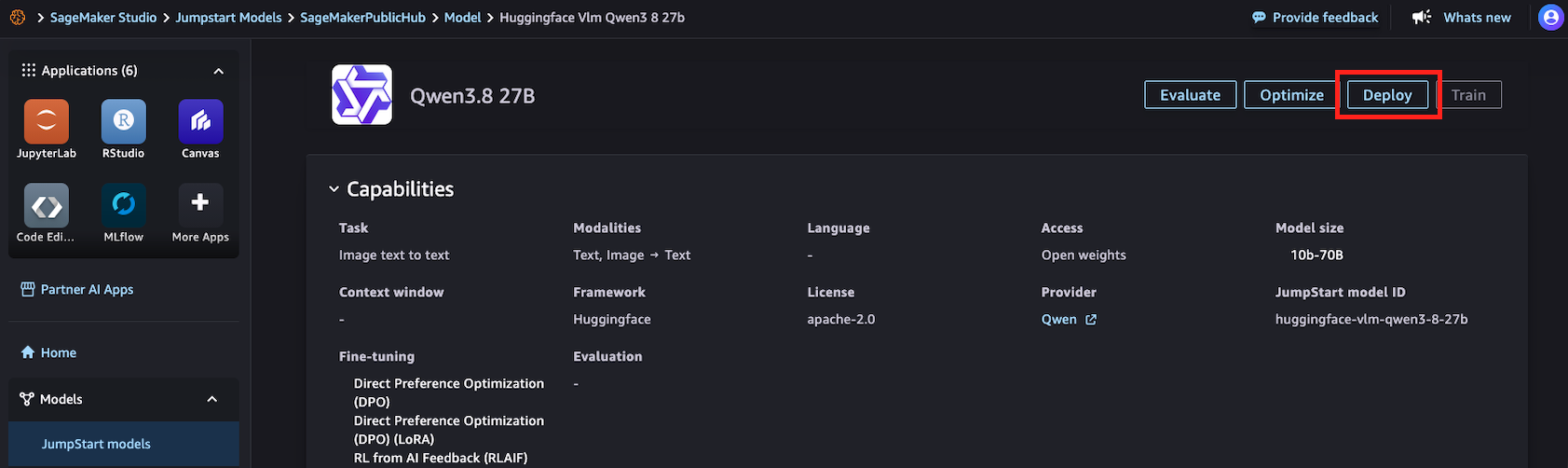
图 2:在 SageMaker Studio 中从模型的 SageMaker JumpStart 详情页面部署模型
使用 SageMaker Python SDK 的代码路径:
import time

from sagemaker.core.jumpstart.accessors import JumpStartModelsAccessor
from sagemaker.core.jumpstart.configs import JumpStartConfig
from sagemaker.core.training.configs import Compute
from sagemaker.serve import ModelBuilder

MODEL_ID = "huggingface-vlm-qwen3-5-27b"
MODEL_VERSION = "1.13.0"
REGION = "us-east-1"
ACCEPT_EULA = False  # Set True only after reviewing the model terms

def get_field(value, name, default=None):
    if isinstance(value, dict):
        return value.get(name, default)
    return getattr(value, name, default)

# Resolve the JumpStart-recommended deployment configuration.
specs = JumpStartModelsAccessor().get_model_specs(
    region=REGION,
    model_id=MODEL_ID,
    version=MODEL_VERSION,
)

if isinstance(specs, list):
    if not specs:
        raise ValueError(
            f"No JumpStart specification found for {MODEL_ID}"
        )
    specs = specs[0]

recommended_instance_type = get_field(
    specs,
    "default_inference_instance_type",
)

if not recommended_instance_type:
    raise ValueError(
        f"No recommended instance type found for {MODEL_ID}"
    )

print(f"Model: {MODEL_ID}")
print(f"Region: {REGION}")
print(f"Recommended instance: {recommended_instance_type}")

start = time.time()

jumpstart_config = JumpStartConfig(
    model_id=MODEL_ID,
    model_version=MODEL_VERSION,
    accept_eula=ACCEPT_EULA,
)

model_builder = ModelBuilder.from_jumpstart_config(
    jumpstart_config=jumpstart_config,
    compute=Compute(
        instance_type=recommended_instance_type,
        instance_count=1,
    ),
)

model = model_builder.build()
endpoint = model_builder.deploy()
deploy_time = time.time() - start

print(f"Deployed in {deploy_time:.1f} seconds")
print(f"Endpoint: {endpoint.endpoint_name}")
步骤 2:运行示例提示并测量性能
from sagemaker.core.payloads import retrieve_all_examples
import json
import time

MODEL_ID = "huggingface-vlm-qwen3-5-27b"
MODEL_VERSION = "1.13.0"
REGION = "us-east-1"

example_payloads = retrieve_all_examples(
    region=REGION,
    model_id=MODEL_ID,
    model_version=MODEL_VERSION,
    serialize=True,
)

#you can re-create the endpoint pointer using the endpoint name:
#from sagemaker.core.resources import Endpoint
#endpoint = Endpoint.get(endpoint_name="<your_endpoint_name>",region=REGION)

def read_response_body(result):
    body = result.body
    if hasattr(body, "read"):
        body = body.read()
    if isinstance(body, bytes):
        body = body.decode("utf-8")
    if isinstance(body, str):
        try:
            return json.loads(body)
        except json.JSONDecodeError:
            return body
    return body

def extract_output(response):
    """Handle common JumpStart text-generation response formats."""
    if isinstance(response, list):
        response = response[0] if response else ""
    if isinstance(response, dict):
        choices = response.get("choices")
        if choices:
            choice = choices[0]
            message = choice.get("message")
            if isinstance(message, dict):
                return message.get("content", "")
            return choice.get("text", "")
        for field in (
            "generated_text",
            "output_text",
            "text",
        ):
            if field in response:
                return response[field]
    return response

results = []

for payload in example_payloads or []:
    start = time.perf_counter()
    result = endpoint.invoke(
        body=payload.body,
        content_type=payload.content_type,
        accept=payload.accept,
    )
    latency = time.perf_counter() - start
    response = read_response_body(result)
    output = extract_output(response)
    if not isinstance(output, str):
        output = json.dumps(output, indent=2)
    # This is an estimate based on whitespace-separated words.
    output_words = len(output.split())
    results.append(
        {
            "request_preview": payload.body[:50],
            "latency_s": round(latency, 2),
            "estimated_output_words": output_words,
            "words_per_second": round(
                output_words / latency,
                1,
            ) if latency > 0 else 0,
        }
    )
    print("Input:\n", payload.body, end="\n\n")
    print("Output:\n", output, end="\n\n")
    print(
        f"Latency: {latency:.2f} seconds\n"
        f"Estimated output words: {output_words}\n"
        f"Estimated single-request output generation rate: "
        f"{output_words / latency:.1f} words/second\n"
    )
    print("-" * 80)

print("\nSummary:")
for result in results:
    print(result)
结果:
Input:
{"max_tokens": 256, "messages": [{"content": "What is deep learning?", "role": "user"}], "model": "/opt/ml/model"}
Output:
Here's a thinking process that leads to the explanation of deep learning:
1. **Deconstruct the Request:**
* **Question:** "What is deep learning?"
* **Intent:** The user wants a clear, comprehensive, yet accessible definition and overview of deep learning.
* **Target Audience:** Likely someone looking for a general understanding, possibly a student, tech
enthusiast, or professional exploring the field. The tone should be informative, structured, and
not overly jargon-heavy (though key terms need explanation).
2. **Initial Brainstorming & Key Concepts:**
* What is it? A subset of machine learning, which is a subset of AI.
* Core mechanism: Artificial Neural Networks (ANNs).
* "Deep" means many layers (hidden layers).
* How does it work? Learning representations from data (feature learning).
* Key applications: Image recognition, NLP, speech, self-driving cars.
* Why is it popular now? Big data, GPU power, better algorithms.
* Pros/Cons: High accuracy vs. black box, data hunger.
3. **Structuring the Answer:**
Latency: 9.07 seconds
Estimated output words: 153
Estimated single-request output generation rate: 16.9 words/second
--------------------------------------------------------------------------------
Summary:
{'request_preview': '{"max_tokens": 256, "messages": {"content": "What', 'latency_s': 9.07, 'estimated_output_words': 153, 'words_per_second': 16.9}
步骤 3:清理
print(f"Deleting endpoint: {endpoint.endpoint_name}")
endpoint.delete()
endpoint.wait_for_delete()
print("Endpoint deleted")
结论
此模式适用于许多可用的 SageMaker JumpStart 模型,但负载格式、所需实例类型、EULA 和响应解析可能需要针对特定模型进行调整。通过使用一致的测试提示,并测量各模型的延迟、吞吐量和输出质量,您可以比较各种选项,并为您的负载选择最合适的方案。
尝试对 Amazon SageMaker JumpStart 中的不同模型使用此方法,为您的应用找到质量、速度和成本之间的合适平衡。
参考资料
- SageMaker Python SDK 文档
- 基准测试并优化 SageMaker JumpStart 部署(博客文章)
- 从 Hugging Face 一键转到 SageMaker Studio(博客文章)
- Amazon SageMaker JumpStart
关于作者

Vamsi Goparaju
Vamsi 在 AWS 领导市场推广(GTM)和收入加速计划,为我们的客户支持推理和 ModelOps 工作负载,并推动 Amazon SageMaker AI、SageMaker JumpStart 和生成式 AI 的 OSS 用例和产品功能。他拥有超过 16 年的经验,涵盖 AWS、Dell 和 Infosys,在云、高性能计算(HPC)、人工智能(AI)、机器学习(ML)和分析领域带来了技术深度与业务知识的独特融合。他拥有德克萨斯 A&M 大学 Mays 商学院的 MBA 学位。

Gula Nurmatova
Gula 是 AWS 的软件开发经理,常驻美国纽约。她领导 Amazon SageMaker JumpStart 背后的工程团队,使来自 NVIDIA、Meta 和 Mistral 等提供商的基础模型能够轻松地在 SageMaker 和 Amazon Bedrock 上发现、评估和部署。在加入 AWS 之前,她曾在 RTX 和 GE 担任工程和工程管理职位,并拥有计算机科学硕士学位。

Naidile Murali
Naidile 是 AWS 的产品经理,常驻华盛顿州贝尔维尤。她专注于增强 Amazon SageMaker AI 上的 AI/ML 开发者体验,包括入门、IDE 连接和 GPU 容量管理。在加入 AWS 之前,她曾在 HSBC 担任软件工程师。Naidile 拥有乔治城大学的 MBA 学位。

Dan Ferguson
Dan 是 AWS 的解决方案架构师,常驻美国纽约。作为机器学习服务专家,Dan 致力于支持客户高效、有效且可持续地集成 ML 工作流。
来源:AWS Machine Learning Blog · aws.amazon.com