在 AWS Quick 中用 AI 驱动的产品开发生命周期管理(AI-PDLC)加速产品开发
Accelerating product development with AI-driven lifecycle management (AI-PDLC) in AWS Quick
AWS Quick 推出 AI-PDLC 框架,通过六个专用智能体覆盖 Discover、Decide、Design、Prototype 四个上游阶段,每个阶段均设人工审批关卡。
This blog post focuses on how AI can improve and expedite the product development life cycle using agents built on AWS Quick, with human approval baked into the process.
AI-driven software delivery is helping teams ship products faster than ever. As implementation accelerates, the upstream product development process becomes even more important. Coding agents can turn clear requirements into working software faster than before, but they can’t compensate for building the wrong product. With implementation becoming easier, your competitive advantage moves upstream to four critical activities: discovering the right customer problem, deciding which opportunity to pursue, designing the right experience, and validating it through a prototype.
The signals that you need to make those decisions are scattered everywhere. Your customers leave feedback in Slack, your sales team logs insights in Salesforce, systems record incidents in ServiceNow, stakeholders document requirements in Microsoft SharePoint, engineers track work items in Jira, and teams make decisions in Outlook meetings and email threads. As your teams move between these tools, they disconnect context from the decisions it should inform, and lose more at every handoff.
AWS Quick provides the connective layer for this fragmented knowledge. By grounding custom chat agents in connected enterprise data and storing their artifacts in shared Spaces, AWS Quick helps your team build with existing organizational knowledge instead of starting each initiative from a blank page.
The AI-Driven Product Development Lifecycle (AI-PDLC) is a framework that applies these capabilities through a suite of six AWS Quick agents with specialized skills, producing a traceable set of artifacts at each phase. Agents gather and structure context, surface gaps, and draft artifacts. You and your team contribute judgment and approve every decision. The objective isn’t to produce documents faster. It’s to help your team think better, preserve why each decision was made, and give engineering and coding agents a specification grounded in customer evidence. We will show you how to configure the six-agent AI-PDLC suite in AWS Quick and use it to move from distributed customer signals to a validated prototype. Throughout, it preserves context from the first insight through the engineering handoff.
Architecture
The diagram shows the end-to-end flow of the AI-PDLC framework.
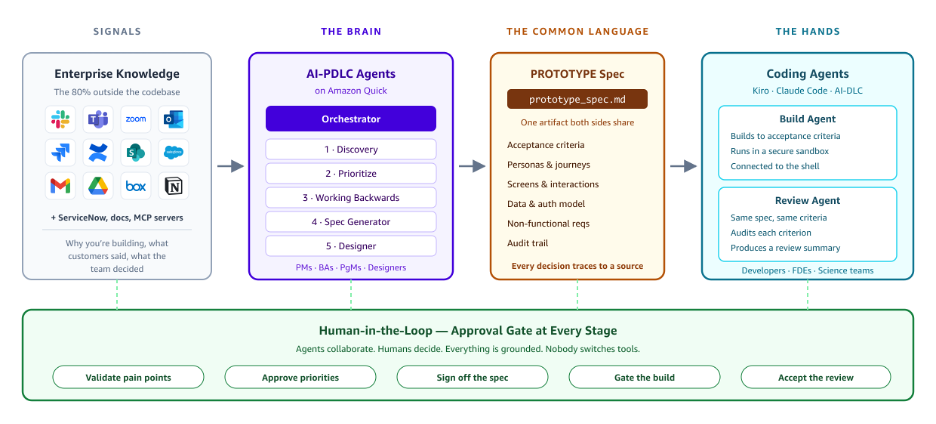
Figure 1: End-to-end AI-PDLC flow, from scattered enterprise signals through AWS Quick agents to the coding-agent handoff
It starts with the signals most teams lose track of, that is, the Slack threads, Jira tickets, docs, and call transcripts that hold the why behind a decision and what customers actually said. Enterprise connectors pull that context from Slack, Outlook, Jira, Salesforce, SharePoint, ServiceNow, and many more enterprise sources.
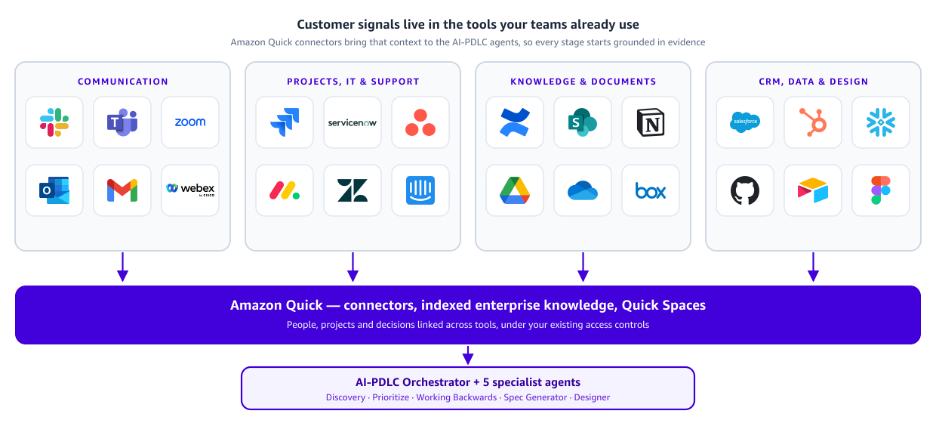
Figure 2: AWS Quick builds a personal knowledge graph that links people, projects, and decisions across connected apps and folders
AWS Quick can build a personal knowledge graph from your connected apps and folders, linking the people, projects, and decisions across your tools.
Those signals feed the brain: the set of agents on AWS Quick, led by an Orchestrator that runs Discovery, Prioritize, Working Backwards, Spec Generator, and Designer. Everything they produce lands in one common language: a prototype_spec.md holding the acceptance criteria, personas, screens, data model. Every decision traces back to a source.
AWS Quick can delegate development tasks to AI coding agents using the Agent Client Protocol (ACP). ACP is an open JSON-RPC 2.0 standard with no vendor lock-in. Customers can use their preferred coding agent like Kiro or Claude Code to build against the specification generated by AI-PDLC.
Underneath it all runs a human approval gate at every stage. You validate the pain points, approve priorities, sign off the spec, gate the build, and accept the review. Production data then flows back into Discovery, closing the loop. The agents do the work while you make the calls, and nobody has to leave their tool to do it.
Solution overview
The AI-PDLC lifecycle spans eight phases: Discover, Decide, Design, Prototype, Engineer, Ship, Operate, and Learn. This post focuses on the first four, where the product team works. The last four are handled by coding agents such as Kiro, which build from the specifications the upstream phases produce. The upstream phases are implemented as six agents in AWS Quick.
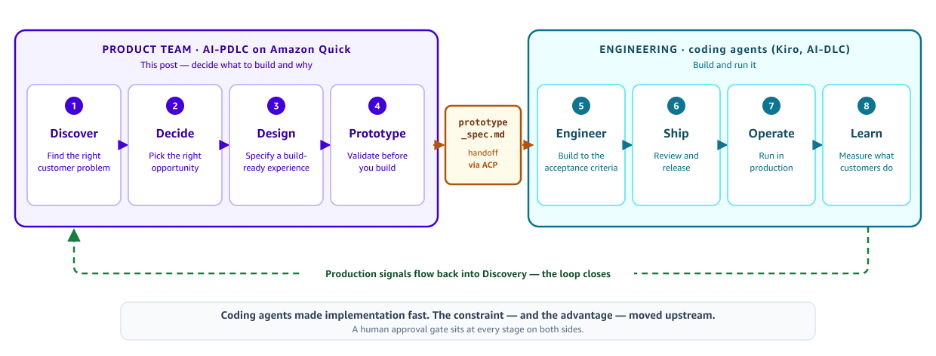
Figure 3: The upstream AI-PDLC phases implemented as six agents in AWS Quick
Users interact only with an Orchestrator, which reads each specialist’s question framework at runtime, asks targeted questions for the current phase, and dispatches artifact generation to the right specialist. A single conversation drives the whole journey, and the pipeline advances only after human approval at each step in the workflow.
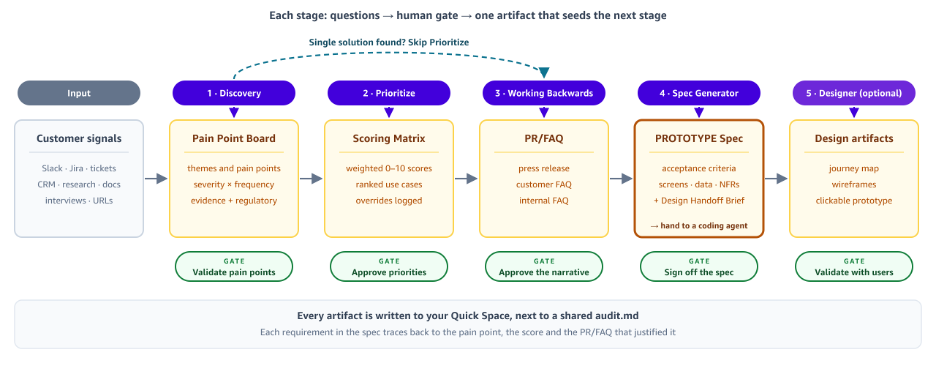
Figure 4: A single Orchestrator conversation drives the pipeline, advancing only after human approval at each gate
Phase 1: Discover
The Discovery agent guides structured pain point analysis across interactive Q&A, URL ingestion, and direct pulls from connected enterprise sources like Slack, Jira, support tickets, Salesforce, and research repositories. It scores every pain point for severity and frequency, producing a Pain Point Board that gives the team one evidence-grounded view of what customers struggle with.
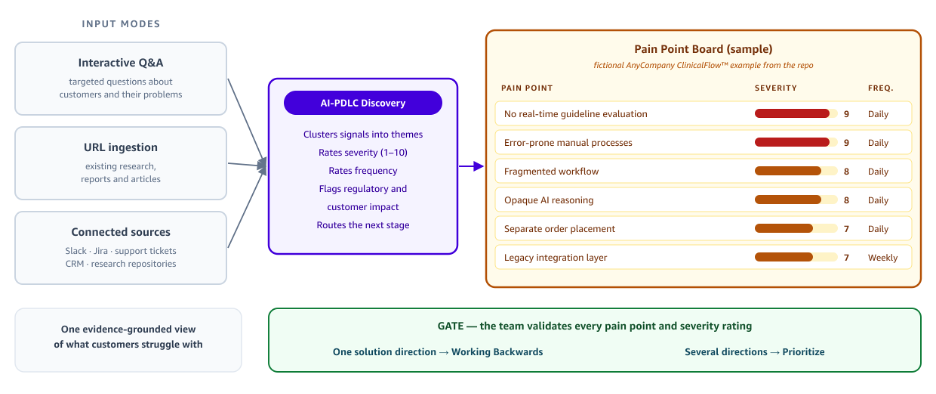
Figure 5: The Discovery agent produces a Pain Point Board scored by severity and frequency
Phase 2: Decide
The Prioritize agent scores each use case against weighted criteria using two transparent 0–10 frameworks: one purpose-built for agentic use cases (large language model (LLM) capability match, tool availability, user acceptance) and one for traditional applications (feasibility, business impact, effort). The team can open the Scoring Matrix and trace exactly why one use case outranks another.
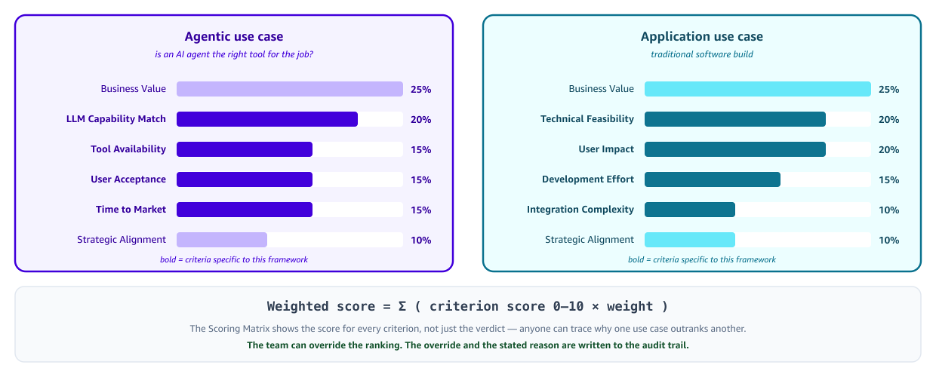
Figure 6: The Prioritize agent Scoring Matrix shows why one use case outranks another
Once the top use case is selected, the Working Backwards agent generates a full PR/FAQ using the Amazon Working Backwards method with customer FAQs and internal FAQs covering unit economics, failure modes, regulatory risk, and competitive landscape. If a concept can’t survive this scrutiny, the team learns that on paper before committing engineering resources.
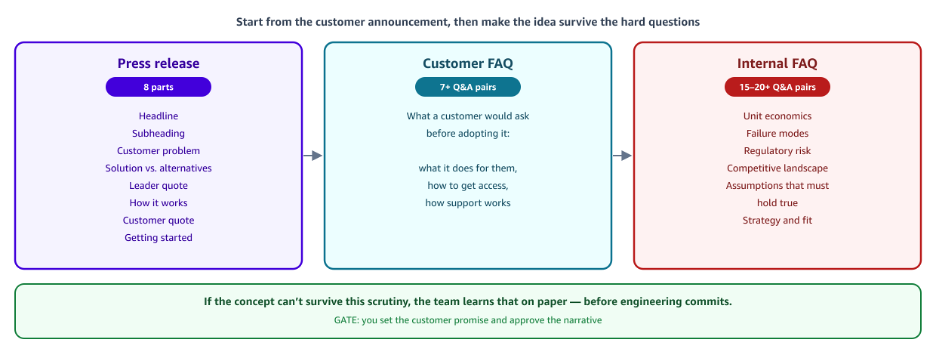
Figure 7: The Working Backwards agent generates a full PR/FAQ for the top use case
Phase 3: Design
The Spec Generator agent turns the validated use case and PR/FAQ into a build-ready specification, with separate templates for agentic versus application use cases plus a Design Handoff Brief for UX teams. Each spec contains acceptance criteria, user flow, constraints, and metadata that traces every requirement back to its source pain point, prioritization score, and the PR/FAQ that validated it. Those acceptance criteria serve a dual purpose: they’re the build contract the coding agent follows, and the review rubric the review agent audits against. What used to take multiple sprints of drafting and review becomes a focused session, detailed enough for engineering to build from design spec immediately, with few or no clarifying meetings required.
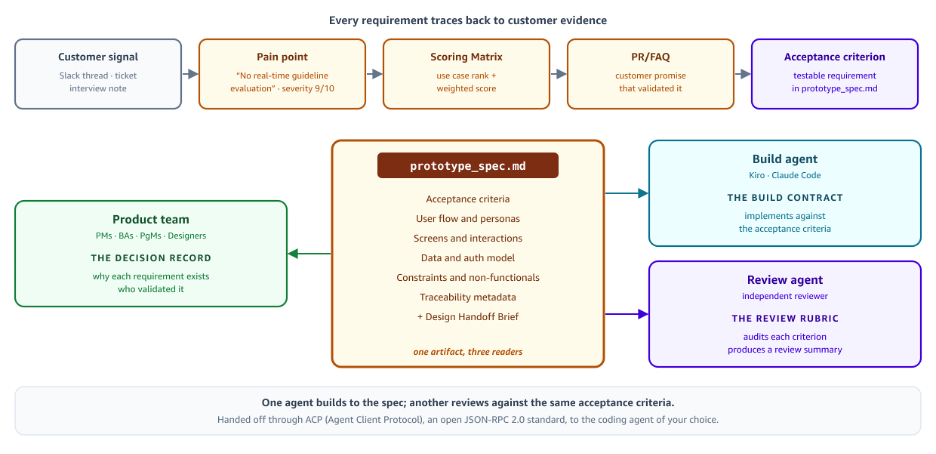
Figure 8: The Spec Generator agent turns the validated use case into a build-ready specification
Phase 4: Prototype
The Designer agent generates journey maps, wireframes, and clickable HTML prototypes directly inside AWS Quick. It works from the Design Handoff Brief, personas from Discovery, user flow from the PR/FAQ, screens to design, brand context, and the emotional target drawn from the customer quote, so teams can validate concepts with stakeholders before committing to Figma or other design tooling. After the spec is approved, it’s dispatched to the engineering team for development.
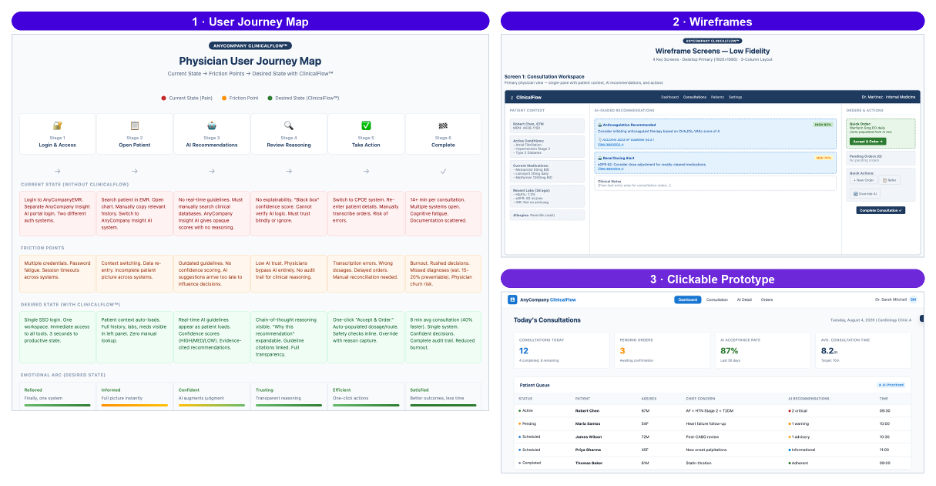
Figure 9: The Designer agent generates journey maps, wireframes, and clickable prototypes inside AWS Quick
The entire loop is iterative, with humans reviewing and approving at every gate. Nothing ships without explicit signoff. What traditionally takes multiple weeks of prototyping and iteration could become days or even just hours of guided agent collaboration depending on the complexity of the problems.
Every decision is logged at two levels. Each specialist records its own decisions, scores, and rationale inside the artifact it produces, and the Orchestrator independently checks that those entries exist while keeping a shared log across the whole pipeline. If one layer slips, the other still holds a complete record, so no gate approval goes untracked.
AI-PDLC can be executed across two pacing modes. Deep Discovery asks 8–12 questions per phase, chasing ambiguities and edge cases. It fits a new problem space where the team wants thorough exploration. Fast Track trims each phase to 3–5 essential questions and suggests defaults from context it already holds, letting you confirm or override each one. It fits time-boxed sessions where the team knows the space and needs to move quickly.
Agent implementation details: Step by step
We will walk through the details of the agent creation and implementation process.
Prerequisites
- An AWS Quick workspace with the Desktop client installed.
- Access to create custom agents in AWS Quick with Enterprise connectors configured for Slack, Jira, SharePoint, or other tools your team uses.
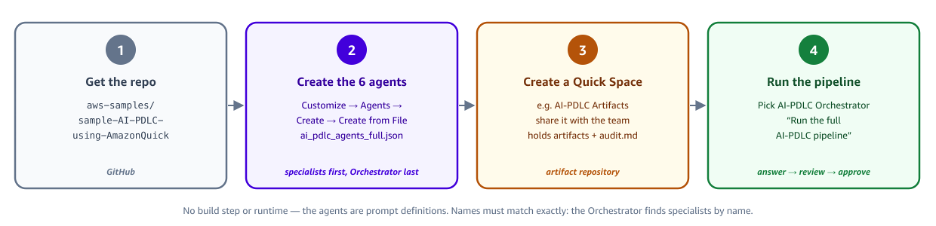
Figure 10: An AWS Quick workspace with enterprise connectors configured
Step 1: Clone the AI-PDLC repository
The full agent suite, reference architecture, prompt templates, and setup instructions are available in the AI-PDLC GitHub repository.
The repository contains:
- Agent instruction files for all six agents.
- Question framework samples for each specialist agent.
- Configuration files and setup guide.
Step 2: Create the specialist agents
In AWS Quick, create the specialist agents using the instructions from the repository:
Step 2.1: Download the JSON file from the GitHub repository for agent building.
Step 2.2: Go to Quick Desktop → Customize → Agents → Create, then choose Create from File.
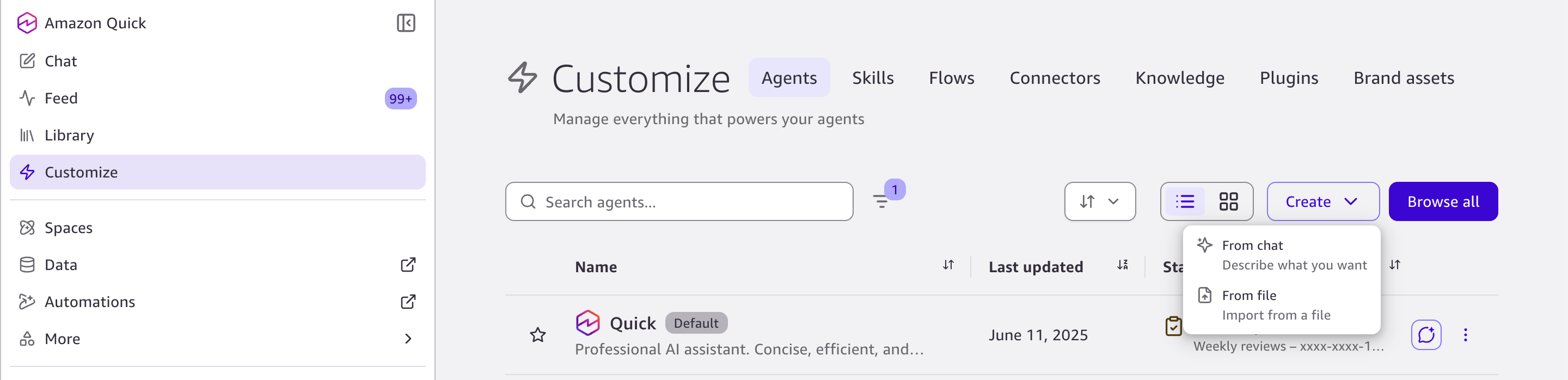
Figure 11: Creating the specialist agents in Quick Desktop with Create from File
Step 2.3: The chat window opens up.
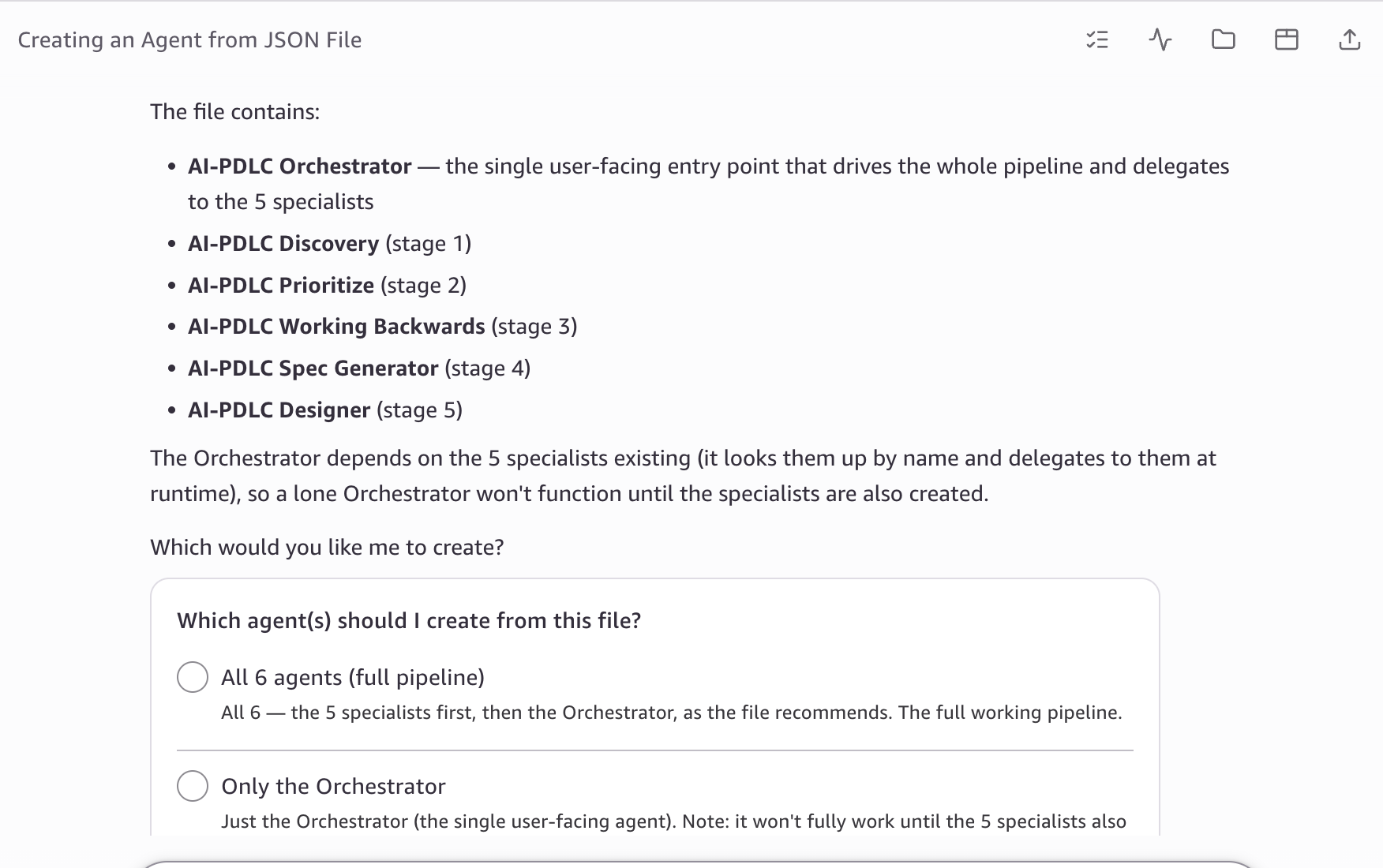
Figure 12: The chat window that opens during agent creation
Step 2.4: The following six agents with instructions are created:
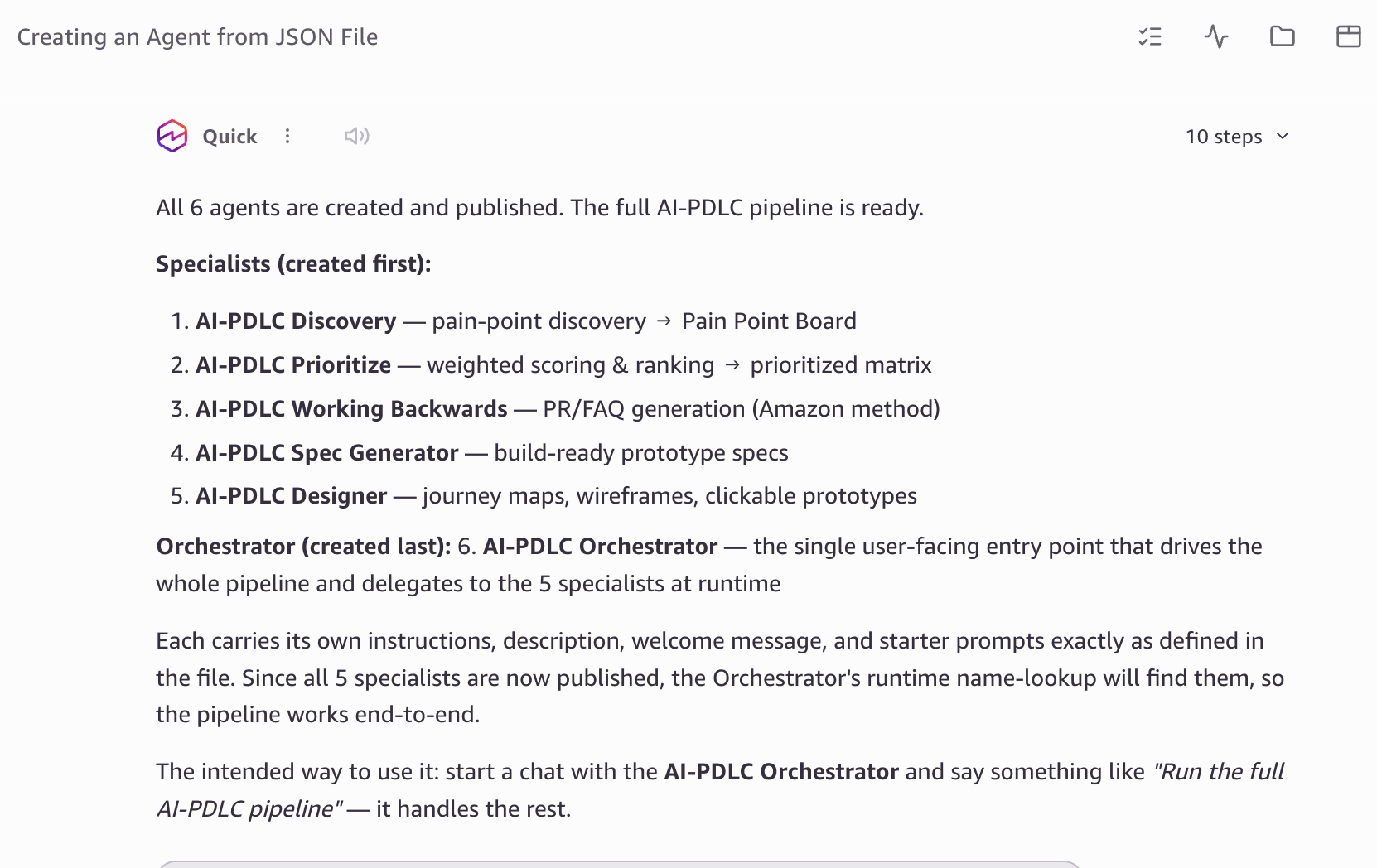
Figure 13: The six AI-PDLC agents created with their instructions
The Orchestrator is the central architectural component. It dynamically reads each specialist’s instructions at runtime:
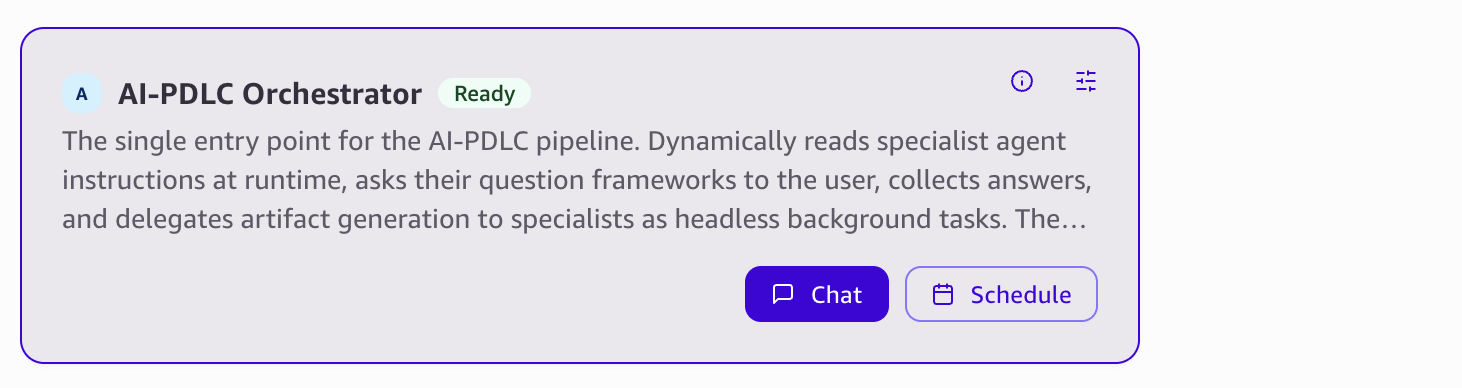
Figure 14: The Orchestrator dynamically reads each specialist’s instructions at runtime
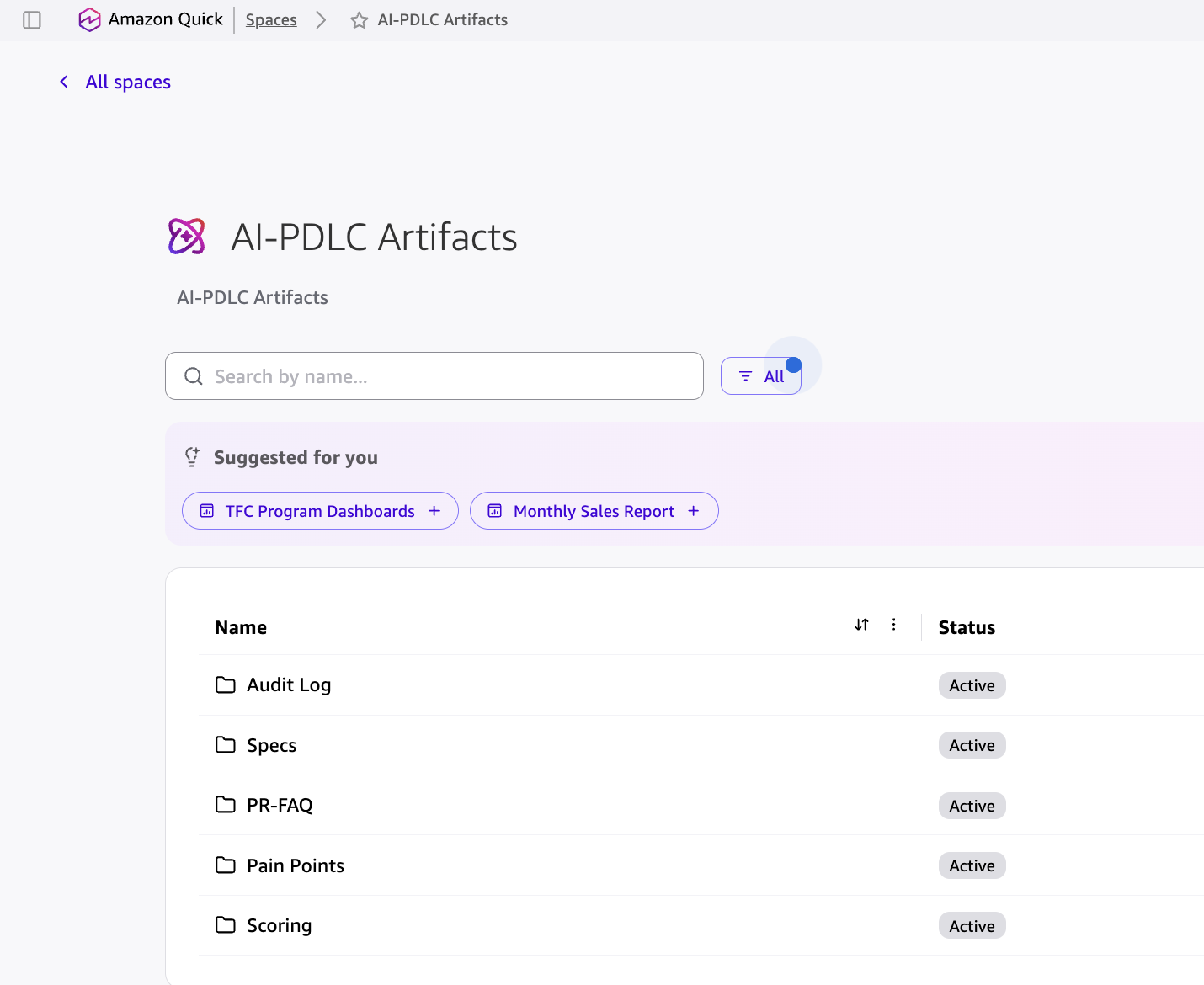
Step 3: Configure Quick Spaces (artifact repository)
Create a shared Quick Space for storing pipeline artifacts:
- Open Quick Spaces and select Create New Space.
- Name: AI-PDLC Artifacts.
- Grant access to relevant team members.

Figure 15: Creating the AI-PDLC Artifacts Space and granting access to team members
Step 4: Run the pipeline
- Open AWS Quick Desktop.
- Select AI-PDLC Orchestrator from the agent picker.
- Enter: “Run the full pipeline” (or “Fast Track” for an abbreviated session).
- Answer the Orchestrator’s structured questions as it guides you through each phase.
- Review artifacts as they are produced at each gate.

Figure 16: Running the pipeline and reviewing artifacts as they are produced at each gate
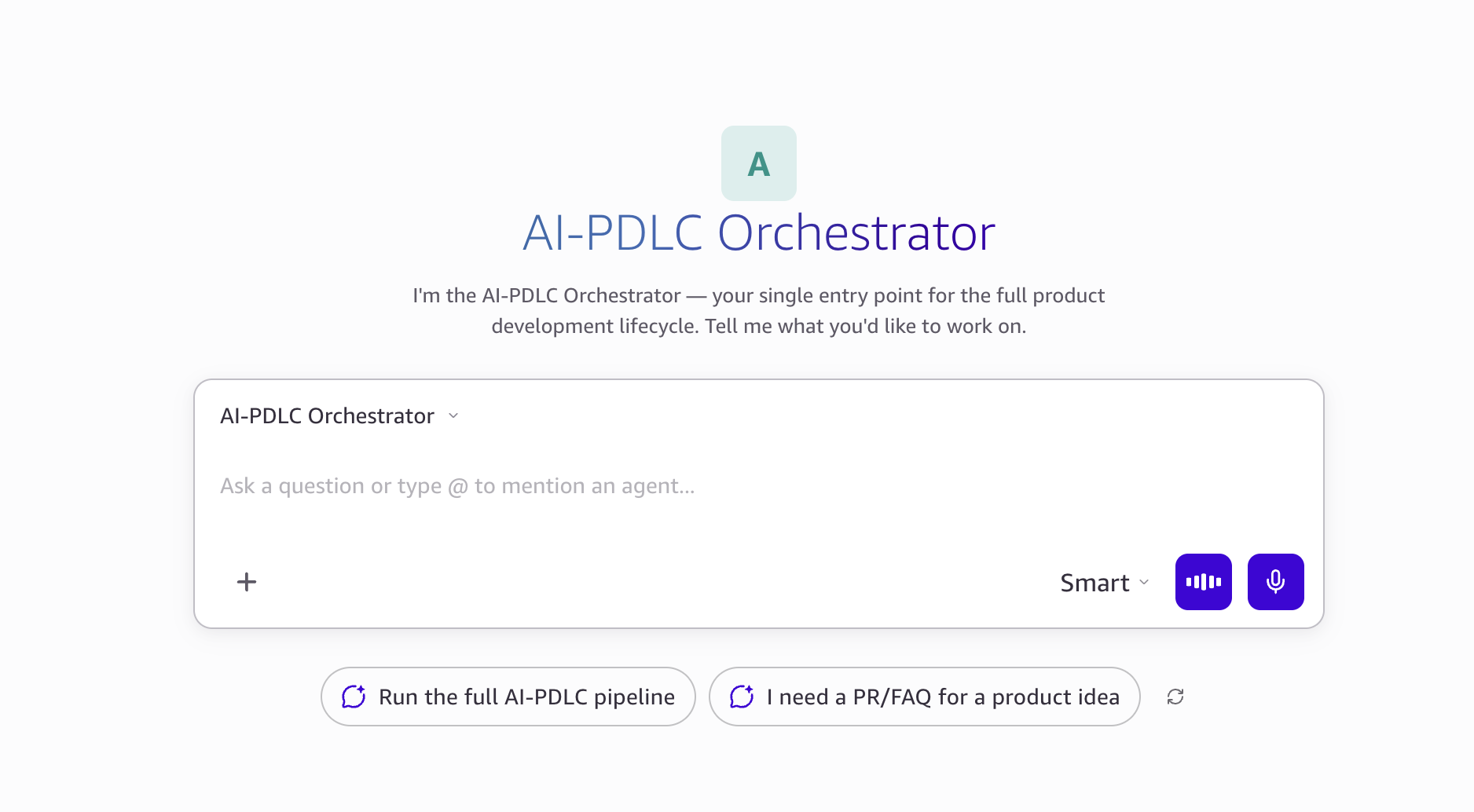
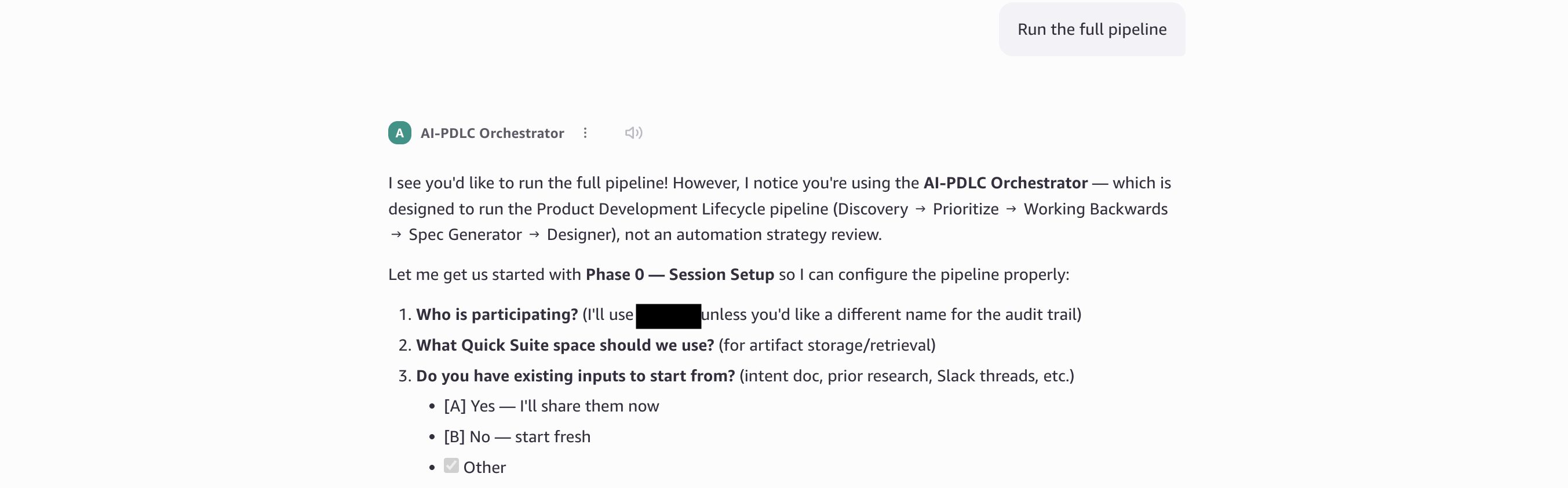
Figure 17: Starting a pipeline run with the AI-PDLC Orchestrator
You can select the pace, Deep Discovery or Fast Track, based on your needs.

Figure 18: Selecting the pace, Deep Discovery or Fast Track, based on your needs
Watch it in action
For a live demonstration of AI-PDLC in action, from customer insight through all four phases to a working prototype, watch our YouTube video walkthrough:
- YouTube Part 1: End-to-end product lifecycle with AWS Quick and AI coding agents (51:49)
- YouTube Part 2: Creating AI-PDLC agents
The video covers:
- Setting up the agent suite.
- Running the full Orchestrator pipeline through a real-world use case.
- Real-time artifact generation in action.
- The ACP handoff to coding agents.
- Tips for choosing between Deep Discovery and Fast Track modes.
AI-PDLC scenarios
We will walk through some common scenarios where the AI-PDLC framework can be applied:
Scenario 1: New product development, starting from scratch
When a team identifies a new market opportunity or unmet customer needs, they face the classic cold-start problem: scattered signals, competing ideas, and no structured way to move from insight to action. AI-PDLC guides the team through the full upstream journey, surfacing pain points from real customer data and scoring competing ideas against transparent criteria. It also validates the concept through a rigorous PR/FAQ and produces a build-ready spec so the first line of code is written against a validated plan, not a hunch.
Scenario 2: Feature addition to an existing product, roadmap-driven or customer-driven
Product teams continuously receive signals that inform what to build next: customer feedback in support channels, feature requests from sales, usage data showing dropoff points, or strategic priorities from leadership. AI-PDLC accelerates this by pulling those signals from connected tools (Slack, Jira, Salesforce, AWS Quick Sight). The framework structures them into a prioritized backlog with evidence-backed scoring and produces a spec that preserves the “why” behind each feature, so engineering receives context-rich work items instead of one-line Jira tickets stripped of intent.
Scenario 3: Bug fixes and incident-driven improvements
When a production issue surfaces through customer complaints, monitoring alerts, or support escalations, the response often skips structured analysis and jumps straight to a code fix. AI-PDLC brings discipline to this reactive workflow by capturing the root cause as a documented pain point, assessing whether the fix warrants a broader design change or a targeted patch. It produces a scoped spec with testable acceptance criteria so the fix addresses the underlying problem rather than just the symptom, and the decision trail is preserved for future reference.
Each scenario follows the same pipeline (Discover → Decide → Design → Prototype) but enters at different depths. New products run the full journey, feature additions may skip deep discovery, and bug fixes may compress to a single focused cycle. The methodology adapts while the audit trail and governance remain consistent regardless.
Clean up
The resources this walkthrough creates incur no cost at rest, so you can safely keep the entire AI-PDLC suite in place if you plan to run the pipeline again.
To remove what you no longer need, delete the six agents under Customize → Agents in Quick Desktop, delete the AI-PDLC Artifacts Space (or just the test artifacts within it) and revoke any team access you granted, and disconnect any Enterprise connectors or coding agent links you added solely for this exercise. You can also remove the cloned GitHub repository from your local machine.
Conclusion
The bottleneck in product development has shifted. Coding agents have made implementation fast. However, the upstream work still constrains teams: discovering customer problems, deciding what to build, validating the concept, and producing clear specifications. Teams that compress this upstream cycle can gain a compounding advantage: they build the right product, faster, with fewer costly pivots.
AI-PDLC addresses this directly. It provides a structured, AI-native framework, implemented as a suite of agents in AWS Quick that guides product teams through Discover, Decide, Design, and Prototype with built-in governance at every gate. AI-PDLC attributes every decision. Every artifact traces back to customer evidence. And when the spec reaches engineering, it carries the full context of why it exists, who validated it, and what “done” looks like.
The product team’s role isn’t to write code. It’s to make the right decisions about what to build and why, quickly and traceably. AI-PDLC makes that possible.
Get started today
- Clone the repository.
- Follow the setup guide in the repository to create five specialist agents and one Orchestrator.
- Select “AI-PDLC Orchestrator” from the agent picker and say: “Run the full pipeline”.
About the authors

Vishnu Elangovan
Vishnu is Worldwide Agentic AI Solution Architect with over a decade of experience in Applied AI/ML and Deep Learning. He loves building and tinkering with scalable AI/ML solutions and considers himself a lifelong learner. Vishnu is a trusted thought leader in the AI/ML community, regularly speaking at leading AI conferences and sharing his expertise on Agentic AI at top-tier events.

Debaprasun Chakraborty
Debaprasun is an AWS Solutions Architect, specializing in the AI/ML and Analytics domain. He has around 20 years of software development and architecture experience. He is passionate about helping customers in their AI journey, cloud adoption, migration and strategy.

Anupa Bhattacharyya
Anupa is a Senior Technical Account Manager at Amazon Web Services, where she helps enterprise customers accelerate their cloud journey with a focus on generative and agentic AI. Drawing over 15 years of experience, she designs strategic initiatives that turn emerging AI capabilities into real customer outcomes, and she is a frequent conference speaker who enjoys sharing her work with the broader technical community. Outside of work, she enjoys painting, traveling, family time, and savoring new cuisines.
来源:AWS Machine Learning Blog · aws.amazon.com